How Much Do Zapier Next Gen Zaps Cost? Task Usage Explained Before December 1, 2026
Introduction
You built three Next Gen Zaps while they were free, and they quietly became the backbone of your lead routing. Then the billing notice arrived: from December 1, 2026, every one of those Zaps starts drawing tasks from the same monthly pool your Classic Zaps use. The surprise is not the rate, which matches Classic Zaps. The surprise is the loop you wrote in week one, the one that fetches a record, checks an API, and writes a row for every new signup. That loop was free in November. In December, it can burn a month of tasks in a single afternoon. Here is what each call costs, and how to budget for it.
Quick answer
From December 1, 2026, each app action and successful external call in a Next Gen Zap costs 1 task, MCP build calls cost 2 tasks each, and runs that only filter or format data cost nothing.
The hard part is not the per-action rate, which matches Classic Zaps, but counting the calls your code makes inside loops, because one loop over a thousand rows can cost more in a day than a whole month of Classic Zaps.
Checked on 2026-11-23 against Zapier’s Next Gen Zaps billing help article (updated November 18, 2026), Zapier’s task usage article (updated November 13, 2026), and zapier.com/pricing.
Evidence
Zapier states the switch plainly in its billing help article: “Next Gen Zaps are free until then, and the free period ends for all customers at once.” The date is December 1, 2026, at 12 pm ET (17:00 UTC).
The numbers that matter, all from Zapier’s own pages as of November 23, 2026: each app action in a Next Gen Zap uses 1 task, the same rate as in a Classic Zap, and each successful external call, a request your code makes to an API or URL through Zapier, also uses 1 task. Each successful tool call through Zapier MCP uses 2 tasks, a fixed rate, and failed tool calls do not count. The Free plan includes 100 tasks a month. Professional starts at $19.99 a month when billed annually, for 750 tasks. Team starts at $69 a month when billed annually, for 2,000 tasks. Pay-per-task billing caps at 3 times your plan’s task limit, so on Professional at 750 tasks that means 750 plan tasks plus 1,500 extra.
One rule changed recently. Coverage from late October 2026 described a minimum of 1 task per completed Next Gen Zap run, even for runs that did nothing billable. The November 18, 2026 update of Zapier’s billing help article removed that rule: “If no action or external call that uses tasks runs, the run uses no tasks.” A run that only filters, formats, loops, or branches now costs zero.
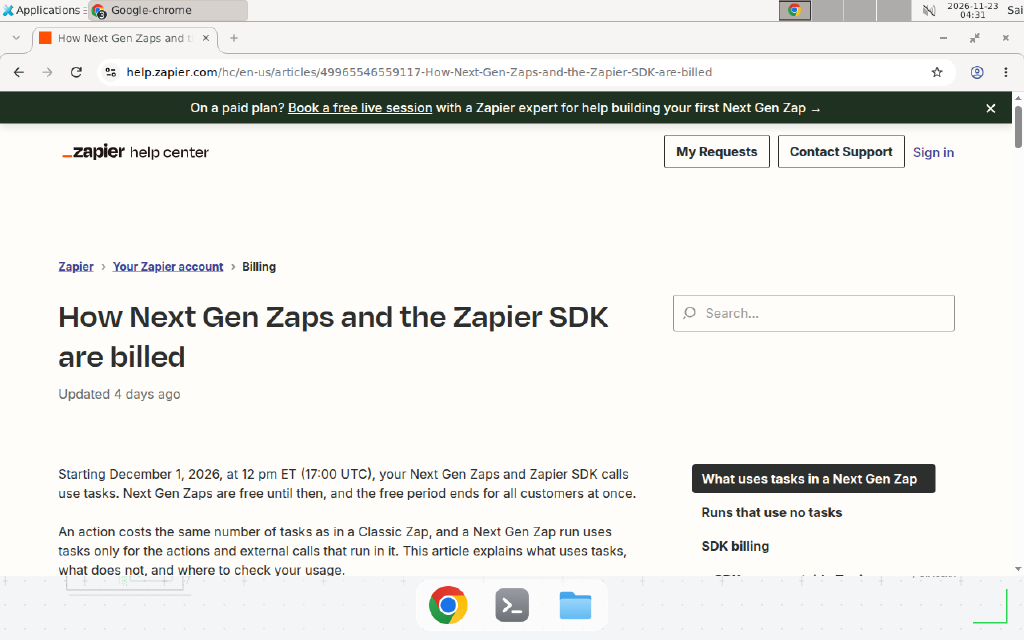
Zapier’s help article “How Next Gen Zaps and the Zapier SDK are billed”, checked on 2026-11-23.
Full counting rules: How Next Gen Zaps and the Zapier SDK are billed and How is task usage measured in Zapier?. Prices: the Zapier pricing page.
Prerequisites
- A Zapier account with at least one Next Gen Zap, or a Classic Zap you are considering converting. Next Gen Zaps are available on Professional, Team, and Enterprise plans.
- Access to your account’s Usage Insights page and billing settings.
- A list of your Next Gen Zaps and, for each one, what its code actually calls. If you built a Zap by describing it to Claude or Cursor, open the Zap and read the steps, because the build conversation is not a reliable record of what runs.
Step-by-step guide
Step 1: List every Next Gen Zap and what each run calls
Open the Workflow Manager and filter for Next Gen Zaps. For each Zap, write down three numbers: app actions per run, external calls per run, and inbox-lease triggers per run. An inbox-lease trigger is a trigger your code leases inside the Zap to pull events from an inbox, and each one costs 1 task. The trigger that starts the Zap itself stays free, so do not count it. If you built your Zaps with an AI assistant, read the generated code, not your original prompt: prompts say “check each lead”, while code says “for each lead, fetch the CRM record, then fetch the enrichment API, then write the row”, three billable calls per lead.
Step 2: Multiply out the loops
This is where budgets die. A Next Gen Zap can loop over a whole list with no item cap, which Classic Zaps cannot do. Compute tasks per run as (app actions plus external calls plus inbox-lease triggers) multiplied by items processed. A Zap that processes 1,000 rows and makes 1 external call plus 1 app action per row uses 2,000 tasks per run, or 60,000 tasks a month if it runs daily.
Step 3: Add the build-time MCP cost
Building is not free. While your MCP client builds a Next Gen Zap, it may run app actions through Zapier MCP, such as fetching sample data. Each successful tool call uses 2 tasks at the Zapier MCP rate. Forty successful sample-data fetches during a build session cost 80 tasks, a one-off charge in the same pool as your production Zaps, so keep sessions short and reuse a small sample.
Step 4: Check your current usage in Usage Insights
Go to Usage Insights and your billing settings to see your account totals. Two limits apply here. First, Zapier does not yet show a per-run task count for Next Gen Zaps, so you cannot click a single run and see its cost; totals are what you get, and per-run Task History is listed as coming later. Second, SDK usage outside Zapier shows one account-level total with no breakdown per script or job, so track a server-side cron job’s usage in your own logs.
Step 5: Decide per Zap, keep, shrink, or move back
For each Zap, pick one of three outcomes. Keep it, if the math fits your tier with room to spare. Shrink it, by cutting external calls, batching writes, or moving storage to Zapier Tables. Or move it back to a Classic Zap, if the Next Gen features it uses, such as long waits or self-healing, are not worth the task cost. Moving back is a real option, but importing a Classic Zap creates a copy and the original keeps running unless you turn it off, so check for duplicate runs.
Copy-paste template: the Next Gen Zap task budget worksheet
Copy this table into a doc and fill one row per Zap. All numbers are tasks per month.
| Zap name | Runs / month (Example: 30) | Actions per run (Example: 2) | External calls per run (Example: 1) | Inbox leases per run (Example: 0) | Build MCP calls this month (Example: 40) | Tasks / month |
|---|---|---|---|---|---|---|
| Lead router | 30 | 2 | 1 | 0 | 40 | (2 + 1) x 30 + 40 x 2 = 170 |
| Signup sync loop | 30 | 1 | 1 | 0 | 0 | (1 + 1) x 1,000 rows x 30 = 60,000 |
Formulas: tasks per run equal actions plus external calls plus inbox leases, multiplied by items processed per run when the Zap loops. Monthly tasks equal tasks per run multiplied by runs per month, plus 2 tasks per successful MCP build call. Compare the total against your plan: Free 100, Professional 750, Team 2,000, at the entry tiers. Example — replace with your values.
Cost / scale math
The worked examples below show how the same rules produce very different bills. All prices use the entry tiers on zapier.com/pricing, checked November 23, 2026: Professional $19.99 a month billed annually for 750 tasks, Team $69 a month billed annually for 2,000 tasks. The simple case is cheap: a Next Gen Zap that creates a HubSpot contact and posts in Slack for each new Typeform lead uses 3 tasks per run, so 100 leads a month cost 300 tasks, inside Professional’s 750.
Example 1: the 1,000-row loop. A Next Gen Zap runs daily over 1,000 new signup rows. Per row it makes 1 external call to an enrichment API and 1 app action to write the result: 2 tasks per row, 2,000 tasks per run, 60,000 tasks a month. Professional’s 750-task tier covers about 11 hours of one day of this Zap. You would need a 100,000-task tier, priced by the task selector rather than the plan name. The fix is usually to shrink the Zap: enrich in batches, write to Zapier Tables for free, or move the loop to a tool that charges by compute.
Example 2: the agent that reads too much. A Next Gen Zap built with an AI agent checks each incoming email, and the agent makes 5 external read calls per email to gather context. At 200 emails a day, that is 1,000 external calls a day, 30,000 tasks a month, before a single action runs. The fix is to pass the email body in the trigger payload instead of fetching it, and fetch the CRM record only when the email passes the filter.
The pattern across both: actions are cheap, loops and reads are expensive, and the free tier of 100 tasks covers roughly 33 runs of the simple Zap, or 50 MCP tool calls, and nothing of the loop or the reading agent.
When not to use this / Limits
Do not move a high-volume loop onto a Next Gen Zap just because the builder is convenient. If a workflow processes thousands of rows per run, or an agent reads data on every event, the per-call billing makes it an expensive way to run that job. A Classic Zap with the same steps costs the same per action but cannot loop as freely. Use a Classic Zap, or a tool that bills by compute, for bulk sync jobs. Per-run task counts for Next Gen Zaps are not available yet, so you are budgeting from estimates until Task History ships: if your estimate lands within 20% of your tier, raise the tier or shrink the Zap.
Troubleshooting
| Symptom | Likely cause | Command to check | Fix |
|---|---|---|---|
| Task usage jumps the week after December 1 | A Next Gen Zap loop is processing more rows than you estimated | Compare Usage Insights totals before and after December 1, and check rows processed per run | Cap the loop with a filter, batch the writes, or move storage to Zapier Tables |
| Usage Insights shows a total but no per-run breakdown | Per-run task counts for Next Gen Zaps are not available yet | Confirm the Zap appears only in totals | Budget from your worksheet estimate until Task History ships, keeping a 20% margin |
| Build session consumed far more tasks than expected | The MCP client fetched sample data on every test run, at 2 tasks per successful call | Count the tool calls in the build conversation, and check MCP totals at mcp.zapier.com | Test with a small fixed sample instead of re-fetching the full dataset |
| A Zap that only filters events still shows usage | The filter sits after an action or external call, so the billable step runs first | Check the order of steps and which calls ran in the run history | Move the filter before any action or external call |
Common mistakes
Counting runs instead of calls. A Zap that runs 100 times a month sounds cheap until you notice each run loops over 200 rows with 2 calls per row. Count calls per run first, then multiply by runs.
Assuming the trigger is free in every direction. The trigger that starts a Next Gen Zap stays free, but an inbox-lease trigger your code uses inside the Zap costs 1 task each.
Treating AI by Zapier like a normal action. AI by Zapier uses its own price, set by the model tier you select, not the standard 1 task per action. Remember the build-time cost too: the 2-task MCP rate applies while Claude or Cursor builds the Zap, so a long afternoon of iterating can cost 100 tasks or more.
Test before you rely on it
Run this checklist before December 1, while Next Gen Zaps are still free, so a mistake costs nothing:
- Pick your busiest Next Gen Zap and count its actions, external calls, and inbox leases per run by reading the code, not the prompt.
- Run it once against 10 rows, confirm the call count matches your estimate, then scale to your real volume.
- Open Usage Insights and confirm your current totals leave room for the new usage on top of your Classic Zaps.
- Move one filter before the first action in a filter-heavy Zap, run it, and confirm a filtered-out run uses no tasks.
- Check the 80% usage email setting in billing.
- Decide the fate of each Zap in writing: keep, shrink, or move back, with the task math attached.
FAQ
The FAQ in the front matter covers the most asked questions: the December 1 start date, the per-run cost, build-time MCP calls, the shared task pool, free By Zapier apps, and per-run visibility. Two more points deserve a line here. Composing, editing, testing, and publishing a Next Gen Zap use no tasks, so iterating is free and only the calls it makes while running or building count. Classic Zaps are not affected by this change, except for a Classic Zap with SDK calls inside a Code by Zapier step, where each SDK call costs 1 task on top of the step’s base task.
For the build side, our Zapier Next Gen Zaps tutorial shows how to describe a workflow to Claude and deploy it, our Zapier MCP server setup guide covers the MCP connection behind the build calls, and our Zapier SDK tutorial for coding agents explains the shared SDK billing. For the bigger picture, the complete n8n guide is the pillar page for teams weighing Zapier against alternatives, and our Zapier to n8n migration guide covers the exit route.
Conclusion
Next Gen Zaps stop being free on December 1, 2026, at 12 pm ET, and the rate itself is fair: 1 task per action, 1 per external call, 2 per MCP build call, nothing for code that only filters or formats. The bill only hurts when a loop or a chatty agent multiplies those small numbers into thousands. Do the worksheet math this week, while the testing is still free, and decide per Zap whether to keep it, shrink it, or move it back.
Ask yourself this before December 1: if your busiest Next Gen Zap ran at full volume for a whole month, could you show the task math for it in one minute? If not, open the Zap and count the calls inside the loop.
Frequently asked questions
When do Zapier Next Gen Zaps start using tasks?
On December 1, 2026, at 12 pm ET (17:00 UTC). Next Gen Zaps are free until then, and the free period ends for all customers at once. The date is fixed, so there is no staggered rollout to wait out.
How many tasks does one Next Gen Zap run use?
One task per app action and one task per successful external call that runs. Code that only filters, formats, loops, or branches uses no tasks, so a run that does nothing but reshape data costs zero. Failed actions and failed external calls also cost nothing.
Do MCP tool calls made while building a Next Gen Zap use tasks?
Yes. While your MCP client builds a Next Gen Zap, each successful tool call, such as fetching sample data, uses tasks at the Zapier MCP rate of 2 tasks per call. Failed tool calls are free.
Do Next Gen Zaps use the same task pool as Classic Zaps?
Yes. Next Gen Zap usage counts toward the same monthly task limit as your Classic Zaps, and toward the same 80% and 100% usage emails. If you use pay-per-task billing, Next Gen Zap usage counts toward that maximum too.
Are Zapier Tables and Zapier Forms still free in Next Gen Zaps?
Yes. From December 1, 2026, free By Zapier apps such as Zapier Tables, Zapier Forms, and Storage by Zapier are free everywhere, including in Next Gen Zaps, through Zapier MCP, and through the SDK, whether you use them as an action or reach them through an external call.
Can I see how many tasks each Next Gen Zap run used?
Not per run, not yet. Zapier shows totals in Usage Insights and in your billing settings, and per-run Task History for Next Gen Zaps is listed as coming later. SDK usage outside Zapier shows one account-level total with no per-script breakdown.