How to Use GPT-5.1 in n8n: Connect the Model to the OpenAI Node and AI Agent
You open the OpenAI node in n8n, scroll the model list for GPT-5.1, and it is not there. Your agent keeps answering with GPT-5 while OpenAI’s newest model, released November 12, 2026, sits one typed string away. The fix takes two minutes, but the setting that decides whether the upgrade helps or hurts is buried one level deeper, in the Reasoning option.
Quick answer
Add an OpenAI node, pick Text and Generate a Model Response, type gpt-5.1 as the model, and set Reasoning effort to none for speed or medium for depth. AI Agents take the same ID in an OpenAI Chat Model.
The hard part is not typing the model name, it is choosing the reasoning effort, because the wrong level quietly triples your token bill or your wait time.
Checked on 2026-11-15 against the OpenAI GPT-5.1 model page, the OpenAI reasoning guide, and the n8n OpenAI node docs. Interfaces change fast, so if a menu or label differs, trust the linked page.
Evidence: what actually changed
OpenAI describes GPT-5.1 plainly: “GPT-5.1 is our flagship model for coding and agentic tasks with configurable reasoning and non-reasoning effort.” That second half is the point. Earlier GPT-5 models reasoned on every call, and you paid for the thinking whether the task needed it or not. GPT-5.1 adds a none effort level, listed as the default, with low, medium, and high above it.
Four numbers decide whether the switch is worth it. First, price matches GPT-5: $1.25 input, $0.125 cached, and $10 output per 1M tokens. Second, context is 400,000 tokens with 128,000 max output, and the knowledge cutoff is September 30, 2024. Third, reasoning tokens bill as output tokens, per the OpenAI reasoning guide, so thinking costs the $10 rate. Fourth, n8n is a large, active target: 210,559 GitHub stars as of 2026-11-15.
One caution: the model page already marks the dated snapshot gpt-5.1-2025-11-13 deprecated, three days after release. Use the gpt-5.1 alias, not the snapshot ID, and re-check the page before pinning anything in production.
Prerequisites
- n8n 1.117.0 or newer, so you have the OpenAI node V2 with the Responses API operations. Older versions only offer the Chat Completions path and no Reasoning option.
- An OpenAI API key with GPT-5.1 access. On n8n Cloud you can use Gateway credits instead, by selecting Use Gateway credits in the credential field.
- Five minutes to build the ticket classifier in this guide.
- Basic comfort with JSON, for the HTTP Request fallback in step 5.
Step-by-step guide
Step 1: Add the OpenAI credential
In n8n, open any workflow, add an OpenAI node, and create a new OpenAI credential with your API key. The credential is shared, so every OpenAI node, AI Agent, and Chat Model in the instance reuses it. A bad key fails loudly as an authentication error in step 2, not as a silent wrong-model call.
Step 2: Make a one-off call with the OpenAI node
Add an OpenAI node, set Resource to Text and Operation to Generate a Model Response. This is the Responses API operation, the one that exposes reasoning control. In the Model field, type gpt-5.1. The dropdown may not list it yet, the model shipped November 12, 2026, and n8n’s list lags behind new releases. Typing the ID works, and the API validates it on the first call.
Add a message with role User and text Classify this ticket in one word, billing, bug, or feature request: "I was charged twice for the Pro plan this month." (Example — replace with your values.) Turn on Simplify Output so the node returns plain text instead of the raw payload. Execute the node. You should get back billing. A model-not-found error means a typo first, then check your account’s GPT-5.1 access.
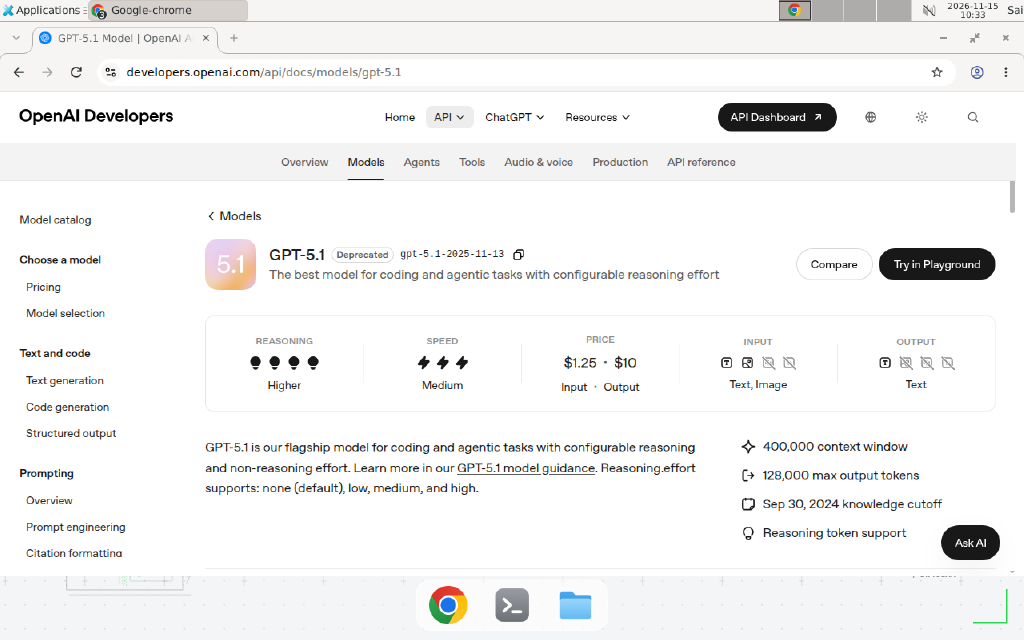
The OpenAI GPT-5.1 model page, checked on 2026-11-15. It lists reasoning effort none, low, medium, and high, with none as the default.
Step 3: Set the reasoning effort
Open the node’s Options and find Reasoning, described in the n8n docs as the level of reasoning effort the model should spend, with an option to return a reasoning summary for debugging. Pick by the job, not by habit:
| Effort | Use it for | Watch out for |
|---|---|---|
none | Classification, fast retrieval, voice, anything latency-critical | Multi-step tool calls get dumber, the model may skip planning |
low | Drafting, support chat, execution-oriented coding | Still light on planning for genuinely hard tasks |
medium | Agentic coding, research, spreadsheet work | Reasoning tokens start to dominate the bill |
high | Hard debugging, deep planning, high-value decisions | Slowest and most expensive, only when quality matters more than both |
OpenAI’s guidance matches this split: none fits latency-critical tasks that do not benefit from reasoning, naming voice, fast retrieval, and classification. The default is none, a change from earlier reasoning models, and the right default for most n8n workflows, which classify, route, or summarize rather than solve hard problems.
Step 4: Wire GPT-5.1 into an AI Agent
For a real agent, add an AI Agent node instead of a one-off OpenAI node. Connect an OpenAI Chat Model as its model sub-node and type gpt-5.1 in the Model field. Give the agent a system prompt that states its job and its output format, for example: You triage support tickets. Reply with exactly one word: billing, bug, or feature request. Never explain, never add punctuation. (Example — replace with your values.)
Then attach tools. A triage agent needs a way to read the ticket, usually a Gmail or webhook trigger upstream, and a way to record the result, usually a Google Sheets or Postgres node downstream. Keep the split clean: the model classifies, n8n routes. If the model also writes to the sheet, a bad classification silently corrupts your data instead of just mislabeling a row.
We could not verify whether the OpenAI Chat Model sub-node exposes a reasoning effort setting. The n8n docs list it on the OpenAI node’s Generate a Model Response operation, not on the Chat Model. If you need effort control inside an agent, expose the OpenAI node as a tool the agent calls, or use the HTTP Request fallback in step 5.
flowchart LR
    A[Webhook: new ticket] --> B[AI Agent with GPT-5.1]
    B --> C{Category?}
    C -->|billing| D[Google Sheets: billing queue]
    C -->|bug| E[Google Sheets: bug queue]
    C -->|feature request| F[Google Sheets: backlog]
Step 5: Control reasoning exactly with the HTTP Request node
When the node UI does not expose the setting you need, call the API directly. Add an HTTP Request node, POST to https://api.openai.com/v1/responses, authenticate with a Header Auth credential carrying Authorization: Bearer YOUR_OPENAI_API_KEY, and send this JSON body:
{
  "model": "gpt-5.1",
  "reasoning": { "effort": "none" },
  "input": "Classify this ticket in one word, billing, bug, or feature request: \"I was charged twice for the Pro plan this month.\"",
  "max_output_tokens": 500
}
Change "effort": "none" to "low", "medium", or "high" to move along the speed-depth tradeoff. The max_output_tokens cap matters: OpenAI recommends reserving at least 25,000 tokens for reasoning and outputs when you experiment, because a call that runs out mid-reasoning returns incomplete and still bills you for the thinking. For a one-word classifier, 500 is plenty, and the cap stops a runaway bill.
Step 6: Measure before you trust it
Run the classifier on 10 real tickets at none effort, then the same 10 at medium, and compare output tokens per run and wall-clock time in n8n’s execution data. The table below shows the shape of that comparison with example values, not measured results. Run your own 10 before you quote numbers to anyone.
| Effort | Median latency (example) | Output tokens per ticket (example) | Classification matches (example) |
|---|---|---|---|
none | 1.2 s | 8 | 9 of 10 |
medium | 6.8 s | 340 | 10 of 10 |
(Example — replace with your values.)
For a classifier, one extra match rarely justifies five times the latency and forty times the output tokens. For a debugging agent, the tradeoff flips. Find your flip point, do not copy ours.
Copy-paste template: Responses API call with reasoning control
Use this as the body of an HTTP Request node when you want GPT-5.1 with exact reasoning control, including knobs the node UI does not show. Swap the input text and the effort value, leave the rest alone.
{
  "model": "gpt-5.1",
  "reasoning": {
    "effort": "none",
    "summary": "auto"
  },
  "input": [
    {
      "role": "system",
      "content": "You triage support tickets. Reply with exactly one word: billing, bug, or feature request. Never explain, never add punctuation."
    },
    {
      "role": "user",
      "content": "PASTE_TICKET_TEXT_HERE"
    }
  ],
  "max_output_tokens": 500,
  "store": false
}
Setting store to false keeps the response out of OpenAI’s stored-response history, which matters if tickets contain customer data. The summary field asks for a reasoning summary you can log for debugging.
When not to use this / Limits
Do not use GPT-5.1 for jobs it was not built for. It does not generate images, it does not support fine-tuning, and it has no audio input, according to the model page. If your workflow needs the cheapest possible call, use GPT-5 mini at $0.25 input and $2 output per 1M tokens instead. If you need the deepest reasoning OpenAI sells, the reasoning guide now points at newer models, and GPT-5.1’s snapshot is already marked deprecated, so treat it as a current workhorse, not a long-term pin. And do not set effort to none for multi-step tool use: OpenAI’s guide warns that none fits tasks that do not benefit from reasoning or multi-chained tool calls, and an agent planning three tool calls in sequence is exactly where none quietly produces confident, wrong actions.
Cost / scale math
Pricing is $1.25 input, $0.125 cached input, and $10 output per 1M tokens, identical to GPT-5. Take a classifier handling 1,000 tickets a day, with prompt plus ticket averaging 800 input tokens and a one-word answer of about 60 output tokens. Assumptions: no prompt caching, no retries, one call per ticket.
| Effort | Input cost per day | Output cost per day | Total per day | Total per month |
|---|---|---|---|---|
none | 800,000 x $1.25 / 1M = $1.00 | 60,000 x $10 / 1M = $0.60 | $1.60 | about $48 |
medium | $1.00 | 60,000 + 300,000 reasoning x $10 / 1M = $3.60 | $4.60 | about $138 |
Reasoning tokens are the whole difference: roughly 300 per call at medium effort, billed at the $10 output rate. Turn on prompt caching and the input line drops 90 percent, to about $0.10 a day, because the system prompt is identical on every call and cached input costs $0.125 per 1M. The lever is effort first, caching second, and the model choice costs nothing extra over GPT-5.
Troubleshooting
| Symptom | Likely cause | Command to check | Fix |
|---|---|---|---|
model not found or 404 on first call | Typo in the model ID, or the account has no GPT-5.1 access | Re-read the Model field, then open the OpenAI GPT-5.1 model page | Correct the ID to gpt-5.1, or use gpt-5.1-chat-latest for chat-style calls |
| GPT-5.1 missing from the model dropdown | n8n’s list lags behind the November 12 release | None, the list is bundled with the n8n version | Type gpt-5.1 into the Model field manually |
| No Reasoning option in the node | Wrong operation, or node older than V2 | Check the operation name and your n8n version | Use Text, Generate a Model Response, on n8n 1.117.0 or newer |
Empty output with effort none | The task actually needed reasoning, or output was cut off | Re-run the same input at low effort | Raise the effort one step, or raise Maximum Number of Tokens |
Response status incomplete | Ran out of output tokens mid-reasoning | Inspect the response usage object for output_tokens_details | Raise max_output_tokens, OpenAI recommends reserving at least 25,000 tokens for reasoning |
| 429 rate limit errors | Account tier cap hit | Check your tier on the model page, Build tier allows 5,000 RPM | Slow the workflow with a Wait node or a queue, or raise the tier |
Common mistakes
- Using Generate a Chat Completion and wondering where reasoning went. The Chat Completions operation has no Reasoning option. Reasoning control lives on Generate a Model Response, the Responses API operation. Pick the operation first, then look for the setting.
- Pinning the dated snapshot.
gpt-5.1-2025-11-13is already marked deprecated on the model page. Pin thegpt-5.1alias so OpenAI can roll the snapshot forward, and re-check the page monthly. - Leaving Store on for customer tickets. The Responses API stores responses by default. Set
storetofalsein the HTTP Request body, or keep the data out of the prompt, when tickets contain personal data. - Forgetting reasoning tokens are output tokens. A medium-effort call that returns 60 visible tokens can bill 360. Budget on total output tokens, including reasoning, not on the visible answer length.
Test before you rely on it
- Send 10 real tickets through at
noneeffort and confirm the category matches a human label on at least 9. - Send the same 10 at
mediumand decide whether the extra matches are worth the extra latency and tokens. - Trigger the workflow twice with the same ticket and confirm the sheet has one row, not two.
- Replace the API key with a wrong one and confirm the workflow fails loudly instead of writing a blank row.
- Send a ticket in a language your prompt did not mention and confirm the one-word format holds.
- Check the first day’s OpenAI usage dashboard and confirm the spend matches the cost table above within 20 percent.
Conclusion
GPT-5.1 in n8n is a two-minute setup and a one-setting decision: type gpt-5.1 into the OpenAI node’s Generate a Model Response operation, set Reasoning to none for fast classification work or medium for work that needs real thinking, and measure the tradeoff on your own tickets before you trust it. The model costs the same as GPT-5, so the win is control, not price.
If this flow fails at 3 a.m., can your team see which effort level it ran at and what it cost? If not, add the reasoning summary to your logs first. Next, read the n8n AI Agent tutorial to give the classifier tools, the n8n OpenAI node tutorial for the full operation reference, and the complete n8n guide if you are building your first agent from scratch.
Frequently asked questions
What is the model ID for GPT-5.1 in n8n?
Type gpt-5.1 in the Model field. The dated snapshot is gpt-5.1-2025-11-13, but the model page already marks it deprecated, so use the gpt-5.1 alias and re-check the page before pinning a snapshot ID in production. The chat variant gpt-5.1-chat-latest exists for chat-style use.
Is GPT-5.1 better than GPT-5 for n8n agents?
OpenAI positions GPT-5.1 as its flagship model for coding and agentic tasks with configurable reasoning effort. The headline difference is control: reasoning effort supports none, low, medium, and high, with none as the default, so you can trade thinking time for latency. Pricing is identical to GPT-5 at $1.25 input and $10 output per 1M tokens.
Can I control reasoning effort in an n8n AI Agent?
Not directly through the OpenAI Chat Model sub-node. We could not verify a reasoning effort setting there, so control it through the OpenAI node instead: use Text, Generate a Model Response, and set the Reasoning option. For full control, call the Responses API with the HTTP Request node and pass reasoning.effort in the JSON body.
Why is GPT-5.1 missing from my n8n model dropdown?
The model shipped on November 12, 2026, and n8n's dropdown list lags behind new releases. Type gpt-5.1 into the Model field instead of picking from the list. If the call returns a model-not-found error, check the spelling first, then confirm your OpenAI account has access to the model.
How much does GPT-5.1 cost in n8n?
Input costs $1.25 per 1M tokens, cached input $0.125, and output $10 per 1M tokens, the same as GPT-5. Reasoning tokens are billed as output tokens, so the effort level is the real cost lever. A 1,000-ticket daily classifier costs about $1.60 a day at none effort and about $4.60 at medium effort under the assumptions in the cost section.
Should I use Generate a Chat Completion or Generate a Model Response?
Use Generate a Model Response when you want reasoning control, because it uses the Responses API and exposes the Reasoning option. Generate a Chat Completion uses the Chat Completions API, which n8n renamed in node V2 to make the distinction clear. OpenAI also recommends the Responses API for reasoning models.