Stagehand v4 Browser Automation Tutorial: act, extract, and observe in TypeScript
Your Playwright script worked for six months, then the site shipped a redesign on a Tuesday and every selector broke at once. You fixed the selectors, the site changed its class names again, and the maintenance loop never ended. That is the exact failure Stagehand v4 is built for: pages that change faster than your selectors can keep up.
Quick answer
Stagehand v4 is Browserbase’s open-source SDK for AI browser automation. Launch a browser, pass it to Stagehand.create(), then drive pages with three calls: act to do things, extract to pull typed data, and observe to discover what a page offers.
The hard part
The hard part is deciding which steps deserve the model, not wiring up the SDK.
Checked on 2026-11-14 against the Stagehand v4 quickstart docs and the Stagehand GitHub README. Interfaces change fast, so if a method name or option differs, trust the linked docs.
Evidence: what v4 actually changed
Stagehand v4 shipped on August 10, 2026, and the change is architectural, not cosmetic. In v3 and earlier, the SDK kept a copy of the browser’s state inside your process and talked to the browser over the Chrome DevTools Protocol from the outside. Against a local browser that copy is microseconds from the truth, so nobody noticed. Against a remote browser, the copy is always a beat behind, and you end up sending a click to a page that already closed. V4 moves the bookkeeping, target management, frame tracking, and CDP dispatch into a browser extension’s service worker, so the CDP calls happen next to the page and only one JSON message crosses the network per action.
Browserbase’s own launch measurements put the effect at about 2x faster than Playwright on equivalent cloud browsers, with roughly 80% fewer tokens in one extract() example: 35.7k tokens down to 7.4k. Per-action medians from the same measurements show a click dropping from 628 ms to 323 ms and waitForSelector from 493.2 ms to 237.6 ms on a remote browser. Read those numbers with their condition attached: the comparison is against cloud browsers, not your local Chrome, and the token saving comes from v4’s trimmed accessibility-tree view of the page. The README states the design goal plainly: “Stagehand runs as an extension next to the browser, cutting round-trip latency on every action.” The three SDKs, TypeScript, Python, and Go, share one core, so the API below translates directly if you prefer another language.
The breaking changes matter more than the speed. The old new Stagehand() constructor no longer runs in v4, and most v3 examples online will fail on that line. The agent() call is gone entirely: v4 has no autonomous planning loop, and the reference docs list only act, extract, and observe. That is a deliberate scope cut. Stagehand is a set of AI primitives on top of a browser you control, not an agent that figures out the task for you.
Prerequisites
- Node.js 22.18 or newer (check with
node --version; the npm package refuses older versions) - Google Chrome installed locally, for local runs
- An OpenAI API key, or any provider key for a model Stagehand supports
- A Browserbase API key, only if you want hosted browsers (get one at browserbase.com/overview)
- Basic TypeScript; the Python and Go SDKs follow the same pattern if you prefer them
Step 1: Install the SDK
Create an empty directory and install the package. Pin Zod to the 4.4.x line, because newer minors break the extract schema validation, as the README warns.
mkdir stagehand-v4-demo && cd stagehand-v4-demo
npm init -y
pnpm add @browserbasehq/stagehand 'zod@~4.4.3'
The current npm release is in the 4.3.x line as of November 2026. Do not install the v3-latest tag unless you are deliberately staying on v3.
Step 2: Launch a browser, then create Stagehand
This is the one-line change that breaks every v3 tutorial. In v4 you launch a browser first, then hand it to Stagehand.create() with a model. The example below follows the Stagehand v4 quickstart and the Stagehand GitHub README.
import { localBrowser, Stagehand } from "@browserbasehq/stagehand";
import { z } from "zod/v4";

const browser = await localBrowser.launch({ userDataDir: "./browser-data" });

const stagehand = await Stagehand.create({
  browser,
  model: { modelName: "openai/gpt-4.1-mini", apiKey: process.env.OPENAI_API_KEY },
});

const [page] = await browser.context.pages();
await page.goto("https://example.com");
The userDataDir option persists cookies in ./browser-data, so the next run starts already signed in. That one option removes a whole class of login automation: sign in once by hand, and the session survives.
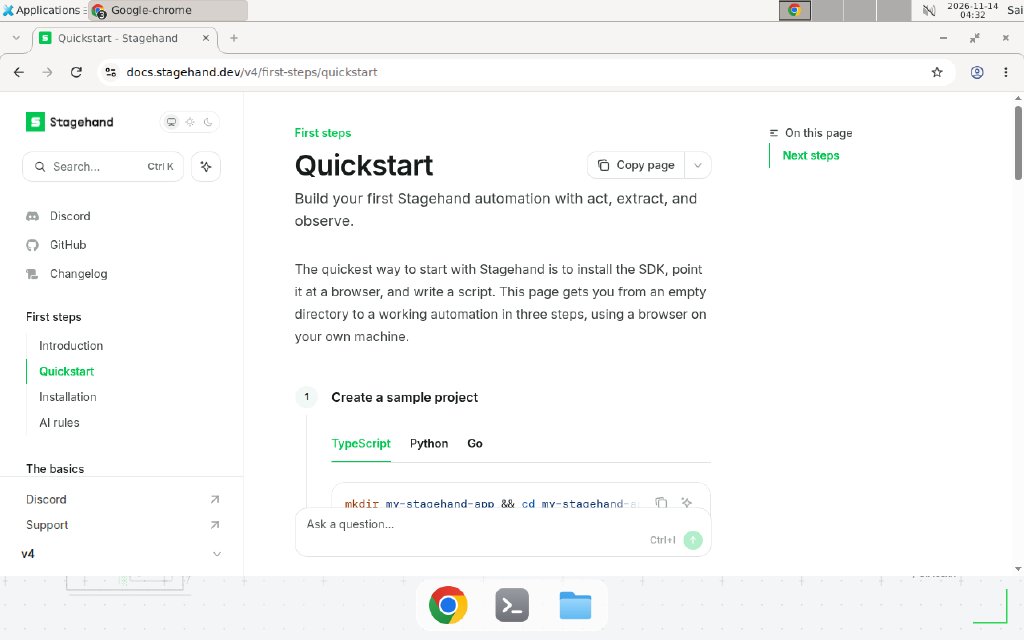
The Stagehand v4 quickstart docs, checked 2026-11-14: launch a browser first, then pass it to Stagehand.create().
Step 3: Observe before you act
The order the docs recommend is observe first, then act. Discovery costs one model call, and the result is a real selector you can reuse with deterministic page calls. This also keeps secrets out of model prompts: observe finds the email and password inputs, and your code fills them without the model ever seeing the values.
const { data: email } = await stagehand.observe("find the email input");
const { data: password } = await stagehand.observe("find the password input");

await page.locator(email[0].selector).fill(process.env.APP_EMAIL!);
await page.locator(password[0].selector).fill(process.env.APP_PASSWORD!);
Use observe whenever the page is unfamiliar or the selector is likely to move. Skip it when the selector is stable and you already know it: a plain page.locator() call costs zero tokens.
Step 4: Act with natural language
act() takes one instruction in plain language and turns it into CDP commands. It self-heals when the site redesigns its form, because it re-reads the page instead of trusting a stale selector.
await stagehand.act("click the sign in button");
await stagehand.act("open the billing page");
Keep each act() call to one action. A call like “log in, open billing, and download the latest invoice” hides three failure points behind one error message. One action per call makes failures diagnosable, and it is also cheaper: a failed long instruction burns a full model call and leaves the page in an unknown state.
For everything that should not involve a model, use the Playwright-style page APIs that ship with the SDK: page.goto(), page.click(), page.locator(), and page.screenshot(). The hybrid pattern is the whole point of Stagehand: natural language where the DOM is unfamiliar, code where the selector is stable. If you are comparing browser-agent approaches, our AgentR Webcmd browser agent tutorial covers a different trade-off, teaching a site once and reusing the learned layout to cut repeat token spend.
Step 5: Extract typed data with a schema
extract() returns data validated against a Zod schema, so the output is a typed object, not a blob of text to parse. Ask for exactly the fields you need: every extra field costs tokens and invites hallucinated values.
const { data } = await stagehand.extract(
  "extract every invoice in the table",
  z.object({
    invoices: z.array(z.object({
      number: z.string(),
      amount: z.number(),
      paid: z.boolean(),
    })),
  }),
);

console.log(data.invoices);
Validate the result in your own code before trusting it. A schema guarantees shape, not truth: a wrong number in the right field still passes validation. For money or counts, compare the extracted total against a second source, such as a page total, before acting on it.
Step 6: Run the same script on Browserbase
Pointing the same script at a hosted browser changes one launch line. The Model Gateway then picks the cheapest model for each action, so you can drop the model configuration entirely, and cache: true makes identical calls come back from Browserbase with no tokens spent. The Stagehand model configuration docs explain the gateway, and the Stagehand caching guide covers what caching does and does not store.
import { browserbase, Stagehand } from "@browserbasehq/stagehand";

const browser = await browserbase.launch({ apiKey: process.env.BROWSERBASE_API_KEY! });
const stagehand = await Stagehand.create({ browser, cache: true });
Two rules from the Browserbase docs are easy to miss. First, after creating a session you have five minutes to connect before it terminates, so launch and connect in the same step. Second, the cache and the Model Gateway work only with Browserbase browsers, not with local Chrome.
Copy-paste template: a reusable price-watch script
This is the one deliverable to copy as-is: a small price-watch script that visits a product page, extracts the price with a schema, and prints a JSON line you can append to a log. Replace the example values with your own. All values below are Example, replace with your values.
// price-watch.ts — Stagehand v4 price watcher (Example — replace with your values)
import { localBrowser, Stagehand } from "@browserbasehq/stagehand";
import { z } from "zod/v4";

const Price = z.object({
  product: z.string(),
  price: z.number(),
  currency: z.string(),
  inStock: z.boolean(),
});

async function main() {
  const browser = await localBrowser.launch({ userDataDir: "./browser-data" });
  const stagehand = await Stagehand.create({
    browser,
    model: { modelName: "openai/gpt-4.1-mini", apiKey: process.env.OPENAI_API_KEY },
  });
  try {
    const [page] = await browser.context.pages();
    await page.goto(process.env.TARGET_URL!); // Example — replace with your values
    const { data } = await stagehand.extract(
      "extract the product name, current price, currency, and whether it is in stock",
      Price,
    );
    console.log(JSON.stringify({ ...data, checkedAt: new Date().toISOString() }));
  } finally {
    await stagehand.close();
    await browser.close();
  }
}

main().catch((err) => { console.error(err); process.exit(1); });
Run it with TARGET_URL=https://example.com/product npx tsx price-watch.ts. The JSON line is the contract: anything downstream, a cron job, an n8n workflow, or a spreadsheet import, reads one line per check and never parses prose. For the n8n side of that pipeline, the complete n8n guide covers scheduling and storing results.
When not to use this / Limits
Do not reach for Stagehand when the page has stable selectors and never changes: plain Playwright is faster, cheaper, and easier to debug, and the v4 speed claims are measured against cloud browsers, not local ones. Do not use it for login flows that require a human challenge, such as captchas or SMS codes; no SDK automates those, and trying will burn tokens on a wall. Do not use extract() as a source of truth for money, legal text, or medical data without a second check, because a schema validates shape, not accuracy. Do not build a fully autonomous agent on top of v4 expecting it to plan: there is no agent() call, so the planning loop is your code. Finally, do not point it at a site whose terms forbid automation without reading them first; a tool that can click anything is not permission to click everything.
Cost and scale math
Stagehand itself is free under the MIT license. The bill has two parts: model tokens and, on Browserbase, browser minutes billed by the minute with a one-minute minimum per session. Work out your own numbers before scheduling a job:
- One
extract()on v4 costs about 7.4k tokens in Browserbase’s example, down from 35.7k on the old approach. At a small-model price of $0.40 per million input tokens (assumption, check your provider’s current price), one extract costs about $0.003. One hundred extracts a day costs about $0.30 a day in model spend. - One
act()orobserve()call costs a similar small completion, so a 5-step flow with one extract lands near 15k to 20k tokens, or roughly $0.01 per run at the same assumed price. - Caching changes the math: with
cache: true, repeated identical actions on Browserbase return from the cache with no tokens spent, so a daily check of the same page costs close to one extract per page per day, not one per run.
We could not verify the exact current per-minute Browserbase rate in this run; vendor docs say browser time is billed by the minute with a one-minute minimum, and the pricing page carries the live numbers.
Troubleshooting
| Symptom | Likely cause | Command to check | Fix |
|---|---|---|---|
new Stagehand() throws or is not a constructor | v3 code on a v4 install | npm list @browserbasehq/stagehand | Launch a browser first, then Stagehand.create({ browser, model }) |
agent is not a function | agent() was removed in v4 | Search the code for .agent( | Write your own loop with observe, act, and extract, or use the hosted MCP server |
Zod schema errors on extract() | Zod newer than 4.4.x | npm list zod | Pin zod@~4.4.3 and reinstall |
| Install fails with a Node version error | Node older than 22.18 | node --version | Upgrade Node to 22.18 or newer |
| Browserbase session ends immediately | More than 5 minutes passed between session creation and connect | Check the session start time in the dashboard | Launch and connect in the same step, without a pause between them |
| Local run fails with no Chrome found | Chrome is not installed | google-chrome --version | Install Chrome; local runs need it |
act() picks the wrong button | Ambiguous instruction on a busy page | Run observe("what can I click on this page?") first | Narrow the instruction (“click the blue Checkout button in the header”) and use observe to get the exact selector |
Common mistakes
- Putting credentials in an
act()prompt. Never writeact("log in as user@example.com with password hunter2"). Useobserveto find the fields, then fill them with deterministic page calls so secrets never reach the model. - Using
act()for stable selectors. If the button has an id that has not changed in a year,page.click("#submit")is faster, free, and deterministic. Save the model for the parts that actually move. - Skipping
observeon an unfamiliar page. Guessing a selector from the page source costs more in failedact()calls than oneobserve()call costs up front. - Expecting caching on local Chrome. Server-side caching and the Model Gateway work only with Browserbase browsers. Local runs pay full token cost on every call, so test caching on a hosted browser, not locally.
Test before you rely on it
- Run the script twice against the same page and confirm the extracted values match; a flaky first run is a warning, not a pass.
- Break one selector on purpose (rename a button in a test copy of the page) and confirm
act()self-heals instead of failing silently. - Run with a wrong password in a test account and confirm the failure is reported, not swallowed.
- Check that the extracted total matches a number shown elsewhere on the page before acting on it.
- Run a 10-page batch and confirm the token count per page stays near the 7.4k figure, not the old 35.7k.
- Confirm the session closes cleanly: no stray Chrome processes and no
browser-datalock left behind.
FAQ
Four questions readers ask most are answered in the front matter above; two more that come up in practice: if a site redesigns overnight, Stagehand usually keeps working because act() re-reads the page, but a renamed flow (a checkout split into two steps) still needs a script change. And if you need the same automation inside an AI coding agent instead of a script, the browse CLI plus the Stagehand skill is the lighter path: npm install -g browse, then browse open https://example.com --local needs no LLM key or Browserbase account.
Conclusion
Stagehand v4 trades the old constructor and the autonomous agent() call for a smaller, faster set of primitives: launch a browser, create a client, and spend model calls only where the page genuinely resists selectors. The speed and token numbers are real but conditional, cloud browsers, not local ones, and the tool is honest about what it is not: a browser driver with AI primitives, not an agent. If your pages change weekly and your selectors break monthly, that trade is worth it. If your pages never change, plain Playwright is still the right answer.
Before you schedule it in production, answer this: if the site redesigns overnight, does your script heal itself, or does it fail at 3 a.m. with nobody watching? If you cannot answer that, run the test checklist above first. Next, wire the price-watch template into a scheduled run, or compare it with the AgentR Webcmd browser agent tutorial to pick the browser-agent pattern that fits your site.
Frequently asked questions
What changed in Stagehand v4 compared to v3?
Stagehand v4 moved its engine into a browser extension that runs next to the page, so the SDK became a thin client. You now launch a browser first and pass it to Stagehand.create({ browser, model }) instead of calling new Stagehand(). The agent() call is gone, and the three AI primitives are act, extract, and observe. TypeScript, Python, and Go SDKs share the same core.
Do I need a Browserbase account to use Stagehand v4?
No. Local runs use your own Chrome and your own model API key, with no Browserbase account. A Browserbase account adds hosted browsers, the Model Gateway (no model configuration needed), server-side caching of repeated actions, and session recordings. The same script runs locally or on Browserbase by swapping one launch line.
How much faster is Stagehand v4 than Playwright?
Browserbase's own measurements say about 2x faster than Playwright on equivalent cloud browsers, with roughly 80% fewer tokens in one extract example (35.7k tokens down to 7.4k). The gain comes from running inside the browser instead of mirroring browser state across the network. Against a local browser the gap is much smaller, so treat the headline as a cloud-browser number.
Can Stagehand v4 plan a whole task by itself?
No. There is no agent() call in v4, so Stagehand does not plan multi-step tasks on its own. You write the loop: observe what is possible, act on one step, extract the result, and decide the next step in your own code. For a fully autonomous loop, pair it with an agent framework or the hosted Browserbase MCP server.
Which model should I use with Stagehand v4?
Use a small, cheap model for act and observe, such as openai/gpt-4.1-mini or gpt-5.4-mini, and reserve a stronger model for extract when the page structure is messy. On Browserbase, the Model Gateway picks the cheapest model for each action automatically. Keep credentials out of model prompts by using observe to find selectors and filling fields with deterministic page calls.
What does Stagehand v4 cost to run?
The SDK is MIT licensed and free. You pay for model tokens and, on Browserbase, browser time billed by the minute with a one-minute minimum per session. The free Browserbase plan allows 15 minutes per session and 3 concurrent sessions. A single extract costs about 7.4k tokens on v4, so model spend stays in fractions of a cent per page with a small model.