How to Use OpenAI 12-Hour Prompt Caching for Persistent AI Agents
Introduction
Your overnight agent runs every hour, and every run reprocesses the same 10,000 tokens of instructions, tool definitions, and runbooks before it does any real work. The 30-minute cache expires between runs, so each hourly call pays a fresh cache write.
On October 20, 2026, OpenAI added a 12-hour option to prompt caching in the Responses API. This tutorial shows how to use it for a persistent agent: which requests get the 12-hour lifetime, how to place breakpoints so the stable prefix survives, and how to prove the savings from your logs.
Quick answer
Pass prompt_cache_options: {"ttl": "12h"} in the Responses API on GPT-5.6 or later, keep stable instructions and tools at the start of the request before an explicit breakpoint, and reuse the prefix at 0.1x after one 2.5x write.
The hard part is keeping the prefix byte-for-byte stable across hours, not setting the ttl field.
Checked on 2026-11-20 against the OpenAI prompt caching guide and the OpenAI API changelog. Interfaces change fast, so if a field or label differs, trust the linked page.
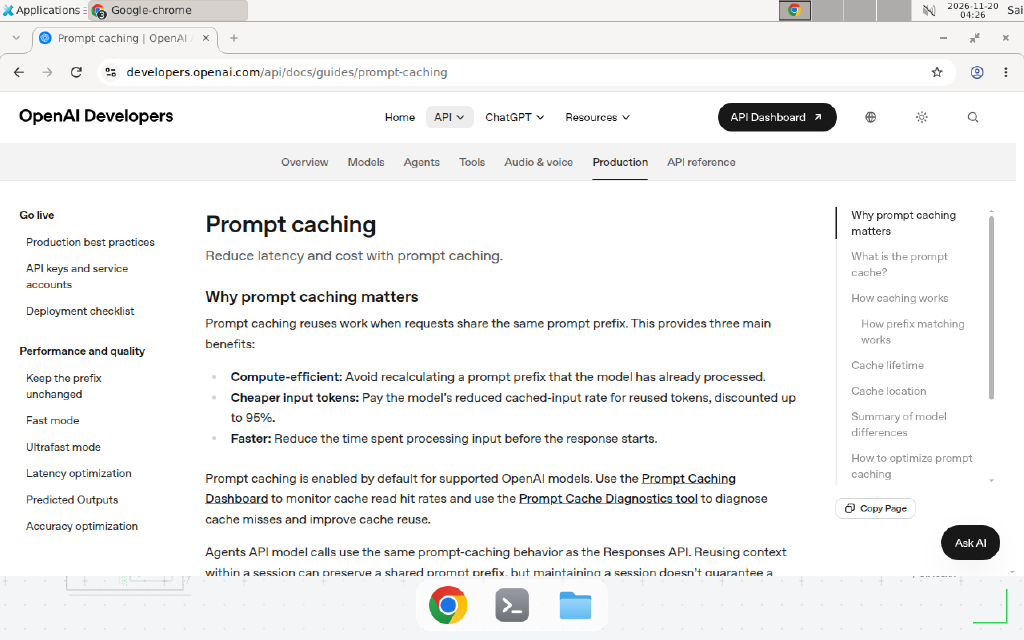
OpenAI’s prompt caching guide, checked 2026-11-20. The guide states cached-input pricing is discounted up to 95%.
Evidence
The numbers that decide this are all in OpenAI’s own documentation. The changelog entry dated October 20, 2026 reads: “You can now choose 12-hour prompt caching in the API. 12-hour prompt caching keeps shared instructions, tools, and context cached longer to benefit from lower cached-input pricing, even when requests are hours apart. 12-hour cache writes cost 2.5x the input token price.”
The prompt caching guide’s comparison table puts the two tiers side by side for GPT-5.6 and later: a cache write costs 1.25x the uncached input rate at the 30-minute lifetime and 2.5x at 12 hours, while a cache read costs 0.1x either way, dropping to 0.05x on GPT-6.2 Astra, GPT-6.2 Sol, GPT-6.1 Sol, and GPT-6.1 Terra. The guide also promises cached-input pricing “discounted up to 95%”, and sets the minimum cacheable prefix at 1,024 visible input tokens for GPT-5.6 and later.
Two concrete rates make the arithmetic real. The changelog lists GPT-6.1 Sol at $2 per million input tokens, $0.10 per million cached input tokens, and $2.50 per million cache-write tokens. A 12-hour write on the same model is therefore $5.00 per million tokens by the documented 2.5x multiplier.
One warning from the guide matters more than any of the prices: “The minimum lifetime governs eligibility for cache-read pricing. It does not guarantee that every request reuses stored KV tensors or has lower latency.” Treat 12 hours as a floor for eligibility, not a promise of a hit, and verify with the usage fields in the next section.
Prerequisites
- An OpenAI API key with access to a GPT-5.6 or later model, such as GPT-6.1 Sol. The 12h ttl is not available on older models.
- Python 3.10 or later and the
openaiPython SDK. If your SDK version rejectsprompt_cache_options, pass it throughextra_bodyinstead. - A persistent agent that repeats the same instructions, tools, or reference context, with gaps longer than 30 minutes between calls. A cron agent or an overnight review loop qualifies. Interactive chat with requests seconds apart does not.
- Familiarity with the Responses API
inputarray and with readingusagefields from a response.
Step-by-step guide
Step 1: Split the prompt into layers by how often each layer changes
Caching keys on the exact start of the request, so order is the whole game. Sort your prompt into layers, slowest changing first:
| Layer | Example content | Changes | TTL |
|---|---|---|---|
| System rules | Role, policies, output format, tool definitions | Per deploy | 12h |
| Reference playbook | Runbooks, product catalog snapshot, escalation rules | Daily | 12h |
| Session context | Conversation history, files from this session | Every turn | 30m default |
| Live question | The current user message or task | Every request | Not cached |
Measure each layer in tokens first. If the stable layers total under 1,024 tokens, the cache never engages, and no ttl setting will help.
Step 2: Build the request with a 12-hour ttl and explicit breakpoints
Put the stable layers in the first developer message, mark its end as an explicit breakpoint, and set the request-level ttl to 12h. The live question goes in a later user message, after the breakpoint.
from openai import OpenAI

client = OpenAI()  # Example — replace with your values

SYSTEM_PROMPT = open("prompts/agent_system.md").read()      # stable rules
TOOL_DOCS = open("prompts/tool_reference.md").read()        # stable tool docs
# Example — replace with your values: load your own files here.

response = client.responses.create(
    model="gpt-6.1-sol",
    input=[
        {
            "role": "developer",
            "content": [
                {
                    "type": "input_text",
                    "text": SYSTEM_PROMPT + "\n\n" + TOOL_DOCS,
                    "prompt_cache_breakpoint": {"mode": "explicit"},
                }
            ],
        },
        {"role": "user", "content": "Review the overnight queue and file a summary."},
    ],
    tools=[...],  # your function tools, in a fixed order
    prompt_cache_options={"ttl": "12h", "mode": "explicit"},
)
Three details in this snippet are load-bearing. First, the ttl lives at the request level, in prompt_cache_options. The guide documents "30m" (default) or "12h" as the only values, and an unsupported value fails the request with a 400 error, so a typo here becomes a visible outage rather than a silent fallback. Second, mode: "explicit" means only your breakpoints count. Third, reusable instructions belong in the first developer message inside input, not in the top-level instructions field: on models starting with GPT-6.2, top-level instructions are appended after input and billed at the uncached rate on every request, even on a cache hit.
We could not verify a per-breakpoint ttl field in the public API reference; it shows ttl at the request level only. Community write-ups describe per-prefix lifetimes, but until that field appears in the official docs, set one ttl per request: one 12h call for the slow agent, one default 30m call for fast turns.
Step 3: Verify the cache is actually hitting
Never trust the ttl setting alone. Every Responses API call reports what happened in usage.input_tokens_details: cached_tokens for billed reads and cache_write_tokens for writes. Log both on every call, plus the wall-clock gap since the previous call.
details = response.usage.input_tokens_details
print(f"input={response.usage.input_tokens} "
      f"cached={details.cached_tokens} "
      f"write={details.cache_write_tokens}")
A healthy hourly agent shows a large cache_write_tokens on the first call of the day and near-zero writes with large cached_tokens after that. The API reference also returns prompt_cache_diagnostics, which names a miss reason such as model_changed, so compare a failing response against a known-good one instead of guessing.
Step 4: Warm the cache once, then let the schedule reuse it
Send the first request of the day as a real call, not a throwaway, because the first call is the one that pays the 2.5x write. A scheduled warm-up call with a trivial question costs the same write as a real task, so schedule the first real task at the start of the window instead. A read does not restart the 12-hour clock, so a service that runs longer than 12 hours needs a fresh 12h write in each window.
Step 5: Keep the stable prefix frozen between deploys
The cache breaks the moment the rendered prefix changes, so treat the stable layers like a release artifact. Pin tool definitions in a fixed order, keep timestamps and request IDs out of developer messages, and version the system prompt file. When you deploy a new system prompt, expect one 2.5x write on the next call, then normal service. Do not deploy prompt tweaks hourly, or you will pay the write rate on every call and conclude, wrongly, that caching does not work.
Copy-paste template: a persistent agent caller with a break-even check
This module is the whole pattern in one file: one function that calls the agent with a 12-hour cache, one logger that records what the cache actually did, and one calculator that tells you whether 12h is cheaper than 30m for your real traffic. Copy it, replace the example values, and run it against your own logs.
import json, time
from openai import OpenAI

client = OpenAI()  # Example — replace with your values
MODEL = "gpt-6.1-sol"
SYSTEM_PATH = "prompts/agent_system.md"   # Example — replace with your values
TOOLS_PATH = "prompts/tool_reference.md"   # Example — replace with your values
LOG_PATH = "logs/cache_usage.jsonl"        # Example — replace with your values

def ask(question: str, ttl: str = "12h") -> str:
    system = open(SYSTEM_PATH).read()
    tools_doc = open(TOOLS_PATH).read()
    resp = client.responses.create(
        model=MODEL,
        input=[
            {"role": "developer", "content": [
                {"type": "input_text",
                 "text": system + "\n\n" + tools_doc,
                 "prompt_cache_breakpoint": {"mode": "explicit"}}]},
            {"role": "user", "content": question},
        ],
        tools=[],  # Example — replace with your values: your function tools here
        prompt_cache_options={"ttl": ttl, "mode": "explicit"},
    )
    d = resp.usage.input_tokens_details
    with open(LOG_PATH, "a") as f:
        f.write(json.dumps({
            "ts": time.time(), "ttl": ttl,
            "input": resp.usage.input_tokens,
            "cached": d.cached_tokens,
            "write": d.cache_write_tokens,
        }) + "\n")
    return resp.output_text

def break_even(prefix_tokens: int, calls_per_window: int) -> dict:
    """Cost in units of one uncached pass over the prefix.
    30m tier rewrites on every call when gaps exceed 30 minutes.
    12h tier writes once, then reads at 0.1x."""
    uncached = calls_per_window
    thirty_min = calls_per_window * 1.25
    twelve_h = 2.5 + 0.1 * (calls_per_window - 1)
    return {"uncached": uncached, "30m": thirty_min, "12h": twelve_h}

# Example: 12 hourly calls over 12 hours.
# break_even(10_000, 12) -> {"uncached": 12, "30m": 15.0, "12h": 3.6}
Run break_even with your own call count. If the 12h number is not the smallest, keep the 30-minute default for that agent.
When not to use this / Limits
Do not set 12h on interactive chat, on agents that run every few minutes, or on requests whose stable prefix is under 1,024 tokens. Requests seconds apart keep the 30-minute cache warm anyway, so a 2.5x write buys nothing. Do not use it for prefixes that change every call, such as prompts with an injected timestamp, because each change invalidates the cached prefix and you pay the write rate for a cache that never hits. Caches are not shared across organizations or regions, and traffic above 15 requests per minute can overflow to machines that do not hold your entry, so a burst of parallel agents may miss even with a valid lifetime. If your agent is a single user chatting in real time, keep the default.
Cost / scale math
Take an hourly agent with a 10,000-token stable prefix, making 12 calls across 12 hours. Costs below are in units of one uncached pass over the prefix, so they hold for any model that follows the documented multipliers.
| Pattern | Calculation | Cost |
|---|---|---|
| No caching | 12 calls x 1.0 | 12.0 |
| 30-minute tier | 12 writes x 1.25 (every gap exceeds 30 minutes) | 15.0 |
| 12-hour tier | 1 write x 2.5 + 11 reads x 0.1 | 3.6 |
The 12-hour tier costs 76% less than the 30-minute tier for this shape (3.6 against 15.0) and 70% less than no caching at all. In dollars on GPT-6.1 Sol at $2 per million input tokens, $0.10 cached, and $2.50 per million for a 30-minute write: no caching costs $0.24, the 30-minute tier costs $0.30, and the 12-hour tier costs $0.061. The break-even point is two reuses: one write plus two reads costs 2.7x, against 3.75x for three 30-minute writes. A daily agent that runs once and never repeats the prefix should stay on 30 minutes.
Troubleshooting
| Symptom | Likely cause | Command to check | Fix |
|---|---|---|---|
cached_tokens is 0 on every request | Something before the breakpoint changes each call, often a timestamp or a reordered tool list | Compare prompt_cache_diagnostics on two consecutive responses | Move volatile content after the breakpoint and freeze tool order |
Request fails with 400 invalid_request_error on ttl | Model older than GPT-5.6, or the request went to Chat Completions instead of Responses | Check the model field and the endpoint path | Use GPT-5.6 or later and the Responses API; older models use prompt_cache_retention |
| Cache hits vanish during a burst of parallel calls | Traffic above 15 requests per minute overflows to machines without your entry | Log cached_tokens against request timestamps and look for misses clustered in bursts | Spread the burst out, or give each tenant a stable prompt_cache_key so routing stays separate |
| Reads billed at full price after 12 hours | The lifetime expired; reads do not restart the 12-hour clock | Check the timestamp of the last write against the first full-price read | Schedule a fresh 12h write at each window boundary and expect one write spike per window |
cached_tokens is smaller than the stable prefix | The prefix is under the 1,024-token minimum, or part of it sits after the breakpoint | Count the tokens before the breakpoint with the SDK tokenizer | Move more stable content before the breakpoint, or accept that short prompts do not cache |
Common mistakes
- Injecting the current time into the system prompt. A timestamp in the developer message changes the prefix on every call, so the cache never matches. Put the time in the user message, after the breakpoint.
- Using top-level
instructionsfor reusable guidance. On GPT-6.2 and later, those tokens sit afterinputand are billed uncached on every request. Put reusable instructions in the first developer message instead. - Setting 12h on a chat agent. Requests seconds apart reuse the 30-minute cache for free, so the 2.5x write is pure waste. Match the ttl to the gap, not to the fashion.
- Editing tool definitions between turns. Adding, removing, or reordering a tool changes the rendered prefix and invalidates the cache. Version tool changes like code releases, and expect one expensive write after each deploy.
Test before you rely on it
- Send two identical calls one hour apart and confirm the second shows large
cached_tokensand near-zerocache_write_tokens. - Send a third call with one word changed in the system prompt and confirm it pays a fresh write, proving your logging can see a miss.
- Run the agent for a full 12-hour window and confirm the total cost matches the
break_evenprediction within 10%. - Deploy a system prompt change and confirm the next call pays one 2.5x write, then returns to cached reads.
- Send 20 calls in one minute and check whether burst misses appear, so you know the overflow behavior before production traffic finds it.
- Confirm the fallback works: if a call returns
cached_tokensof zero three times in a row, the agent still answers correctly, just at full price, and your alert fires.
FAQ
The six questions in the front matter cover the points readers ask about most: supported models, the 12h versus 30m cost comparison, the no-guarantee warning, Chat Completions, the 1,024-token minimum, and what breaks a cached prefix.
Conclusion
Twelve-hour prompt caching is a small configuration change that fixes a specific billing shape: a persistent agent whose stable context is reprocessed after every gap longer than 30 minutes. Set the ttl, freeze the prefix, log cached_tokens on every call, and let the break-even math decide. If this flow fails at 3 a.m., can your team see from the usage log whether the cache hit or missed, and can it fall back to full-price calls without dropping the task? If not, add the logging first, then the ttl.
Next, compare this with long-running agents in Gemini agent multi-day persistent tasks, read migrating away from the OpenAI Agent Builder before shutdown if your agent lives in OpenAI’s builder tools, and see the complete n8n guide for scheduled agents with persistent state.
Frequently asked questions
Which models support the 12-hour prompt cache?
GPT-5.6 and later, in the Responses API only. You set prompt_cache_options ttl to 30m (the default) or 12h. Older models use a different control, prompt_cache_retention, and do not offer the 12h option.
Is the 12-hour cache more expensive than the 30-minute cache?
A 12-hour write costs 2.5x the uncached input rate, against 1.25x for a 30-minute write, but reads cost 0.1x either way. The 12h option wins once the same prefix is reused at least twice after gaps longer than 30 minutes: one write plus two reads costs 2.7x, against 3.75x for three 30-minute writes.
Does a 12-hour lifetime guarantee a cache hit?
No. OpenAI documents the lifetime as a minimum that governs eligibility for cache-read pricing, and states it does not guarantee that every request reuses stored KV tensors or has lower latency. Routing, load, and prefix changes can all cause a miss, so always log cached_tokens.
Can I use 12-hour caching with the Chat Completions API?
We could not verify a 12h option for Chat Completions; the prompt caching guide documents ttl for the Responses API, and older models use prompt_cache_retention instead. Plan on the Responses API if you want the 12-hour lifetime.
What is the minimum prompt size for caching?
On GPT-5.6 and later, a prefix must be at least 1,024 visible input tokens before it can be cached. Hidden system tokens do not count toward the minimum. Short prompts never enter the cache, so the 12h setting changes nothing for them.
What breaks a cached prefix?
Any change to the rendered prefix before a breakpoint: edited instructions, reordered tool definitions, a timestamp injected into a developer message, or a different model. The cache keys on the exact start of the request, so the stable part must be byte-for-byte identical.