How to Set Up SAML SSO in Self-Hosted n8n (Okta, Azure AD, and Any IdP)
Introduction
Your security team just asked why the automation platform that touches production data still uses shared passwords, and your answer was silence. Self-hosted n8n runs your workflows, your credentials, and your customer data, yet on the free Community Edition anyone with a login is one reused password away from all of it. SAML single sign-on fixes that by moving authentication to the identity provider your company already trusts.
This tutorial covers the full setup: the licence, the IdP side, the n8n side, role provisioning, and the two mistakes that lock teams out. It covers Okta and Azure AD and the generic flow for any SAML 2.0 provider.
Quick answer
On a Business or Enterprise self-hosted instance, open Settings, Authentication, Single sign-on, copy the Redirect URL and Entity ID into your IdP, paste the IdP metadata back, test, then activate. Map roles only after a test login works.
The hard part
The hard part is the attribute mapping, not the SAML handshake.
Checked on
Checked on 2026-11-10 against the n8n SAML setup documentation and the n8n SSO environment variables reference. If a menu or label differs, trust the linked page.
Evidence
SAML is not a free feature, and the price is the first thing to check. On the self-hosted Business plan, n8n lists 667 euros a month billed annually (about 800 US dollars a month for US visitors) for 40,000 executions a month, 6 shared projects, and SAML and LDAP SSO, according to n8n’s pricing page as of November 2026. Every plan includes unlimited users, and companies with fewer than 20 employees can get 50 percent off Business through the Startup Program.
The official docs are blunt about the claim that matters most: “n8n uses the upn claim value as the key that links a SAML identity to an n8n account.” Get that claim wrong and your whole team shares one account. Role provisioning arrived in 1.122.2, env var configuration in 2.18.0, and in-app rule mapping in 2.19.0.
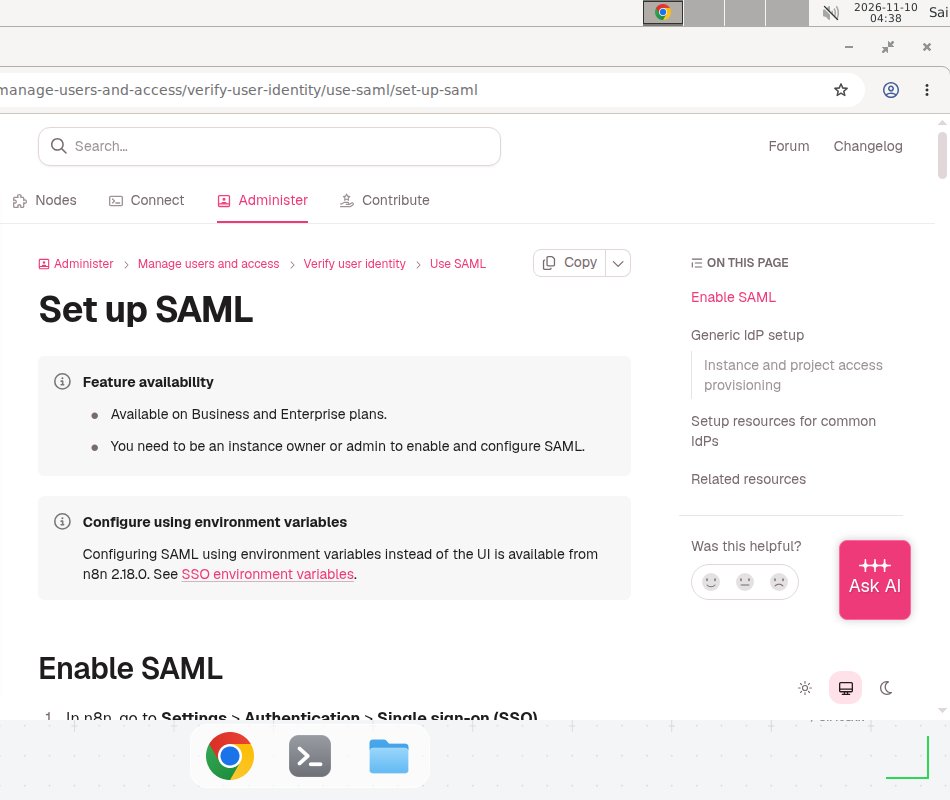
Screenshot: the official n8n SAML setup documentation, checked 2026-11-10.
Prerequisites
- A self-hosted n8n instance on a Business or Enterprise licence. SAML is not available on the Community Edition.
- Instance owner or admin access in n8n. Only owners and admins can enable and configure SAML.
- Admin access in your identity provider (Okta, Azure AD, Auth0, Keycloak, or similar) so you can create a SAML application.
- A public HTTPS URL for your n8n instance. Behind a load balancer, set
N8N_EDITOR_BASE_URLto that public URL first. - A test user account in your IdP that is not your admin account, to prove the login works before activation.
Step 1: Confirm your licence and version
Open Settings and check that your instance shows a Business or Enterprise licence. If it shows Community, stop here: the SSO menu will not appear. Then check your n8n version. You need 1.122.2 or newer for role provisioning, 2.18.0 or newer for env var configuration, and 2.19.0 or newer for mapping rules inside n8n. If you are behind, upgrade first: our guide to updating your self-hosted n8n instance covers the Docker upgrade path.
Step 2: Collect n8n’s Redirect URL and Entity ID
In n8n, go to Settings, then Authentication, then Single sign-on (SSO). The page shows two values you need on the IdP side: the Redirect URL and the Entity ID. Copy both into a note. If your IdP supports setup from imported metadata, open the Entity ID URL and save the XML it returns.
Do not guess these URLs. The Redirect URL is built from your instance’s public address, and a trailing slash or a wrong host is the most common reason the IdP rejects the login later. Our n8n install guide for an Ubuntu VPS and the Docker Compose setup cover getting the public URL right.
Step 3: Create the application in your IdP
Create a new SAML application in your IdP and paste in the Redirect URL and Entity ID from Step 2. n8n publishes dedicated guides for Okta Workforce Identity and Azure AD.
Two settings trip people up. First, n8n does not support POST binding, so configure your IdP to use HTTP request binding. Second, map the four attributes n8n expects, using the URI Reference name format:
| Value (IdP side) | Name |
|---|---|
| User email | http://schemas.xmlsoap.org/ws/2005/05/identity/claims/emailaddress |
| User first name | http://schemas.xmlsoap.org/ws/2005/05/identity/claims/firstname |
| User last name | http://schemas.xmlsoap.org/ws/2005/05/identity/claims/lastname |
| User principal name, unique per user | http://schemas.xmlsoap.org/ws/2005/05/identity/claims/upn |
The upn row is the one that matters. It must be distinct for every user, for example their login name or email. Never set the claim name itself as the value for every user, or everyone will sign in to the same n8n account. This is a configuration error on the IdP side, not an n8n bug.
Step 4: Load the IdP metadata into n8n and test
Back in n8n, under Settings, Authentication, Single sign-on (SSO), load the metadata your IdP generated. Paste the IdP’s metadata URL into the Identity Provider Settings field, or download the metadata XML and paste the raw XML. The URL is easier to maintain, while pasted XML goes stale if your IdP rotates certificates.
Select Save settings, then select Test settings. The test runs a real SAML round trip. If it fails, check three things: the app you created in your IdP actually supports SAML, the Redirect URL and Entity ID went into the correct IdP fields, and the metadata XML is formatted correctly. Fix the failing check, save, and test again. Do not activate SAML until the test passes.
Step 5: Activate SAML and sign in with a test user
Set SAML 2.0 to Activated, then sign out and sign in with your test user, not with your admin account. The test user should land in n8n with the name and email your IdP sent. If the login lands in an account that already belongs to someone else, your upn values are colliding. Stop, fix the upn mapping, and test again before anyone else signs in.
Keep one local owner account with a strong password and MFA as a break-glass login. If the IdP configuration breaks later, that account is how you get back in. If your instance is reachable from the internet, read our guide to checking whether your n8n instance is exposed.
Step 6: Provision roles automatically (optional, recommended)
By default, n8n assigns roles manually: every SSO user arrives as a member and an admin promotes them by hand. Role provisioning, available from n8n 1.122.2, lets the IdP decide. In Settings, Authentication, Single sign-on (SSO), the Role assignment dropdown offers three modes: Assigned manually in n8n, Instance roles via SSO, and Instance and project roles via SSO.
There are two ways to feed n8n the roles. The first is to map rules on your IdP: configure the n8n_instance_role attribute (a string, falling back to global:member when unset) and the n8n_projects attribute (an array of <project-id>:<role> pairs, for example bHsykgeFirmIhezz:viewer). Supported instance roles are global:member, global:admin, and global:chatUser. Find project IDs in the CSV files n8n offers for download, or read one from the project URL.
The second way, available from n8n 2.19.0, is to map rules inside n8n. Each rule is an expression evaluated against the SAML attributes in a $claims object, and the first matching rule wins. To give the Admin role to anyone in the IdP admin group, the rule is {{ $claims.groups.includes('admin') }}. Users who match no rule get the default role, Member.
Warning: switching on either provisioning mode overwrites existing access. Any access granted inside n8n that is not reflected in the IdP response is removed on the user’s next login. Download the two CSV files n8n offers before you save the change.
Step 7: Manage SAML with environment variables (optional)
If you deploy n8n with Docker Compose, manage SSO from environment variables instead of the UI (available from n8n 2.18.0):
N8N_SSO_MANAGED_BY_ENV=true
N8N_SSO_SAML_LOGIN_ENABLED=true
N8N_SSO_SAML_METADATA_URL=https://your-idp.example.com/metadata.xml
N8N_SSO_USER_ROLE_PROVISIONING=instance_and_project_roles
Example values only, replace with your values. Set N8N_SSO_MANAGED_BY_ENV to true and n8n applies these variables on every startup and locks the matching controls in the UI. N8N_SSO_SAML_METADATA and N8N_SSO_SAML_METADATA_URL are mutually exclusive, so set only one. N8N_SSO_USER_ROLE_PROVISIONING accepts disabled, instance_role, or instance_and_project_roles. Append _FILE to a variable to load its value from a separate file.
Copy-paste template: SAML go-live checklist
Copy this checklist into your change ticket and check every box before you tell the team SAML is live.
SAML GO-LIVE CHECKLIST — n8n instance: <your-domain>
IdP: <Okta / Azure AD / Keycloak / other>       Example — replace with your values
Licence: Business / Enterprise                  [ ]
n8n version >= 2.19.0                           [ ]
N8N_EDITOR_BASE_URL set (load balancer)         [ ]
Redirect URL + Entity ID copied                 [ ]
IdP app created, HTTP request binding           [ ]
Attributes mapped: email, firstname, lastname, upn [ ]
upn unique per user                             [ ]
Metadata loaded + Test settings pass            [ ]
Test user signs in correctly                    [ ]
SAML 2.0 Activated                              [ ]
Role provisioning mode + CSVs downloaded        [ ]
Break-glass owner account tested                [ ]
Old shared logins disabled or rotated           [ ]
When not to use this / Limits
Do not buy a Business licence just for SAML if your team is two people sharing one server and nobody requires SSO for compliance. The Community Edition plus strong passwords, MFA on the owner account, and IP allowlisting is cheaper and simpler. SAML also does not solve authorisation on its own: it proves who a user is, but it will not stop a legitimate admin from exporting a workflow they can already see. If your IdP is down, nobody signs in, so keep the break-glass account working and tested. If you run n8n Cloud on Starter or Pro, this tutorial does not apply, because those plans have no SSO; you need Cloud Enterprise instead.
Cost math
The Business licence is priced for governance, not for volume. At 667 euros a month billed annually for 40,000 executions, it costs about 0.0167 euros per execution. The Pro plan costs 50 euros a month for 10,000 executions, or 0.005 euros per execution, so Business costs more than three times as much per execution. The 13-fold price jump buys SAML and LDAP SSO, Git version control, environments, 6 shared projects, and 30-day insights, not volume. The Startup Program discount cuts Business to about 333.50 euros a month. Check n8n’s pricing page for your region before budgeting.
Troubleshooting
| Symptom | Likely cause | Command to check | Fix |
|---|---|---|---|
| Test settings fails | The IdP app does not support SAML, or the Redirect URL and Entity ID went into the wrong fields | Compare the values in n8n with the values in your IdP | Correct the fields, save in n8n, and test again |
| Test fails after pasting metadata | The metadata XML is malformed or truncated | Open the metadata URL and confirm it returns valid XML | Re-download the metadata, or switch to the metadata URL |
| Every user lands in the same account | The IdP sends the same upn value for everyone | Inspect a SAML response with SAML Chrome Panel | Give each user a distinct upn, such as their login name |
| Login works but the role is wrong | Role provisioning is off, or n8n_instance_role is missing | Check the Role assignment dropdown and the attribute your IdP sends | Set the provisioning mode, add the attribute, and have the user sign in again |
| Users lose project access after enabling provisioning | Provisioning removes access not reflected in the IdP response | Compare the downloaded CSVs with the current access list | Add the missing <project-id>:<role> entries to n8n_projects |
Common mistakes
- Activating before testing. Activating with a broken configuration locks the whole team out, and your only way back is the break-glass account or the database.
- Copying the claim name as the
upnvalue. Setting every user’supnto the literal claim URI gives everyone the same identity. The value must be per-user data, such as a login name. - Enabling role provisioning without the CSV backup. Provisioning deletes access it cannot see in the IdP. Download both CSVs first.
- Forgetting
N8N_EDITOR_BASE_URLbehind a load balancer. Behind a proxy the Redirect URL points at an internal host, the IdP rejects it, and the error blames SAML instead of the URL.
Test before you rely on it
- Sign in with a non-admin test user and confirm the name, email, and role are correct.
- Sign in with a user who should be an admin and confirm the
global:adminrole arrives. - Remove a user from a group in the IdP, have them sign in again, and confirm the role is gone.
- Break SAML in a staging copy and confirm the break-glass owner account still signs in.
- Confirm a deprovisioned user cannot sign in after their IdP account is disabled.
FAQ
Which n8n plan do I need for SAML SSO? SAML SSO is available on the Business and Enterprise plans for self-hosted n8n. The free Community Edition has no SSO, and Cloud Starter and Pro do not include it either.
Can I use any identity provider, or only Okta and Azure AD? Any IdP that speaks SAML 2.0 works. n8n ships guides for Okta and Azure AD, and its docs list Auth0, Authentik, Keycloak, JumpCloud, and PingIdentity.
Why do all my users land in the same n8n account after SAML login? Your IdP is sending the same upn value for everyone. n8n uses the upn claim as the key linking a SAML identity to an account, so a shared value means a shared account.
Does enabling role provisioning delete roles I already assigned? Yes, it can. Any access granted inside n8n that is not reflected in the IdP response is removed on the user’s next login. Download the two CSV files n8n offers before you save the change.
Can I configure SAML with environment variables instead of the UI? Yes, from n8n 2.18.0. Set N8N_SSO_MANAGED_BY_ENV to true, then N8N_SSO_SAML_LOGIN_ENABLED and either N8N_SSO_SAML_METADATA or N8N_SSO_SAML_METADATA_URL.
Do I still need passwords in n8n after SAML is on? No, for users who sign in through SAML. They authenticate at your IdP, where password policy and MFA live. Keep one local owner account as a break-glass login.
Conclusion
SAML in n8n is a short configuration with one long tail: the handshake takes minutes, but the attribute mapping and role provisioning decide whether the result is secure or a mess. If a teammate leaves tomorrow, does disabling their IdP account lock them out of n8n with no other change? If yes, your SSO setup works. If not, fix the upn mapping and the provisioning mode first.
The complete n8n guide collects the install, security, and scaling tutorials in one place.
Frequently asked questions
Which n8n plan do I need for SAML SSO?
SAML SSO is available on the Business and Enterprise plans for self-hosted n8n. The free Community Edition has no SSO at all, and Cloud Starter and Pro do not include it either. If you are on Community and your security team requires SSO, the self-hosted Business licence is the cheapest route in, at 667 euros a month billed annually as of November 2026.
Can I use any identity provider, or only Okta and Azure AD?
Any IdP that speaks SAML 2.0 works. n8n ships step-by-step guides for Okta Workforce Identity and Azure AD, and its docs list Auth0, Authentik, Keycloak, JumpCloud, and PingIdentity as known-good options. The generic flow is the same for all of them: copy n8n's Redirect URL and Entity ID into the IdP, then paste the IdP metadata back into n8n.
Why do all my users land in the same n8n account after SAML login?
Your IdP is sending the same userPrincipalName (upn) value for everyone. n8n uses the upn claim as the key that links a SAML identity to an n8n account, so a shared value means a shared account. Give each user a distinct upn, such as their login name or email, and check the n8n.audit.user.login.emailConflict audit event to catch the mismatch.
Does enabling role provisioning delete the roles I already assigned?
Yes, it can. When you switch on one of the SSO provisioning modes, any access granted inside n8n that is not reflected in the IdP response is removed from users on their next login. n8n asks you to download two CSV files with your current access settings before you save the change, so keep those files until every user has signed in at least once.
Can I configure SAML with environment variables instead of the UI?
Yes, from n8n 2.18.0. Set N8N_SSO_MANAGED_BY_ENV to true, then N8N_SSO_SAML_LOGIN_ENABLED and either N8N_SSO_SAML_METADATA or N8N_SSO_SAML_METADATA_URL. When managed by environment variables, n8n applies the settings on every startup and locks the matching controls in the UI.
Do I still need passwords in n8n after SAML is on?
No, for users who sign in through SAML. They authenticate at your IdP, which is where password policy and MFA live. Keep one local owner account with a strong password and MFA as a break-glass login, so a broken IdP configuration never locks every admin out of the instance.