n8n Azure OpenAI Responses API Setup: Use Responses-Only Deployments in 2.43.0
Introduction
You deploy a new model on Azure, point n8n at it, and the workflow dies with 400 Model not supported. Nothing changed in your workflow. The deployment simply does not answer on Chat Completions, it only speaks the Responses API, and until recently the n8n Azure node had no way to call it. This tutorial sets up n8n 2.43.0 with a Responses-only Azure deployment, from the upgrade to the first green test execution.
Quick answer
Upgrade n8n to 2.43.0 or later, create a Microsoft Foundry credential, add a new Microsoft Foundry Chat Model node, pick your deployment, and turn on Use Responses API. Leave it off for deployments that support Chat Completions.
The hard part is not the toggle, it is getting onto the Microsoft Foundry credential and a new node, because the toggle never appears on classic credentials or on nodes created before the change.
Checked on 2026-11-13 against the n8n Microsoft Foundry Chat Model docs, the n8n Microsoft Foundry credentials docs, and n8n pull request #39403. Interfaces change fast, if a menu or label differs, trust the linked page.
Evidence
Two numbers frame this setup. n8n passed 210,000 GitHub stars as of November 2026, so a node regression here hits many teams at once. And the cost is the same on either API path: on Azure Global Standard, GPT-4o lists at $2.50 per million input tokens and $10.00 per million output tokens as of November 2026, so the toggle changes which endpoint your workflow calls, not what you pay per token.
The history matters because it explains the error you are seeing. In n8n 2.20.0, an SDK upgrade silently flipped the Azure node to the Responses API endpoint with no toggle to switch back, so deployments without Responses support started returning 404. The community reported it in June 2026 as issue #30964, and the workaround was pinning n8n to 2.19.5. Pull request #39403, merged 2026-10-05 and released in n8n 2.43.0 on 2026-10-06, fixed it properly: “Some Azure deployments answer only on the Responses API, so the node forced Chat Completions and those returned an error. Adds a Use Responses API toggle on version 1.1 and above.”
Prerequisites
- n8n 2.43.0 or later. Self-hosted instances must upgrade, see our n8n Ubuntu VPS install guide for the Docker setup. n8n Cloud instances get the release on the Cloud rollout schedule. Check your version in n8n under Settings, then About.
- An Azure subscription with a Microsoft Foundry resource (endpoint at
*.services.ai.azure.com) or an Azure OpenAI resource, plus a model deployment on it. The toggle needs the Microsoft Foundry endpoint type, so a Foundry resource is the direct path. - An API key for the resource, or an Entra ID app registration with a client ID, client secret, and tenant ID.
- A workflow that already uses, or will use, the AI Agent node with a chat model sub-node.
Step-by-step guide
Step 1: Upgrade n8n to 2.43.0 or later
The toggle does not exist below 2.43.0, so confirm the version first. On Docker, pull the new image and recreate the container:
docker pull n8nio/n8n:2.43.0
docker stop n8n && docker rm n8n
docker run -d --name n8n -p 5678:5678 \
  -v n8n_data:/home/node/.n8n \
  n8nio/n8n:2.43.0
Example, replace with your values: the volume name n8n_data and the port mapping above are examples, keep your own existing flags and environment variables. After the container starts, open Settings, then About, and confirm the version reads 2.43.0 or higher.
Step 2: Create a Microsoft Foundry credential
The toggle only works with a credential whose Endpoint Type is Microsoft Foundry. A classic Azure OpenAI credential points at a deployment-scoped base URL, and the node refuses the toggle there. In n8n, open Credentials, then New, and choose Microsoft Foundry.
Set Endpoint Type to Microsoft Foundry and paste the full endpoint URL of your resource, for example https://contoso-foundry.services.ai.azure.com/openai/v1. Example, replace with your values: that URL is a placeholder, use the endpoint shown on your own Foundry resource overview page. Add the API key from Keys and Endpoint in the Azure portal. If your resource lives inside a Foundry project, fill in the optional Project field with the project name, n8n uses it to list your deployments. Save the credential and use the built-in test to confirm it connects.
If you prefer Entra ID instead of a key, choose the Microsoft Foundry (Entra ID) option and enter the Tenant ID, Client ID, and Client Secret from your app registration. Then assign the Foundry User role to that application on the Foundry resource in Access control (IAM). Role assignments can take up to five minutes to start working, so a 403 right after assigning the role usually means you need to wait.
Step 3: Add a new Microsoft Foundry Chat Model node
This is the step people skip, and it is the one that causes the toggle to be missing. Existing nodes keep the old Model (Deployment) Name text field and keep calling Chat Completions. You must add a fresh node.
In your workflow, open the AI Agent node, remove the old chat model sub-node if one is attached, and add a new Microsoft Foundry Chat Model node. The node was previously called Azure OpenAI Chat Model. Connect the new node to your Microsoft Foundry credential from Step 2.
Step 4: Pick the deployment and turn on Use Responses API
In the new node, set Model Family to OpenAI for a GPT deployment. Set Model (Deployment) to your deployment, either from the list, which needs the Project set in the node or the credential, or by ID, by typing the deployment name directly.
Then find Use Responses API and set it to On. Off is the default and calls the Chat Completions API, which is right for most deployments. On calls the Responses API, which is what a Responses-only deployment needs. The n8n docs put it plainly: “Turn this on for a deployment that only supports the Responses API. Azure returns a 400 Model not supported error if you call such a deployment with Chat Completions.” The setting sits in the node parameters, not in the credential, so each deployment gets its own choice.
Step 5: Verify with a test execution
Do not trust the credential test alone. It only checks that n8n can reach the resource, not that the node calls the right API path. Run the workflow once with a short prompt such as “Reply with the word ok” and confirm the execution finishes green and returns a model answer.
Then send one real prompt through the workflow and check the output quality and the token usage. If the run fails with 400 Model not supported, the toggle is off or you are still on an old node. If it fails with a 404, the deployment name is wrong or the deployment does not exist in the selected project.
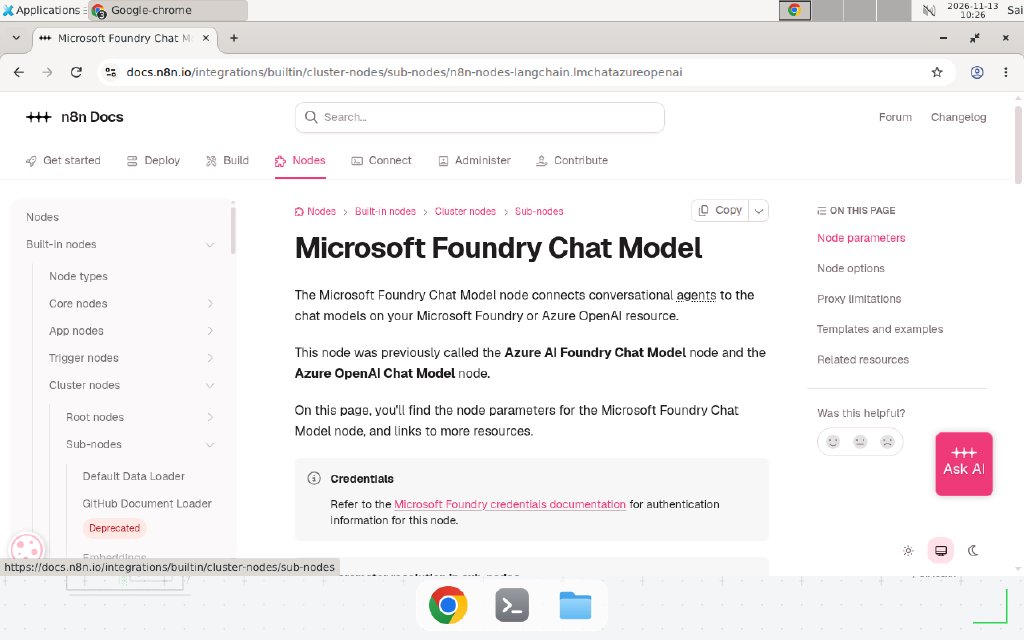
Screenshot: the n8n docs page for the Microsoft Foundry Chat Model node, showing the Use Responses API setting. Checked 2026-11-13.
Copy-paste template: pre-flight checklist for a Responses-only deployment
Copy this into your runbook and tick each line before you move a workflow to production. It is the whole setup reduced to one page.
n8n Azure Responses-only deployment checklist
=============================================
[ ] n8n version is 2.43.0 or later (Settings > About)
[ ] Credential Endpoint Type is Microsoft Foundry, not Classic
[ ] Credential endpoint is the full resource URL, ending in /openai/v1
[ ] API key saved, or Entra ID app has the Foundry User role
[ ] Chat model node was created NEW after the upgrade (not reused)
[ ] Node version is 1.1 or above (toggle is absent on version 1)
[ ] Model Family is OpenAI; deployment selected from list or by ID
[ ] Use Responses API is ON for this deployment
[ ] Test execution returns a model answer, not 400 or 404
[ ] One real production-style prompt runs clean, tokens checked
When not to use this / Limits
Do not turn on Use Responses API for a deployment that supports Chat Completions. The default is off for a reason, and flipping it on everywhere buys nothing while changing the request shape your downstream parsing may depend on. Do not use this setup on a classic Azure OpenAI credential at all, the toggle is refused there by design, and the fix is a Foundry credential, not a node setting. The toggle also does not appear on node version 1, so a workflow carried over from before the change needs a new node, not an edit. We could not verify which current Azure model deployments are Responses-only; vendor docs say the toggle exists for deployments that only support the Responses API, and Azure answers other calls with 400 Model not supported.
Cost / scale math
The API path does not change the price, volume does. Using the Azure Global Standard list prices for GPT-4o as of November 2026 ($2.50 per million input tokens, $10.00 per million output tokens), a workflow that runs 1,000 times a day with 2,000 input tokens and 500 output tokens per run costs:
- Input: 1,000 runs x 2,000 tokens = 2,000,000 tokens = $5.00 per day
- Output: 1,000 runs x 500 tokens = 500,000 tokens = $5.00 per day
- Total: $10.00 per day, about $300 per month
Prompt caching cuts the input side. If 75 percent of those input tokens are cached at $1.25 per million, input falls to $3.13 per day and the total to about $8.13 per day. At 10,000 runs a day the same math gives about $100 per day without caching, which is the point where a cheaper model deserves a look. Check the Azure OpenAI pricing page before you budget, because list prices move and regional rates differ.
Troubleshooting
| Symptom | Likely cause | Command to check | Fix |
|---|---|---|---|
400 Model not supported | Deployment is Responses-only, node calls Chat Completions | Run the workflow and read the node error output | Turn on Use Responses API on the node |
| No Use Responses API setting visible | Old node, old n8n, or classic credential | Check Settings, About, for the n8n version | Upgrade to 2.43.0, add a new node, use a Foundry credential |
404 on execution | Wrong deployment name or wrong project | List deployments in the Foundry portal | Correct the deployment name, set the Project field |
403 after Entra ID setup | App lacks the Foundry User role, or the role has not propagated | Check Access control (IAM) on the resource | Assign Foundry User, wait up to five minutes, retry |
Missing required parameter: tools[0].type | API version too new, strict tools validation | Check the API Version on the credential | Pin the API version to a stable GA release such as 2024-10-21 |
Common mistakes
- Reusing the old node. Editing the existing chat model sub-node never shows the toggle. Create a new node, the docs say so explicitly, and it is the most common reason the setting seems missing.
- Keeping a classic credential. The classic endpoint type has a deployment-scoped base URL with no Responses API path. Switch to a Microsoft Foundry credential with the full resource endpoint.
- Turning the toggle on for every deployment. Responses-only is the exception, not the rule. Leave it off unless Azure answers with 400 Model not supported, otherwise you change a working request shape for no benefit.
- Trusting the credential test. The test proves connectivity, not the API path. Only a real execution proves the node calls the right endpoint.
Test before you rely on it
- Run the workflow five times in a row and confirm all five executions finish green.
- Send a prompt that forces a tool call and confirm the agent’s tool result parses, since the Responses API shapes tool payloads differently from Chat Completions.
- Check the token usage on a real execution against your budget, not against the test prompt.
- Confirm the old HTTP Request workaround is disabled, so a stale node cannot call the deployment on the wrong API path.
- Check that alerts or logs carry the deployment name and the error text, so a 3 a.m. failure tells you which deployment broke.
FAQ
Which n8n version adds Responses API support to the Azure OpenAI node? n8n 2.43.0, released 2026-10-06, via pull request #39403. Versions before 2.43.0 have no toggle on this node.
Do I need a new node, or can I flip the toggle on an existing one? You need a new node. Older nodes keep the text-only deployment field and keep calling Chat Completions.
Why does my Azure deployment return 400 Model not supported? Azure is telling you the deployment only supports the Responses API and you called it with Chat Completions. Turn on Use Responses API. If the toggle is missing, check your n8n version, node version, and credential type.
Can I use the toggle with a classic Azure OpenAI credential? No. The toggle applies only on the Microsoft Foundry route. A classic credential uses a deployment-scoped base URL with no Responses API path, so create a Microsoft Foundry credential instead.
Should I turn on Use Responses API for every Azure deployment? No. Leave it off for deployments that support Chat Completions, which is most of them. Turn it on only for a Responses-only deployment.
Does the Responses API cost more than Chat Completions on Azure? No. You pay the same model rate either way. On Azure Global Standard, GPT-4o lists at $2.50 per million input tokens and $10.00 per million output tokens as of November 2026.
Conclusion
The fix for Responses-only Azure deployments in n8n is a toggle, but the setup around it is the real work: a 2.43.0 upgrade, a Microsoft Foundry credential, and a new node. Get those three right and the 400 goes away. If this workflow fails at 3 a.m., can your team tell which deployment broke from the alert alone? If not, log the deployment name first. Next, read our OpenAI Agents API tutorial to see what the Responses API itself can do beyond plain chat, or start from the complete n8n guide if you are building your first agent workflows.
Frequently asked questions
Which n8n version adds Responses API support to the Azure OpenAI node?
n8n 2.43.0, released 2026-10-06, adds a Use Responses API toggle to the Microsoft Foundry Chat Model node (previously called the Azure OpenAI Chat Model node). The change landed in pull request #39403. Versions before 2.43.0 have no toggle on this node.
Do I need a new node, or can I flip the toggle on an existing one?
You need a new node. Workflows created before the change keep the old Model (Deployment) Name text field and keep calling Chat Completions. Add a fresh Microsoft Foundry Chat Model node to get the deployment list and the Use Responses API setting.
Why does my Azure deployment return 400 Model not supported?
That is Azure telling you the deployment only supports the Responses API and you called it with Chat Completions. Turn on Use Responses API on the node. If the toggle is missing, you are on an old node version, an old n8n version, or a classic Azure OpenAI credential.
Can I use the toggle with a classic Azure OpenAI credential?
No. The toggle applies only on the Microsoft Foundry route. A classic credential uses a deployment-scoped base URL at *.openai.azure.com, which has no Responses API path. Create a Microsoft Foundry credential with the full resource endpoint URL instead.
Should I turn on Use Responses API for every Azure deployment?
No. Leave it off for deployments that support Chat Completions, which is most of them. Turn it on only for a deployment that only supports the Responses API. The default is off, and n8n's docs recommend off for most deployments.
Does the Responses API cost more than Chat Completions on Azure?
No, the API choice itself does not change the per-token price. You pay the same model rate either way. On Azure Global Standard, GPT-4o lists at $2.50 per million input tokens and $10.00 per million output tokens as of November 2026, so a workflow's cost depends on volume, not on which API path the node calls.