n8n AI Assistant Guardrails: Block Bad Publishes, Cap Agent Spend, and Review AI-Built Workflows
Introduction
You asked the n8n Assistant to build a workflow that triages support tickets, and it did, in about ninety seconds. It looks right, until 40 executions fail, because one required input on the Slack node was never connected and the first real ticket hit it. The Assistant is fast, and that is the problem: it hands you a finished-looking workflow at a speed that skips the checking a human would do. n8n 2.43.0, released 2026-10-06, adds guardrails between the Assistant and production.
Quick answer
Upgrade to n8n 2.43 or later: publishing stops on unconnected required inputs, CLI imports obey the same policies, agent runs get an opt-in budget cap, and a human reviews every AI-built workflow before it goes live.
The hard part
The hard part is not turning the guardrails on, it is deciding what “reviewed” means on your team: a blocked publish only helps if someone reads the workflow it blocked.
Checked on 2026-11-22 against the n8n 2.43.0 GitHub release, the Guardrails node documentation, and the AI Assistant documentation. Interfaces change fast, so if a menu or label differs, trust the linked page.
Evidence
The 2.43.0 changelog lists nine guardrail-related changes in one release: the publish block, CLI policy checks, MCP rules, a guardrail runner, an opt-in budget guardrail, persisted spend, editor budget settings, a credential-ownership stop, and a policy-block audit event. Nine controls in one release is a hardening release, not a feature release.
The Guardrails node adds a second layer with nine check types: Keywords, Jailbreak, NSFW, PII, Secret Keys, Topical Alignment, URLs, Custom, Custom Regex. The docs state its job plainly: “The Guardrails node checks text going into or coming out of an AI model against safety, security, and content policies, and can replace PII and secret keys with placeholders.” That sentence belongs in your runbook: the node screens text, it does not judge business logic.
OWASP names the reason both layers exist: its Top 10 for LLM Applications lists Excessive Agency, LLM06:2025, among the top risks. The OWASP Top 10 for LLM Applications is the authority to cite when a teammate asks why a helpful agent needs a leash. The launch announcement for the AI Assistant sets the other side of the rule: “The result is a normal n8n workflow. You can open it, inspect it, edit it, test it, and publish it like any other workflow.” Guardrails make that inspection mandatory instead of optional.
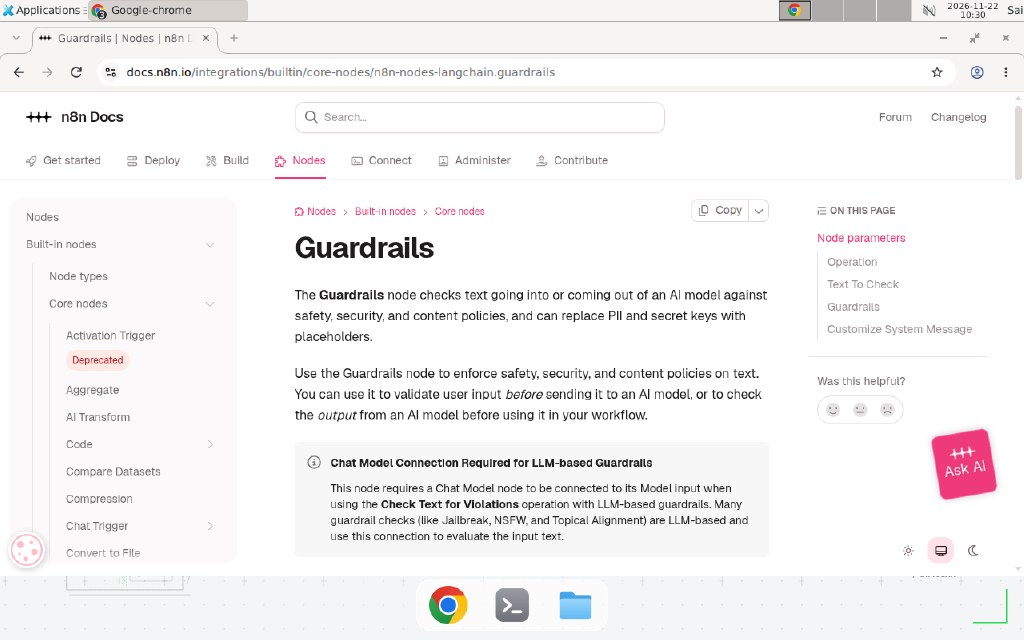
Screenshot: the Guardrails node docs on docs.n8n.io, checked 2026-11-22.
Prerequisites
- n8n 2.43.0 or later, Cloud or self-hosted. Check the version in Settings first.
- Admin or owner access, because policy and budget settings are admin controls.
- A chat model credential for LLM-based Guardrails checks. The docs say these need a Chat Model node on the Model input.
- A test workflow the Assistant built, to watch the publish block fire.
Step 1: Upgrade to 2.43.0 and confirm the version
Guardrails that do not exist in your build cannot protect you. On Docker, pull the pinned image and recreate the container:
docker pull n8nio/n8n:2.43.0
docker compose up -d
On Cloud, confirm the version in Settings. If it still shows 2.42 or earlier, the publish block and the budget guardrail are not there. Pin the version in your compose file instead of latest.
Step 2: Let the publish guardrail catch the broken workflow
This headline change needs no configuration: the changelog reads “core: Block publishing workflows with unconnected required node inputs.” Open a workflow with an unconnected required input, click Publish, and the editor refuses.
This is the failure the Assistant produces most often: it generates nodes fast, and a missing connection is easy to miss in a 12-node canvas. The guardrail turns that miss into a blocked publish instead of a 3 a.m. failure. Connect the input, or delete the node. Know the limit: the block only catches structurally unconnected required inputs. A connected node with the wrong credential or a prompt that invents a field name still publishes, which is why Step 8 exists.
Step 3: Close the CLI bypass with policy checks
Before 2.43.0, the editor enforced policies but the CLI did not, so a CI pipeline could publish what the editor would refuse. The release adds “core: Apply policy checks to CLI import and execute commands,” so the same checks now run on the command line:
n8n import:workflow --separate --input=./workflows/support-triage.json
n8n execute --id=<workflow-id>
If a policy blocks the import, the command fails instead of silently loading a workflow the editor would reject. The same release adds an audit trail: “core: Send a log streaming audit event when a policy blocks an action.” Confirm the audit event arrived in your log stream after a blocked import. For CI publishers, this matters more than Step 2.
Step 4: Cap what an agent run can spend
A looping agent is a billing event, not just a bug. n8n 2.43.0 adds three pieces that fit together: an opt-in budget guardrail for agent runs, persisted agent budget spend, and usage and budget settings in the editor.
Turn the budget guardrail on before you give an agent a tool that can loop. The setting is opt-in, so an untouched instance has no cap, and that default is the trap: the first runaway agent is the one that teaches you the setting exists. Persisted spend survives a restart, so a crashed loop cannot reset its own budget. On Cloud, the editor also shows remaining Assistant credits on the banner. Start low, watch a week, then raise it.
Step 5: Stop the wrong credential from running
On a shared instance, the Assistant can attach someone else’s credential, and the workflow then runs with their access. n8n 2.43.0 adds two fixes: “editor: Show whose credential a node uses and let others switch from it” and “editor: Stop Execute and Publish when a credential is not yours.”
Open every node the Assistant created and read the credential name it shows. If it is not yours, switch it to your own credential before you execute or publish. The editor will stop you at publish anyway, so find it in review first.
Step 6: Add the Guardrails node to agent workflows
The Guardrails node protects the text itself, and it belongs in any agent workflow that talks to customers or touches real data. Add it between the trigger and the AI Agent node to screen input, and between the agent and the send node to screen output.
Search for “Guardrails” in the node panel. Check Text for Violations runs the full set of checks and sends failing items to the Fail branch: wire it to a polite refusal or a human, never to the send node. Sanitize Text replaces URLs, PII, secret keys, and regex matches with placeholders, which fits logging paths.
For a support agent, use Jailbreak and Topical Alignment on input and PII plus Secret Keys on output. Set the Threshold between 0.0 and 1.0: a higher threshold is stricter. The URL check can block every link except the ones in Block All URLs Except. LLM-based checks need a Chat Model node on the Model input.
Step 7: Set Browser Use permissions before the Assistant browses
n8n 2.43.0 releases Browser Use to all users: the Assistant can work in a web browser while it helps you, for example to read a page an API does not expose. That is useful, and it is also a new permission surface.
Before your team uses it, open Settings > Assistant and read the Permissions settings. Decide as a team whether fetching a new site should be allowed, asked first, or blocked. We could not verify whether Browser Use works on self-hosted instances; n8n docs say it is available on Cloud Starter and Pro plans. Self-hosted Assistant setups set N8N_AI_ASSISTANT_BASE_URL, as the environment variable documentation describes.
Step 8: Review every AI-built workflow like a pull request
Guardrails catch structure, budgets, and text, not a wrong business rule: that is the review step no setting replaces. n8n stores isolated workflow suggestions for review, and background sub-agent approvals escalate to parent chats, so nothing lands on the canvas or gets lost in a thread nobody watches.
Walk the workflow node by node and ask four questions: does every node have a purpose you can state in one sentence, does every credential belong to the run owner, does every branch that sends, pays, or deletes end in a human approval, and can you name the input that makes each node fail. If any answer is no, fix it before you publish.
Copy-paste template: the AI-built workflow review checklist
Require it before any Assistant-built workflow is activated.
## AI-built workflow review (n8n 2.43+)

- [ ] Version is 2.43.0 or later (Settings confirms it)
- [ ] Publish succeeded, which proves no required input is unconnected
- [ ] Every node has a purpose I can state in one sentence
- [ ] Every credential belongs to the workflow owner, not a teammate
- [ ] No send, pay, or delete step runs without human approval
- [ ] Guardrails node screens input (Jailbreak + Topical Alignment)
- [ ] Guardrails node screens output (PII + Secret Keys + URL allowlist)
- [ ] Agent budget guardrail is on, with a cap set from real run costs
- [ ] CLI import was tested, so CI publishes obey the same policies
- [ ] Tested with real inputs, including one input designed to fail
- [ ] Failure path notifies a human and logs enough to find the cause
- [ ] Rollback plan written: how to deactivate and who does it
Example — replace with your values: a budget cap of $5 and a threshold of 0.7 are starting points, not recommendations for your instance.
When not to use this / Limits
Do not treat these guardrails as a substitute for testing, and do not enable them on a workflow that already runs in production without a maintenance window: the publish block will refuse the next publish of a workflow that was already live with an unconnected input, and you will be debugging under pressure. Do not use the Guardrails node as your only control on actions that move money or delete records. Its LLM-based checks can be fooled, and a threshold is a guess until you have measured false positives on your own traffic. If your agent only answers questions from a fixed knowledge base and never writes anywhere, the budget guardrail and output screening are enough.
Cost math
Work out your cap from your own runs. Example — replace with your values:
| Item | Example value |
|---|---|
| Cost per agent turn | $0.02 |
| Turns per day | 200 |
| Budget cap | $5 per run |
| Worst case | $5, then it stops |
Without a cap, one looping agent can spend the monthly budget in an afternoon. With a $5 cap, the damage from a single run is bounded, and the persisted spend total tells you it happened.
Troubleshooting
| Symptom | Likely cause | Command to check | Fix |
|---|---|---|---|
| Publish refuses, unconnected input warning | A required node input has no wire, often one the Assistant added | Open the workflow, find the highlighted node | Connect the input or delete the node |
| CLI import fails with a policy error | The editor’s policy now applies to CLI imports too | Re-run the import, read the error, check the audit event | Fix the workflow or the policy, then re-run the import |
| Guardrails node never flags anything | No Chat Model connected, or the threshold is too low | Open the Guardrails node, check the Model input | Connect a Chat Model node, raise the threshold, test with a jailbreak prompt |
| Agent run stops early with a budget message | The opt-in budget guardrail cap was reached | Check the persisted spend in the editor’s budget settings | Raise the cap, or fix the loop |
| Execute is blocked, credential is not yours | The Assistant attached a teammate’s credential | Open the node, read whose credential it shows | Switch to your own credential |
Common mistakes
- Treating the publish block as a test suite. It only checks structure. A fully connected workflow can still send the wrong refund. Test with real inputs, including one designed to fail.
- Leaving the budget guardrail off because it is opt-in. Opt-in means unprotected by default. Turn it on before the first production run, not after the first surprise bill.
- Wiring the Guardrails Fail branch to the send node. A failed check must stop the message. Route Fail to a refusal or a human, and log the violation.
- Forgetting the CLI path. A policy that only exists in the editor has a hole in it. Test a CLI import against the same policy before you declare the rollout done.
Test before you rely on it
- Publish a workflow with an unconnected required input and confirm the editor refuses.
- Import the same workflow through the CLI and confirm it refuses it too.
- Send a fake API key through the Guardrails node and confirm the output is sanitized or routed to Fail.
- Let a test agent loop with a low budget cap and confirm it stops at the cap.
- Execute a workflow that uses a teammate’s credential and confirm the editor blocks it.
- Check the log stream after a blocked action and confirm the audit event names the workflow.
FAQ
Which n8n version do I need? Use 2.43.0 or later, released 2026-10-06: it adds the publish block, CLI policy checks, the opt-in budget guardrail, and the guardrail runner. The Guardrails node works on earlier versions, but the publish and budget checks need 2.43.
Does the publish guardrail catch every broken workflow? No. It catches structurally unconnected required inputs, the most common way an AI-built workflow ships broken. It does not catch a connected but misconfigured node, a wrong credential, or a prompt that invents a field name. Run the workflow with real inputs before you activate it.
Do guardrails work on self-hosted n8n? The publish block, CLI policy checks, credential checks, and the Guardrails node are core features and work on self-hosted instances running 2.43.0 or later. Browser Use is the exception: n8n’s documentation lists it on Cloud Starter and Pro plans, and we could not verify self-hosted availability, so check Settings > Assistant.
How is this different from approval requests in n8n 2.49 Agents? Approvals in 2.49 pause a running agent before a sensitive tool call and wait for a person. The 2.43 guardrails stop problems earlier: they block broken publishes, cap agent spending, and screen text going in and out of a model. Use both layers.
What does the opt-in budget guardrail cap? It caps what an agent run can spend, and n8n persists the spend in the database so the total survives restarts. It is opt-in, so nothing is capped until you turn it on. Set the cap before you hand an agent a tool that can loop.
Can the Guardrails node stop prompt injection? It helps, it does not guarantee it. The node has jailbreak and topical alignment checks that flag manipulation attempts, and a URL check that blocks links outside your allowlist. Keep hard rules inside the tool sub-workflows and keep human approval on actions that move money or delete data.
Conclusion
n8n 2.43.0 turns the Assistant from a fast builder into a supervised one: publishing stops on broken structure, the CLI obeys the same policies, agent spending gets a cap, and the Guardrails node screens the text itself. None of that replaces the review, so ask this before your next publish: if this workflow fails at 3 a.m., can your team see what happened, undo it, and name the person who approved it?
New to the Assistant? Start with How to Use n8n Assistant: Build Workflows From Plain Language. The complete n8n guide collects every n8n tutorial on this site.
Frequently asked questions
Which n8n version do I need for AI Assistant guardrails?
Use n8n 2.43.0 or later. That release, dated 2026-10-06, adds the publish block for unconnected required inputs, policy checks on CLI import and execute, an opt-in budget guardrail for agent runs, and a guardrail runner in the agent loop. The Guardrails node itself is older and works on earlier versions, but the publish and budget checks need 2.43.
Does the publish guardrail catch every broken workflow?
No. It catches structurally unconnected required inputs, which is the most common way an AI-built workflow ships broken. It does not catch a connected but misconfigured node, a wrong credential, or a prompt that hallucinates a field name. Treat it as a first gate, not a test suite, and run the workflow with real inputs before you activate it.
Do guardrails work on self-hosted n8n?
The publish block, CLI policy checks, credential checks, and the Guardrails node work on self-hosted instances running 2.43.0 or later. Browser Use is the exception: n8n's documentation lists it on Cloud Starter and Pro plans, and we could not verify self-hosted availability from the docs we checked, so check Settings > Assistant on your own instance before promising it to a team.
How is this different from the approval requests in n8n 2.49 Agents?
Approvals in 2.49 pause a running agent before a sensitive tool call and wait for a person. The 2.43 guardrails in this article stop problems earlier: they block a broken workflow from publishing at all, cap what an agent run can spend, and screen text going in and out of a model. Use both layers, approvals for judgment calls and guardrails for predictable mistakes.
What does the opt-in budget guardrail actually cap?
It caps what an agent run can spend, and n8n persists the spend in the database so the total survives restarts. The setting is opt-in, so nothing is capped until you turn it on, and the editor shows usage and budget settings for agents. Set the cap before you hand an agent a looping tool.
Can the Guardrails node stop prompt injection?
It helps, it does not guarantee it. The node has a jailbreak check and a topical alignment check that flag manipulation attempts, and a URL check that blocks links outside your allowlist. A determined injection can still slip past an LLM-based check, so keep hard rules inside the tool sub-workflows and keep human approval on actions that move money or delete data.