How to Use n8n 2.49 AI Agents: Webhook Channel, Approval Requests, and Tool Guardrails
Introduction
You gave your n8n agent a tool that can refund a customer, and now every support ticket is a coin flip. The agent is helpful, fast, and occasionally confident about the wrong refund amount, and the only thing between that confidence and your payment processor is a system prompt that says “be careful.” That is not a control. n8n 2.49.0, released 2026-11-17, adds three missing pieces: a webhook channel so any system can reach the agent, approval requests so a human signs off on risky calls, and pattern-based tool guardrails that block bad calls before they run.
Quick answer
Upgrade to n8n 2.49.0, create an agent, connect the new webhook channel, mark write tools as sensitive so they need approval, and add pattern guardrails that block calls matching risky argument patterns.
The hard part
The hard part is deciding which tool calls need a human and which patterns are always wrong, not wiring up the webhook.
Checked on
Checked on 2026-11-19 against the n8n 2.49.0 release notes and the n8n Build and manage agents docs. Agents is still in Preview, so if a menu or label differs, trust the linked page.
Evidence
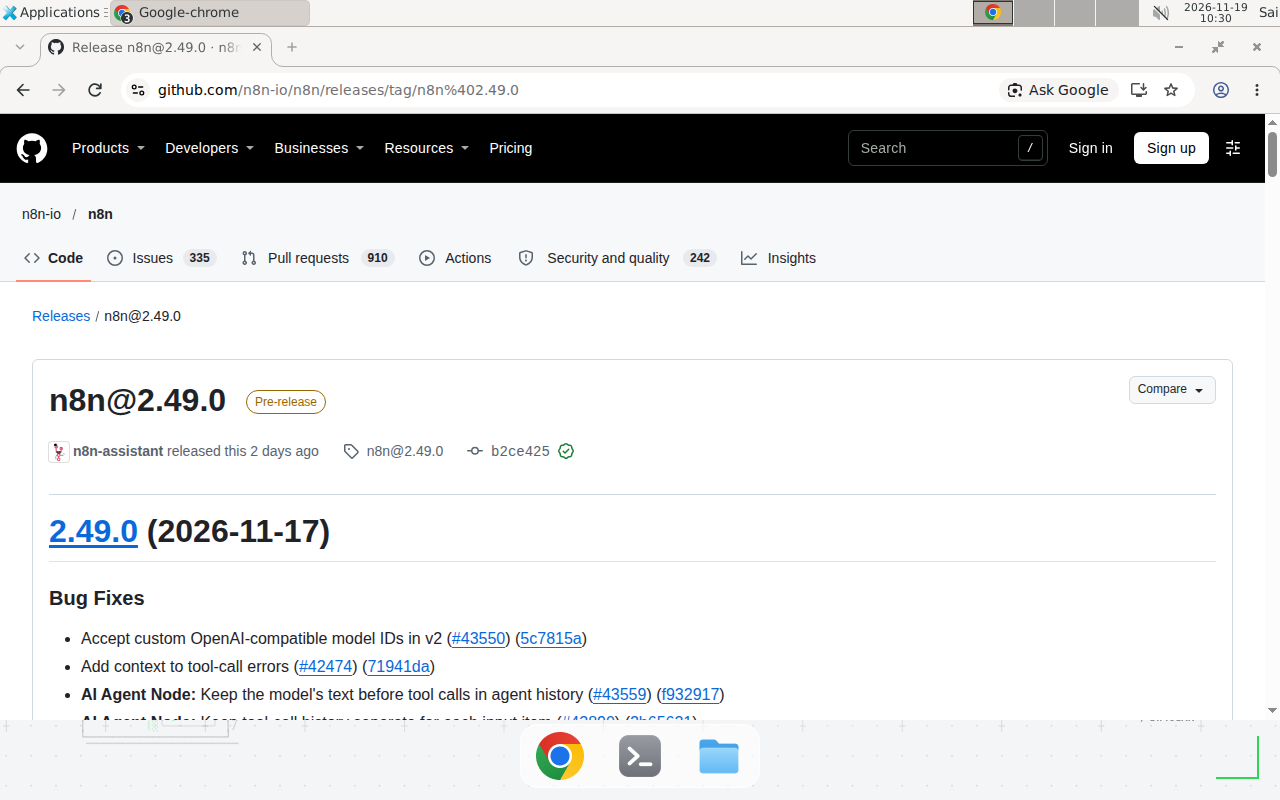
The n8n 2.49.0 release notes list four agent features that matter here: “Add a webhook channel for agents” (PR #42989), “Support approval requests in the webhook agent channel” (PR #43056), “Agent config schema now can include tool guardrails” (PR #43404), and “Run pattern-based tool guardrails on agent tool calls” (PR #43664). The n8n team frames the design this way in its Introducing n8n Agents launch post: “Mark a tool as sensitive and the agent pauses for Approve or Reject before using it.” The same post gives the cost rule: “One turn with an agent is one execution. Tool calls to your workflows and to sub-agents don’t count separately, and agents share your workflow execution quota.” The Build and manage agents docs warn that Agents are still in Preview, so “they can make mistakes, and their behavior may change while the feature is in development.”
One honest gap: the release notes also list “Add agent channel descriptions and rename the Webhook channel to API” (PR #43758), so the channel may be labeled API in your editor. We could not verify the exact label in a live 2.49.0 editor; vendor docs say the channel exists. If your editor says API, that is the same channel.
Prerequisites
- n8n 2.49.0 or later. On n8n Cloud, use the latest stable version. Self-hosted needs 2.32.3 or later for Agents at all, and 2.49.0 for the webhook channel.
- A model credential for the agent, such as OpenAI, Anthropic, or Google Gemini. n8n Gateway credits also work for a first test.
- A public URL for your instance if you self-host and want outside systems to call the webhook. Set
WEBHOOK_URLto that public URL. - A Slack workspace or another chat channel where a human watches for approvals, plus one read-only tool and one write tool: a lookup workflow and a refund workflow.
Step 1: Upgrade to n8n 2.49.0
Check your version first. In the editor, open Settings, then About, and read the version number. If it is below 2.49.0, upgrade before continuing, because the webhook channel does not exist in earlier builds.
On Docker, pull the new image and restart the container:
docker pull n8nio/n8n:2.49.0
docker stop n8n && docker rm n8n
docker run -d --name n8n -p 5678:5678 \
  -e WEBHOOK_URL=https://n8n.example.com \
  -v n8n_data:/home/node/.n8n n8nio/n8n:2.49.0
Replace https://n8n.example.com with your own public URL. That WEBHOOK_URL value is what n8n uses to build channel URLs, and a wrong value is the most common reason a channel URL returns nothing.
Step 2: Create the agent with a narrow job
Open the Agents tab and select Create Agent. Give the agent one job, not a department. Our example answers order questions, looks up accounts, and issues refunds only after a human approves.
Pick a model in the Agent tab. A cheaper model is fine for testing, because approval and guardrail behavior does not depend on model size. Then write instructions like a brief for a colleague:
You are a support agent for Example Store. Answer order questions
from the account lookup tool. Never issue a refund, change an order,
or message a customer without approval. If a refund is denied, tell
the customer it was declined and offer to escalate.
Name the tools that need approval in the instructions, not just in the settings. The n8n human-in-the-loop docs warn that the agent needs to know which tools require approval and how to respond when a request is denied.
Step 3: Add the webhook channel
Open the Channels section and add the webhook channel, added by PR #42989. The same release cycle renames it to API in the editor (PR #43758), so if you see API instead of Webhook, pick that.
n8n gives you a webhook URL for the agent. Save it somewhere safe, because anyone with the URL can message the agent (Example, replace with your values):
https://n8n.example.com/webhook/agent/9f3a2b1c-4d5e-6f7a-8b9c-0a1b2c3d4e5f
Channels only take effect once you publish. Keep the URL out of public repos and shared docs. If it leaks, regenerate it by removing and re-adding the channel.
Step 4: Attach one read tool and one write tool
In the Tools section, select Add tool. Add two tools for the test agent:
- Get account context, a workflow tool that looks up an account by email and returns order status. Read-only, no approval needed.
- Issue refund, a workflow tool that calls your payment provider with an order ID and an amount. Write tool, approval required.
Wrapping the write action in a workflow is the control that matters most. The launch post puts it directly: with a workflow in between, “the agent never holds that credential. It holds a workflow that adds a note and does nothing else.” The agent holds a workflow that refunds one order and does nothing else, so a prompt injection cannot turn it into a tool that refunds every order.
Step 5: Turn on approval requests for the write tool
For sensitive tools, the agent pauses and asks for approval before running the tool. In the chat, select Approve to let the tool run, or Reject to cancel it, as the Build and manage agents docs describe. That flow now works on the webhook channel too, which is the 2.49.0 change in PR #43056.
Mark Issue refund as sensitive in the agent’s tool settings. Then decide where the approval request goes. The approval channel can differ from the channel the user talks to: a customer can message the agent through the webhook while the approval request lands in your team’s Slack, as the human-in-the-loop docs describe. When the agent wants the refund tool, the run pauses and the approver sees the tool and the parameters chosen. Approve runs the tool with the agent’s input. Deny cancels the action.
Step 6: Add pattern-based tool guardrails
Approvals catch judgment calls. Guardrails catch predictable mistakes before a human ever sees them. In 2.49.0 the agent config schema can include tool guardrails (PR #43404), and n8n runs pattern-based guardrails on agent tool calls (PR #43664). A guardrail blocks a tool call whose name or arguments match a pattern you define. Two patterns cover most support-agent accidents:
| Guardrail pattern | What it blocks | Why it exists |
|---|---|---|
| Refund amount above 500 | Any refund over $500 (Example, replace with your values) | Large refunds need a manager |
| Refund with no order ID | A refund call missing the order ID field | A missing ID usually means the agent guessed |
We could not verify the exact pattern syntax the 2.49.0 Agent Builder accepts, because the docs had not yet documented the guardrail editor; vendor docs say the config schema supports them. Start with the simplest pattern the editor offers, test it with a deliberately bad call, and only then add more patterns. A guardrail blocks the call, not the model’s output: it cannot stop the agent from writing a wrong refund amount in a chat reply, only from executing a refund call that matches a bad pattern. Approvals cover the judgment, guardrails cover the pattern, and neither replaces the other.
Step 7: Publish, then call the agent over HTTP
Select Publish in the Agent Builder. Publishing takes a snapshot of the draft, and only the published version runs in production. Test the webhook channel with curl. Send a read-only question first, so nothing needs approval:
curl -X POST "https://n8n.example.com/webhook/agent/9f3a2b1c-4d5e-6f7a-8b9c-0a1b2c3d4e5f" \
  -H "Content-Type: application/json" \
  -d '{"message": "What is the status of order 1042?"}'
Example, replace with your values. Expect a reply with the account lookup result. Then send a refund request with the same call and watch the run pause for approval instead of refunding. Open the Sessions tab and confirm it shows a pending approval. Approve it, then confirm the refund workflow ran with the exact amount you approved. Reject a second test refund and confirm the agent tells the customer the request was declined instead of retrying silently. Every conversation is stored as a session, so open the Sessions tab to review the messages, the tools used, and pending approvals. If a refund looks wrong, the session shows which tool call the agent proposed, which parameters it chose, and who approved it.
Copy-paste template: agent instructions and guardrail checklist
Copy this block into your agent’s instructions.
AGENT INSTRUCTIONS (paste into the Instructions field)
-------------------------------------------------------
You are a support agent for Example Store.
- Answer order questions using the Get account context tool.
- Never issue a refund, change an order, or message a customer
  without approval. If a refund is denied, tell the customer the
  request was declined and offer to escalate.
- If a tool call is blocked by a guardrail, do not retry it with
  different parameters. Tell the user what was blocked and why.
- Never invent an order ID or an amount.
When not to use this / Limits
Do not put an agent behind a public webhook for anything that moves money, deletes data, or messages customers until approvals and guardrails have survived a week of real traffic in a private channel. If your only caller is a human in Slack, the chat channel plus approvals is enough, and the webhook adds an exposed URL you must protect. If your instance runs in queue mode, do not use Agents at all yet, because the docs say queue mode is not supported for agents. Agents are still in Preview, so expect labels and screens to move between releases, including the Webhook versus API channel name in 2.49.0. Guardrails are pattern rules, not judgment. They cannot catch a plausible but wrong refund, which is exactly what approvals are for.
Cost / scale math
n8n’s rule is simple: one turn with an agent counts as one execution, and tool calls to your workflows and sub-agents do not count separately. Agents share the same execution quota as workflows.
| Daily agent turns | Executions per day | Executions per 30 days |
|---|---|---|
| 50 | 50 | 1,500 |
| 200 | 200 | 6,000 |
As of October 2026, n8n’s pricing page listed Starter at 20 euros a month with 2,500 workflow executions, and Pro at 50 euros a month with 10,000 executions, billed annually. At 200 turns a day, a support agent uses about 6,000 executions a month, which fits inside Pro, because the workflows the agent calls do not count separately. Model API cost sits on top of this: every turn also bills the model provider for the tokens in the reasoning loop.
Troubleshooting
| Symptom | Likely cause | Command to check | Fix |
|---|---|---|---|
| Webhook URL returns 404 | Channel not published, or WEBHOOK_URL is wrong | curl -I https://n8n.example.com/webhook/agent/<id> | Publish the agent first, then check WEBHOOK_URL and restart n8n |
| Agent answers but never asks for approval | Write tool not marked sensitive | Open the Sessions tab and check which tools the run used | Mark the write tool as sensitive and republish |
| Agent retries a denied refund | Instructions do not say what to do after a denial | Read the session messages after the denial | Add a denial rule to the instructions |
Common mistakes
- Approving the tool, not the call. Marking a tool as sensitive is not enough if the approver cannot see the parameters. Check that the approval message shows the order ID and the amount, not just the tool name. A bare “approve refund?” card is a rubber stamp.
- Giving the agent the credential instead of the workflow. If the agent holds a payment credential directly, a prompt injection can use it for anything the credential allows. Put the write action behind a workflow tool that does one thing.
- Testing only the happy path. Test the denied refund, the blocked guardrail call, and the missing order ID before you publish, because those are the cases that cost money.
Test before you rely on it
- Send a read-only question through the webhook and confirm the reply uses the lookup tool.
- Send a refund request and confirm the run pauses for approval before any money moves.
- Reject a refund and confirm the agent tells the customer it was declined without retrying.
- Send a refund over your guardrail limit and confirm it never reaches the approval queue.
Conclusion
n8n 2.49.0 turns the agent from a clever demo into something you can point at a real system: a webhook channel any service can call, approval requests that put a human in front of every risky tool call, and pattern guardrails that block predictable mistakes before they reach a human. Start read-only, keep approvals on every write until the agent has a track record, and test the denial path as carefully as the approval path.
If this agent refunded a customer at 3 a.m. with nobody watching, could your team see what happened and undo it? If not, add the approval and the session review first. Next, read The Complete n8n Guide to place this agent inside a hardened instance, and the n8n AI Agent tutorial if you also need the older workflow-based agent node.
Frequently asked questions
What is the webhook channel for n8n Agents in 2.49?
It is a new channel that lets any system reach a published n8n agent over HTTP instead of a chat app. You send a message to the agent's webhook URL and get the agent's reply back, so a ticketing system, a form, or another workflow can talk to the same agent your team uses in Slack. The release notes add it in n8n 2.49.0 as 'a webhook channel for agents' (PR #42989).
Do I need n8n 2.49 to use approval requests and tool guardrails?
Approval requests for sensitive tools existed before 2.49 in the AI Agent node and in Agents, but 2.49 extends them to the new webhook channel (PR #43056) and adds pattern-based tool guardrails to the agent config (PR #43664). If you only need approvals inside Slack or chat, an older 2.32.3 or later build works. The webhook channel itself needs 2.49.0.
What is the difference between an approval request and a tool guardrail?
An approval request pauses the agent before a sensitive tool runs and waits for a person to approve or reject that specific call. A tool guardrail is a rule that runs on every tool call, before any approval, and blocks calls whose name or arguments match a pattern you define. Approvals catch judgment calls, guardrails catch predictable mistakes. Use both.
Can I use the webhook channel on self-hosted n8n?
Yes, if your instance runs 2.49.0 or later and is reachable from the system calling it. n8n's own docs warn that queue mode is not supported for agents yet and that connecting channels can fail, so run agents in regular mode for now, and set a public WEBHOOK_URL so the channel URL is reachable.
How much does one agent conversation cost in executions?
One turn with an agent counts as one execution, and tool calls to your workflows and sub-agents do not count separately. Agents share the same execution quota as your workflows, so a support agent handling 200 chats a day uses 200 executions a day before you count the workflows it calls.
What happens if nobody answers an approval request?
The run waits. n8n keeps runs waiting for approval alive, and the docs note that active runs, including runs waiting for approval, can finish even if you turn the Agents feature off. Set a response-time expectation with your approvers, and keep the approval channel somewhere a human actually watches.