How to Automate Zoom Meetings with Make: Recordings, Scheduling, and Logs
Your client call ends, the recording sits in Zoom’s cloud, and nobody files it. By Friday, the decision from Tuesday’s call lives only in someone’s memory, and the link is buried three scrolls deep in chat. This article builds the small machine that stops that: a Make scenario that notices when a meeting ends, downloads the cloud recording, files it in Google Drive, and logs the link in a sheet, so every meeting has a paper trail without anyone remembering to make one.
Quick answer
Connect Zoom to Make, then run a scenario that watches for finished meetings, downloads each cloud recording, files it in Google Drive, and logs the link in a sheet. Admins use Zoom Administration, everyone else uses the Zoom app.
The hard part is not wiring the modules, it is picking the right one of Make’s two Zoom apps and getting the OAuth connection right the first time.
Checked on 2026-11-12 against the Zoom app documentation on Make and the Zoom Administration documentation on Make. Interfaces change fast, so if a menu or label differs, trust the linked page.
Evidence: what the two Zoom apps on Make actually do
Make now ships two Zoom apps, and confusing them is the single most common failure in this integration. The older app was renamed Zoom Administration and is for admin users only. The newer Zoom app is for individual users, and it manages the meetings, webinars, chats, and cloud recordings in your own account. Make’s own documentation puts the split in one sentence: “With Zoom Administration modules in Make, you can manage the meetings, webinars, cloud recordings, phone calls, and chats in your Zoom account.” The same page adds the pointer that matters: “This app is for admin users. If you need to perform tasks as an individual user, see the Zoom app.” The full endpoint list behind both apps lives in the Zoom API documentation.
The scale explains why this is worth building. Zoom reported total revenue of $1.28 billion in its second fiscal quarter of 2027, the quarter ended July 31, 2026, up 4.9 percent year over year, with enterprise revenue up 7.8 percent and now 62 percent of the total. Millions of those meetings end with nobody writing anything down, which is the gap this scenario fills.
Two hard limits shape the design. First, Zoom’s free Basic plan caps group meetings at 40 minutes and 100 participants, and cloud recording is not included, so the recording half of this article needs a paid Zoom plan. Second, Make’s documentation notes that only 100 Create a Meeting API requests are permitted within a 24-hour window for a user, so a scenario that creates meetings must stay far below that ceiling. A third limit hides in the connection step: when you use a custom OAuth app, webhooks are not available, which silently disables every instant Watch trigger.
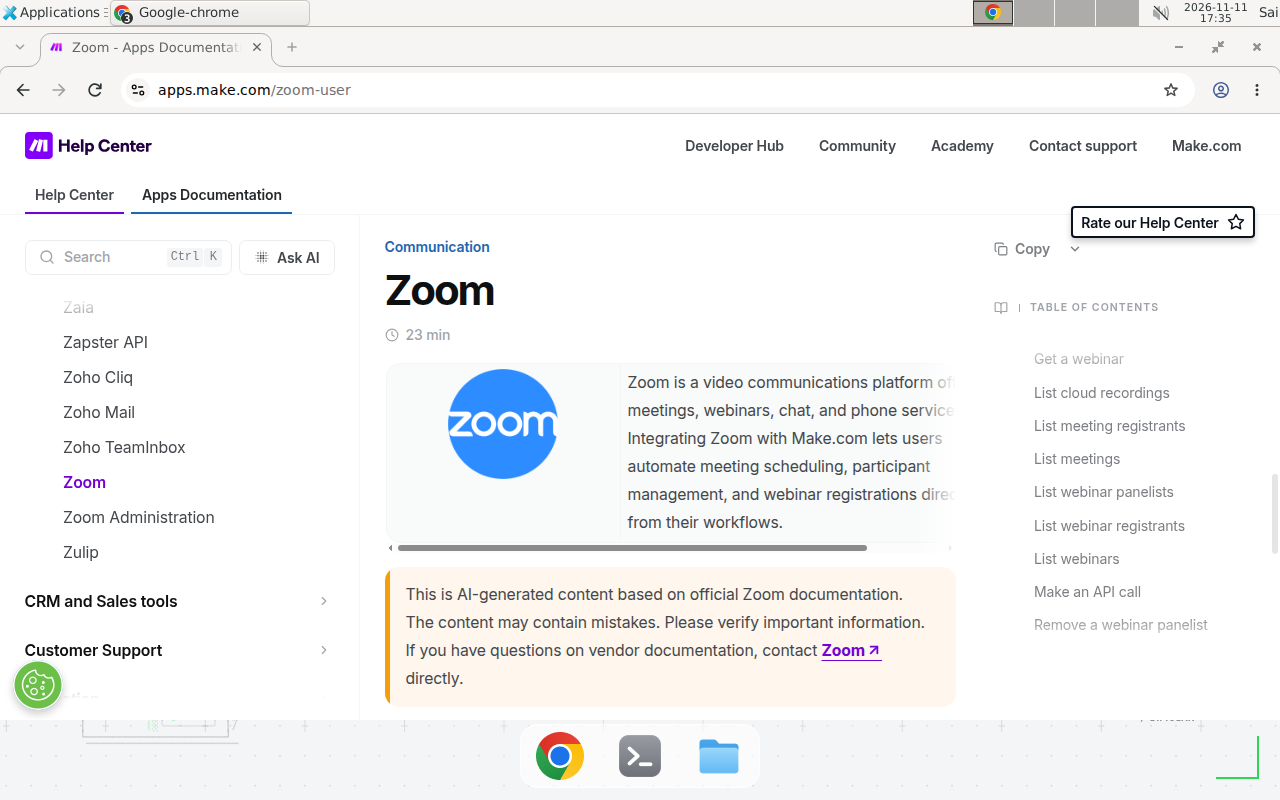
The Zoom app documentation page on Make, checked November 12, 2026. The table of contents lists the modules, including List cloud recordings, List meetings, and Make an API call; the intro names meeting scheduling, participant management, and webinar registrations.
Prerequisites
- A Make account. The Free plan works: 1,000 credits a month, a 15-minute minimum schedule interval, and two active scenarios.
- A Zoom account. Cloud recording needs a paid plan, Pro or higher. Scheduling alone works on the free Basic plan.
- A Google account with Drive and Sheets, for the recording file and the log.
- A Slack workspace or an email inbox, for the notification at the end. Pick the one your team actually reads.
- Know whether you are a Zoom admin. If you are not sure, you are probably not one, so start with the Zoom app.
Step 1: Pick the right Zoom app
Open Make, create a new scenario, and search for Zoom in the module picker. You will see two apps with nearly identical names. Pick by role, not by habit:
| App | Who it is for | Connection | Best for |
|---|---|---|---|
| Zoom | Individual users | OAuth client ID and secret from your own Zoom Marketplace app | Your own meetings, webinars, and recordings |
| Zoom Administration | Zoom account admins | One-click OAuth sign-in, optional custom credentials | Meetings, users, phone calls, and chats across the whole account |
If you pick Zoom Administration without admin rights, the connection succeeds and the modules fail later with permission errors, which looks like a broken scenario but is really a wrong app. If you pick the Zoom app, expect one extra setup step, creating the OAuth app in Zoom Marketplace, which Step 2 covers. The steps below use Zoom Administration, since its module list is fully documented; if you use the Zoom app, the module names and the flow are the same.
For a refresher on the same app-automation pattern in another tool, see how to automate Canva designs with Make, which uses the same schedule, dedupe, and log structure.
Step 2: Connect Zoom to Make
For Zoom Administration, the connection is the easy path. Add any Zoom Administration module to the scenario, click Create a connection, sign in to Zoom in the popup, and confirm access. Make stores the OAuth connection, so later modules reuse it without another login. Zoom has deprecated the JWT app type and tokens, so if an old connection uses JWT, re-establish it with OAuth, or the scenario will stop working without warning.
For the Zoom app, the connection needs credentials first. In the Zoom App Marketplace, open Created Apps and create an OAuth app. When prompted, enter the callback URI https://www.integromat.com/oauth/cb/zoom-user, then copy the Client ID and the Client secret shown on screen. Back in Make, add a Zoom module, click Create a connection, and paste the two values. Keep the secret in Make only, never paste it into a sheet or a chat message.
If the connection shows an error, reconnect once before debugging anything else. OAuth tokens expire, and a stale connection produces confusing errors in every module downstream.
Step 3: Build the recording scenario
Add the modules in this order:
- Zoom Administration, Watch Recordings. This instant trigger fires when a recording finishes, not on a schedule. Pick meeting recordings only.
- Filter. Keep only recordings longer than one minute, so test calls and accidental starts do not pollute the log.
- Zoom Administration, Download a Cloud Recording. Map the recording ID from the trigger bundle. The module returns the file itself, not a link.
- Google Drive, Upload a File. Map the downloaded file into a folder named
Zoom Recordings(Example, replace with your folder). Name the file from the meeting topic and start time, for exampleWeekly Sync 2026-11-12.mp4(Example, replace with your values), so the Drive folder stays searchable. - Google Sheets, Add a Row. Map the meeting topic, host, start time, duration, Drive file link, and recording ID into the columns from the template below.
- Slack, Send a Message, or Gmail, Send an Email. Send one line per recording: the meeting topic, the date, and the Drive link. One line is enough, because the sheet holds the detail.
The recording ID is the dedupe key. If the scenario ever reruns the same trigger, the sheet would gain a duplicate row, so add a Data Store check before Step 5 when your volume grows: look up the recording ID, skip the bundle if it exists, and store it after the row is added. The pattern is the same one described in how to prevent duplicate records in Make scenarios.
Step 4: Run it once and read the log
Hold a short test meeting, record it to the cloud, end it, and wait for the recording to finish processing. Then open the scenario execution log. A healthy first run shows one bundle from the trigger, one downloaded file, one new Drive file, one new sheet row, and one notification. Check three things: the Drive file plays, the sheet row shows the right meeting topic and date, and the notification link opens the Drive file, not a dead Zoom URL.
Step 5: Add the meeting-creation variant
The same connection supports the other direction, creating meetings instead of filing them. Build a second scenario: a new Google Calendar event or form response triggers Zoom Administration, Create a Meeting, with topic, start time, duration, and timezone mapped from the trigger. The module returns the join URL, so log it to the same sheet and send it to the invitees.
Two limits apply here. Only 100 Create a Meeting requests are permitted within a 24-hour window for a user, so one meeting per form submission is fine, but a bulk import of hundreds is not. And always map the timezone explicitly: a meeting created with the wrong timezone shows up at the right time in Make and the wrong time in every invitee’s calendar, and nobody notices until the meeting is missed.
Copy-paste template: the scenario blueprint
Copy this table into your notes. It is the whole scenario on one page.
| Order | App and module | Key setting |
|---|---|---|
| 1 | Zoom Administration, Watch Recordings | Instant trigger, meeting recordings only |
| 2 | Filter | Duration longer than 1 minute |
| 3 | Zoom Administration, Download a Cloud Recording | Recording ID from the trigger bundle |
| 4 | Google Drive, Upload a File | Folder: Zoom Recordings (Example, replace with your folder) |
| 5 | Google Sheets, Add a Row | Columns: topic, host, start, duration, Drive link, recording ID |
| 6 | Slack or Gmail, Send a Message | One line: topic, date, Drive link |
Sheet header row, one row of headers: Meeting topic, Host, Start time, Duration (min), Drive link, Recording ID. Example row (Example — replace with your values): Weekly Sync, alex@example.com, 2026-11-12 10:00, 42, https://drive.example.com/file/abc123, rec-987654321. Never store the temporary Zoom download URL as the permanent link: those links expire, Drive links do not.
When not to use this / Limits
Do not build the recording half of this scenario on Zoom’s free Basic plan, because there is no cloud recording to download, and no Make module can invent one. Do not use it for end-to-end encrypted meetings either, because Zoom disables cloud recording when encryption is on. Do not use a custom OAuth app connection if you need instant triggers, because Make’s docs state that webhooks are not available with a custom OAuth app. Do not use this as your only backup: downloading to Drive is a copy, but if you delete the Drive file and the Zoom cloud copy, the recording is gone. And do not expect transcripts from Make: neither Zoom app has a transcription module, so summaries must come from Zoom’s own AI Companion or a separate transcription step.
Cost / scale math
Make charges one credit per module that runs, and the instant trigger changes the arithmetic completely. Because Watch Recordings fires only when a recording finishes, there are no empty polling runs to pay for. Assume 20 recorded meetings a month and the 6-module scenario above.
| Item | Credits per run | Runs a month | Credits a month |
|---|---|---|---|
| Watch Recordings trigger | 1 | 20 | 20 |
| Filter, download, upload, log, notify | 5 | 20 | 100 |
| Total | 6 | 20 | 120 |
At 120 credits a month, the Free plan’s 1,000 credits cover this scenario eight times over, with room for a second scenario. Compare that with a scheduled poll: checking List Cloud Recordings every 15 minutes costs 2,880 credits a month before a single recording is processed, which alone exceeds the Free plan. The instant trigger is not a convenience here, it is the difference between free and paid.
The Zoom side has its own ceiling. A Pro license includes 10 GB of cloud recording storage per license, so at roughly 20 recordings a month the cloud fills in a few months unless the scenario deletes the cloud copy after the Drive upload succeeds. Add a seventh module, Delete a Cloud Recording, after the upload, and the cloud stays near empty forever. We could not verify the current Pro price from Zoom’s pricing page on the day of writing; third-party summaries list it near $16 per user per month, so confirm it there before you budget.
Troubleshooting
| Symptom | Likely cause | Command to check | Fix |
|---|---|---|---|
| Watch Recordings never fires | Custom OAuth app connection, which disables webhooks | Open the connection and check whether it uses custom client credentials | Reconnect with the standard OAuth connection, or replace the trigger with a scheduled List Cloud Recordings module |
| Connection fails after months of working | JWT token deprecated, or the OAuth token expired | Open the connection in Make and check its status | Re-establish the connection with OAuth |
| Scenario runs but finds no recordings | Recording still processing, or the meeting was recorded locally | Check the meeting in Zoom: does a cloud recording exist yet | Wait for processing to finish, and confirm cloud recording is enabled in Zoom settings |
| Download a Cloud Recording fails with 403 | Wrong Zoom app for your role, or a free plan without cloud recording | Check which app the module belongs to, and your Zoom plan | Switch to the app that matches your role, or upgrade to a paid Zoom plan |
| Meetings created at the wrong time | Timezone not mapped in Create a Meeting | Read the start time and timezone in the module’s input bundle | Map the timezone explicitly from the trigger, never leave it blank |
| Same recording logged twice | Trigger reran, and no dedupe store exists | Search the sheet for the recording ID | Add a Data Store check on the recording ID before the Add a Row step |
| Create a Meeting fails after many creates | The 100 requests per user per 24 hours API limit | Count creates in the execution log for the last day | Spread bulk creates across days, or create the meetings in Zoom directly |
Common mistakes
- Picking the wrong Zoom app. Zoom Administration is for admins, the Zoom app is for individual users. A connection that succeeds and modules that fail with permission errors almost always mean the wrong app, not a broken scenario.
- Using a custom OAuth app and expecting instant triggers. Custom credentials disable webhooks, so Watch modules never fire. Use the standard connection for triggers.
- Saving the temporary Zoom download URL instead of the Drive link. Zoom download links expire, so a sheet full of them is a sheet full of dead links. Log the Drive link.
- Polling on a schedule when an instant trigger exists. A 15-minute poll burns 2,880 credits a month on empty runs. Watch Recordings costs one credit per actual recording and nothing in between.
- Forgetting the cloud storage ceiling. Ten gigabytes per Pro license fills fast when every meeting is recorded. Delete the cloud copy after the Drive upload succeeds.
Test before you rely on it
- Hold a 2-minute test meeting, record to the cloud, and confirm the sheet row, the Drive file, and the notification all appear.
- Run the scenario with a locally recorded meeting and confirm it correctly finds nothing.
- Disconnect Zoom in Make, run the scenario, and confirm the error names the connection, not a module.
- Create a meeting from a form submission and confirm the join URL and the timezone are right in the invitee’s calendar.
- Let it run for a week, then compare the sheet against the Drive folder and confirm every row has a matching file.
FAQ
Which Zoom app should I use in Make, Zoom or Zoom Administration?
Use the Zoom app if you are an ordinary user automating your own meetings. Use Zoom Administration only if you are a Zoom account admin managing meetings, webinars, recordings, and users across the account.
Do I need a paid Zoom plan to automate recordings with Make?
Yes, for cloud recordings. Cloud recording is a paid-plan feature, and the Watch Recordings and Download a Cloud Recording modules only see recordings stored in Zoom’s cloud. On the free Basic plan you can still automate scheduling with Create a Meeting, but there is no cloud recording to download.
Can Make create Zoom meetings from a form or a calendar event?
Yes. Use the Create a Meeting module with a trigger such as a Google Forms response, a new Google Calendar event, or a new row in a sheet. Keep in mind the API limit: only 100 Create a Meeting requests are permitted within a 24-hour window for a user.
Why does my Watch Meetings trigger never fire?
The usual cause is a custom OAuth app connection. Make’s docs state that when you use a custom OAuth app, webhooks are not available, and the Watch modules are instant triggers that depend on webhooks. Reconnect with the standard OAuth connection, or switch to a scheduled List Meetings module.
What happens when my Zoom cloud recording storage fills up?
Zoom stops recording new meetings to the cloud, and the scenario finds nothing to download. A Pro license includes 10 GB of cloud recording storage per license, so download recordings to Google Drive and delete the cloud copies after the download succeeds.
Can Make transcribe my Zoom recordings or write meeting summaries?
No, neither Zoom app on Make has a transcription module. Download the recording file with Make, then send it to a transcription service, or use Zoom’s own AI Companion, which writes meeting summaries on paid Zoom plans.
Conclusion
A meeting that files itself is a small win, but it compounds: every recording lands in Drive, every meeting has a row in the sheet, and nobody spends Friday reconstructing what was decided on Tuesday. If this flow fails at 3 a.m., can your team see what happened and undo it? If not, add the execution-log check to your weekly routine before you add more modules. Next, turn a Make scenario into an MCP tool so an AI assistant can trigger a recording download on demand, or add reusable JavaScript functions to your Make scenarios when the tracker sheet needs computed fields. Still deciding between platforms? Read n8n vs Make for AI agents first.
Frequently asked questions
Which Zoom app should I use in Make, Zoom or Zoom Administration?
Use the Zoom app if you are an ordinary user automating your own meetings. Use Zoom Administration only if you are a Zoom account admin managing meetings, webinars, recordings, and users across the account. The two apps connect differently: the user app needs OAuth client credentials from a Zoom Marketplace app, while the admin app connects with a one-click OAuth sign-in.
Do I need a paid Zoom plan to automate recordings with Make?
Yes, for cloud recordings. Cloud recording is a paid-plan feature, and the Watch Recordings and Download a Cloud Recording modules only see recordings stored in Zoom's cloud. On the free Basic plan you can still automate scheduling with Create a Meeting, but there is no cloud recording to download.
Can Make create Zoom meetings from a form or a calendar event?
Yes. Use the Create a Meeting module with a trigger such as a Google Forms response, a new Google Calendar event, or a new row in a sheet, and map the topic, start time, and duration into the module. Keep in mind the API limit Make documents: only 100 Create a Meeting requests are permitted within a 24-hour window for a user.
Why does my Watch Meetings trigger never fire?
The usual cause is a custom OAuth app connection. Make's docs state that when you use a custom OAuth app, webhooks are not available, and the Watch modules are instant triggers that depend on webhooks. Reconnect with the standard OAuth connection, or switch the scenario to a scheduled List Meetings module instead.
What happens when my Zoom cloud recording storage fills up?
Zoom stops recording new meetings to the cloud, and the scenario finds nothing to download. A Pro license includes 10 GB of cloud recording storage per license, so download recordings to Google Drive on a schedule and delete the cloud copies after the download succeeds, which is exactly what the scenario in this article does.
Can Make transcribe my Zoom recordings or write meeting summaries?
No, neither Zoom app on Make has a transcription module. Download the recording file with Make, then send it to a transcription service, or use Zoom's own AI Companion, which writes meeting summaries on paid Zoom plans.