How to Migrate from Make to n8n: Rebuild Your Scenarios Without Breaking Them
Your Make bill just jumped again, and someone suggested n8n. You open both tools side by side and notice that nothing transfers: no import button, no converter, no shared file format. This guide covers the move that works: export every scenario as a blueprint, rebuild it node by node in n8n, and switch over one scenario at a time without downtime.
Quick answer
Export each Make scenario as a blueprint JSON file for reference, then rebuild it by hand in n8n using the module-to-node map below. There is no working converter, so budget one focused hour per simple scenario.
The hard part is not rebuilding the steps, it is translating Make’s per-module billing and implicit state, routers, iterators, and data stores, into n8n’s model without silently changing what the flow does.
Checked on 2026-11-13 against the Make Help Center blueprint documentation, the n8n workflow import and export documentation, and the n8n pricing page. Interfaces change fast, so if a menu or label differs, trust the linked page.
Evidence: why the billing model decides the migration
The two platforms meter different things, and that single difference explains most migration stories. Make charges per module execution, now called a credit: one credit equals one module run for non-AI steps. Every paid tier, Core at $9 per month, Pro at $16, and Teams at $29 on annual billing, includes the same 10,000 credits a month, and the free tier includes 1,000.
n8n charges per workflow execution instead. Cloud Starter costs 20 euros a month on annual billing and includes 2,500 executions, Pro costs 50 euros and includes 25,000. A twelve-step workflow costs one execution no matter how many nodes it runs, which is why long scenarios are where n8n wins. The Community Edition is free to self-host with no execution meter, and the project has 210,323 GitHub stars as of 2026-11-13.
n8n states the model plainly on its pricing page: “If it doesn’t run, you don’t pay. Unlike other tools that charge per step or user, n8n lets you build freely and only pay when a workflow runs from start to finish.”
Prerequisites
- A Make account with access to every scenario you plan to move.
- An n8n instance, either n8n Cloud or a self-hosted install. If you self-host, follow our n8n Docker Compose setup guide first.
- Credentials for every app in the scenarios: Slack, Google Sheets, Airtable, your CRM, and any API keys. n8n cannot import Make connections, so you will reconnect everything by hand.
- A spreadsheet for your migration inventory.
Step 1: Inventory every scenario before you touch anything
Open Make, list every active scenario, and record four facts for each: trigger, module count, apps used, and credits burned last month. Make shows per-scenario usage in its history. A 3-module scenario running 20 times a month is a ten-minute rebuild; a 25-module scenario with routers and a data store is a half-day project. Migrate the smallest high-value scenario first, so your first win is fast and your first mistake is cheap. Also note hidden dependencies: a data store one scenario writes and another reads, a webhook URL pasted into a form tool, a schedule that depends on another scenario.
Step 2: Export every blueprint as your reference map
Make can save any scenario as a blueprint, a JSON file describing its modules, settings, and mapped values. Open the scenario, click the three dots in the upper right of the Scenario Builder, and choose Export blueprint. The file downloads as JSON and must stay under 2 MB. Store these files in version control or a shared drive: they are your source material and your rollback plan. If the rebuild goes wrong, the blueprint is the exact record of what the original did. Warning: it carries no connections, webhook registrations, or data store records, so recreate those on the n8n side.
Step 3: Pick your n8n home and set it up
Under 2,500 executions a month, n8n Cloud Starter at 20 euros a month is the simplest landing spot. For more volume, self-host the Community Edition on a VPS: our Docker Compose guide covers it, or follow the official Docker installation docs. Do not rebuild until the instance is running. Create credentials first: open Credentials in n8n, add one per app, and test each connection, so you never stop mid-rebuild to hunt for an API key. Our Zapier to n8n migration guide covers the same credential-first habit.
Step 4: Rebuild the first workflow with the module-to-node map
Open the blueprint JSON next to a blank n8n canvas and rebuild the logic, not the layout.
| Make module | n8n node | Notes |
|---|---|---|
| Watch trigger (polling) | Schedule Trigger plus app node, or the app Trigger node | Interval lives in the trigger node |
| Custom Webhook | Webhook node | New URL, update every sender |
| Webhook response | Respond to Webhook node | Set body and status explicitly |
| Router | Switch node or If node | One Switch per Router, one output per route |
| Filter | If node | Move condition into the If node |
| Iterator | Split Out node | One array item becomes many items |
| Aggregator | Aggregate node or Code node | Aggregate for sums and joins, Code for the rest |
| Set Variable | Set node | n8n expressions replace mapping |
| HTTP (Make an API call) | HTTP Request node | Same method, URL, headers, and body |
| Data Store (get, add, update) | Google Sheets, Postgres, or Code with static data | No built-in equivalent |
| Error handler route | Error Trigger node plus an error workflow | Errors go to a separate workflow |
Work through the blueprint module by module. Do not improve the logic while you translate it: a migration that also redesigns the flow is two projects.
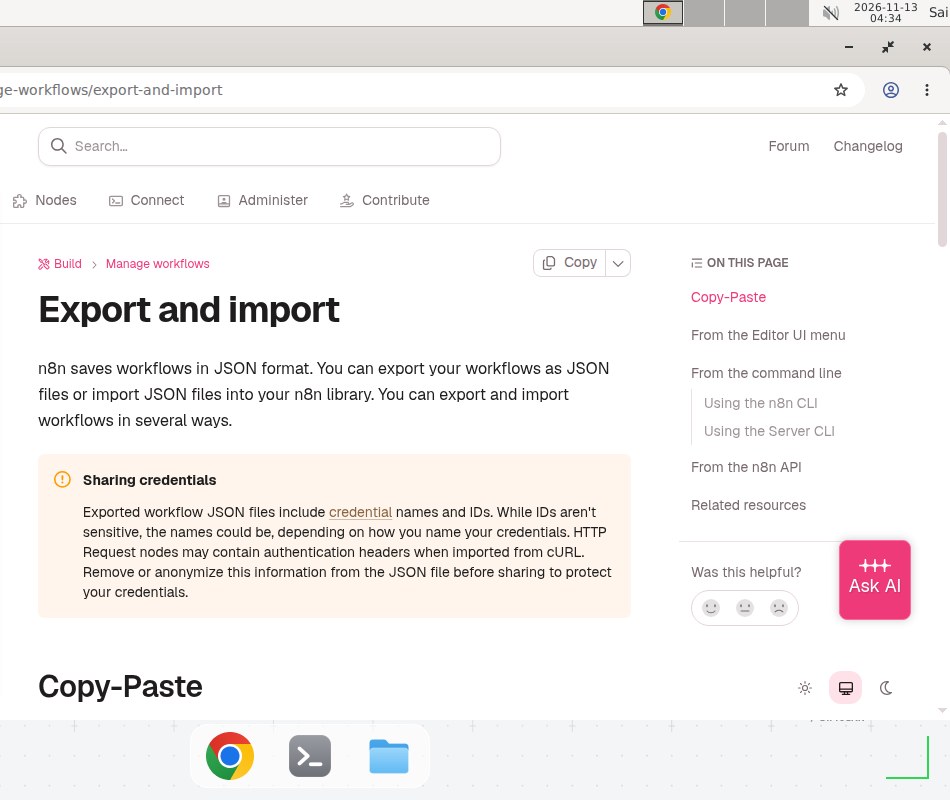
n8n’s official export and import documentation, checked 2026-11-13.
Step 5: Translate expressions, filters, and dates
This is where most migrations quietly go wrong. Make mapping uses double curly braces with its own functions, such as formatDate(now; YYYY-MM-DD), while n8n expressions use {{ $json.fieldName }} and Luxon dates such as {{ $now.toFormat('yyyy-MM-dd') }}.
Three translation rules cover most cases. First, replace Make’s ifempty(value; fallback) with n8n’s {{ $json.value || 'fallback' }}. Second, check every date format by hand, because Make’s DD and n8n’s dd mean different things and a wrong token produces a valid-looking wrong date. Third, test every filter with a real empty value, because Make treats missing fields leniently and n8n expressions throw an error on undefined unless you guard them.
Step 6: Replace data stores and other Make-only state
Make data stores hold state between runs: dedup keys, counters, cursors, and lookup tables. n8n has no built-in data store, so choose a replacement before you rebuild: Google Sheets for a lookup table under a few thousand rows, Postgres for a key or counter that must survive restarts, and the Code node with $getWorkflowStaticData() for a tiny counter, which is local to one workflow and easy to lose in a bad import, so treat it as a stopgap. Whatever you pick, recreate the current contents first: export the store from Make, load the same rows into the replacement, then point the n8n workflow at it. A rebuilt workflow pointed at an empty store reprocesses every record it has ever seen.
Step 7: Rebuild webhooks and repoint every sender
Every Make webhook URL dies with the migration: n8n generates its own URLs. For each Webhook node, copy the production URL into every service that posts to it: the form tool, the payment provider, the third-party app, any internal script. Send a test payload from each sender and confirm it arrives in n8n’s execution log. A webhook nobody repointed fails silently on the sender’s side. Keep the Make scenario active until every sender is confirmed.
Step 8: Run both versions in parallel for a week
Activate the n8n workflow and let it run next to the Make scenario for at least a week, or ten executions, whichever is longer. Compare the outputs row by row: same records written, same messages sent, same rows skipped. The parallel run catches what a single test never shows, such as a filter that behaves differently on weekend data, or a date expression that only fails on the first of the month. When the outputs match, deactivate the Make scenario, but do not delete it for another month.
Step 9: Deactivate, record, and move to the next scenario
Deactivate the Make scenario, note the date in your inventory, and record the new execution count in n8n after a week. If the count is far above or below your estimate, revisit the cost math below before the next scenario: a wrong estimate on scenario one means wrong estimates everywhere. Then take the next scenario and repeat steps 2 through 8.
Copy-paste template: migration worksheet
Copy this worksheet into your inventory document and fill one row per scenario. It keeps a multi-week migration honest, and it doubles as the rollback record.
MIGRATION WORKSHEET — Make to n8n (Example — replace with your values)
Scenario: [Make scenario name]
Blueprint file: [path to exported blueprint JSON]
Trigger: [webhook / schedule every 15 min / watch Gmail]
Modules: [count]  Apps: [Slack, Google Sheets, Airtable]
Make credits last month: [number]
n8n replacement: [node list, one per line]
Data store replacement: [Google Sheets / Postgres / static data]
Webhook senders to repoint: [list every service]
Parallel run start: [date]  Parallel run end: [date]
Outputs matched: [yes / no, note differences]
Make deactivated: [date]  Make deleted: [date, at least 30 days later]
A starter workflow JSON skeleton for webhook flows. Save it as webhook-starter.json, import it with Import from File, and reconnect the nodes. All values are placeholders. Example — replace with your values.
{
  "name": "Webhook starter (Example — replace with your values)",
  "nodes": [
    {
      "parameters": {
        "httpMethod": "POST",
        "path": "your-webhook-path",
        "responseMode": "responseNode"
      },
      "name": "Webhook",
      "type": "n8n-nodes-base.webhook",
      "typeVersion": 2,
      "position": [240, 300]
    },
    {
      "parameters": {
        "conditions": {
          "options": {"caseSensitive": true, "leftValue": "", "typeValidation": "loose"},
          "conditions": [{"id": "cond-1", "leftValue": "={{ $json.type }}", "rightValue": "important", "operator": {"type": "string", "operation": "equals"}}],
          "combinator": "and"
        },
        "looseTypeValidation": true
      },
      "name": "Is it important?",
      "type": "n8n-nodes-base.if",
      "typeVersion": 2.2,
      "position": [460, 300]
    },
    {
      "parameters": {"respondWith": "text", "responseBody": "OK", "options": {}},
      "name": "Respond",
      "type": "n8n-nodes-base.respondToWebhook",
      "typeVersion": 1.4,
      "position": [680, 300]
    }
  ],
  "connections": {
    "Webhook": {"main": [[{"node": "Is it important?", "type": "main", "index": 0}]]},
    "Is it important?": {"main": [[{"node": "Respond", "type": "main", "index": 0}]]}
  }
}
When not to use this / Limits
Do not migrate a scenario that is working fine and cheap: one burning 200 credits a month on Make’s free tier gains nothing from moving and risks a working automation. Do not migrate during a busy period either: the parallel run needs a quiet week for a clean comparison. This guide also does not cover Make’s AI features, which have no direct n8n equivalent and need a redesign, not a translation. Finally, if your team has no one comfortable with self-hosting, do not pick the Community Edition just to save 20 euros a month. The Cloud plan is cheaper once you count the time spent patching a server; our guide to keeping n8n updated shows what that maintenance looks like.
Cost / scale math
Take a 12-module scenario running 500 times a month. On Make, that is 12 times 500, or 6,000 credits, inside Core at $9 a month. On n8n Cloud Starter, it is 500 executions against a 2,500 allowance. At this volume the migration is about control, not price. At 3,000 runs a month, Make needs 36,000 credits, far past Core’s 10,000, while n8n needs 3,000 executions, past Starter’s 2,500, so you move to Pro at 50 euros a month. But note the per-step math: a 3-module scenario run 3,000 times costs 9,000 Make credits and fits Core, while the same runs cost 3,000 n8n executions and need Pro. Count steps times runs for Make, and runs alone for n8n.
Self-hosting changes the math completely. n8n Community on a small VPS costs around $5 to $6 a month with no execution meter. We could not verify a single standard VPS price; providers list basic instances in that range, so check yours before budgeting. At 36,000 Make credits a month it pays for itself many times over. The trade is maintenance: you own updates, backups, and uptime.
Troubleshooting
| Symptom | Likely cause | Command to check | Fix |
|---|---|---|---|
| n8n workflow runs but produces different output | A Make expression translated wrong, often a date or empty value | Run with the same input bundle and compare node outputs in the execution log | Pin the input data and fix the expression against the real value |
| Webhook receives nothing after cutover | A sender still posts to the old Make URL | Check the n8n execution log, then the sender’s delivery log | Repoint the sender to the n8n production URL and send a test payload |
| Duplicated records after migration | The data store replacement started empty, so dedup keys were missing | Compare the replacement table with the Make export | Stop the workflow, load the exported keys, then reactivate |
Common mistakes
- Translating the layout instead of the logic. Copying the visual shape of a Make scenario produces a workflow that looks right and behaves differently. Translate what each module does, not where it sits.
- Skipping the parallel run. A single test proves the workflow starts, not that it is correct. Only a week of parallel running with real data proves the outputs match.
- Forgetting the data store contents. Rebuilding without migrating the stored rows means the new version reprocesses history. Export the store before you rebuild, not after.
- Deleting the Make scenario on cutover day. Deactivation stops billing and keeps the rollback. Deletion is permanent. Wait at least 30 days, and only delete when the n8n version has run clean for a full month.
Test before you rely on it
- Run the n8n workflow ten times with real inputs and compare every output against the Make version.
- Send a test payload from each webhook sender and confirm it appears in the n8n execution log.
- Run the workflow with an empty value in every optional field and confirm nothing throws.
- Confirm the data store replacement holds the same rows as the Make export, counted, not eyeballed.
- Check the first scheduled run fires at the right time in the right timezone.
FAQ
Is there a tool that converts Make scenarios to n8n workflows automatically? No. There is no official converter, and community scripts only produce a rough skeleton. A blueprint is a reference, not an import file.
Can I import a Make blueprint JSON file into n8n? No. The formats use different schemas, and n8n only imports its own JSON. Read the blueprint, then rebuild the logic with n8n nodes.
Will my webhooks keep working after migration? No. n8n generates new webhook URLs, so every sender must be repointed. Keep Make live until each one is updated.
Does n8n have an equivalent of Make Data Stores? No built-in equivalent. Use Google Sheets for small tables, Postgres for larger ones, or the Code node with $getWorkflowStaticData() for tiny counters. Pick it before you rebuild.
How much cheaper is n8n than Make, really? It depends on step count. A 12-module scenario run 500 times costs 6,000 Make credits but 500 n8n executions. Long scenarios favor n8n, short high-volume ones favor Make.
Can I run Make and n8n side by side during the move? Yes. Rebuild one scenario at a time, run both in parallel for a week, compare outputs, then deactivate the Make original.
Conclusion
Migrating from Make to n8n is a translation job, not an import job: the work is in expressions, dates, data stores, and webhook URLs. Do it one scenario at a time, run both versions in parallel, and let the cost math decide which scenarios move.
Before you deactivate the next Make scenario, ask: if this n8n workflow fails at 3 a.m., will the error workflow tell you which record failed and what it was doing? If not, wire up error handling first. Then read the n8n complete guide to plan what you build next.
Frequently asked questions
Is there a tool that converts Make scenarios to n8n workflows automatically?
No. There is no official converter, and community scripts that parse Make blueprint JSON only produce a rough skeleton. A blueprint is a reference document for your rebuild, not an import file. Budget a focused hour per simple scenario.
Can I import a Make blueprint JSON file into n8n?
No. Make blueprints and n8n workflow JSON use different schemas, and n8n only imports its own format through Import from File, Import from URL, or paste. You read the blueprint, then rebuild the same logic with n8n nodes.
Will my webhooks keep working after migration?
No, the URLs change. n8n generates new webhook URLs, so every service that posts to Make must be repointed to the n8n URL. Keep the Make scenario live until you have updated every sender.
Does n8n have an equivalent of Make Data Stores?
No built-in equivalent. The usual replacements are a Google Sheets node for small lookup tables, a Postgres node for anything larger, or the Code node with $getWorkflowStaticData() for tiny counters. Pick the replacement before you rebuild.
How much cheaper is n8n than Make, really?
It depends on step count, not run count. Make charges per module execution, so a 12-module scenario run 500 times costs 6,000 credits. n8n charges per workflow execution, so the same flow costs 500 executions. Long scenarios favor n8n, high-volume short scenarios can favor Make.
Can I run Make and n8n side by side during the move?
Yes, and you should. Rebuild one scenario at a time, run both versions in parallel for a week, compare outputs, and only then deactivate the Make original.