How to Use Make's New arrayDiff, arrayIntersect, set, and escapeJSON Functions
Introduction
Your order sync ran at 3 a.m. and created 40 duplicate records, because the scenario had no cheap way to ask one question: which order IDs are in the shop but not in the CRM yet? The old answer was an Iterator, a filter, and an Aggregator, three modules that each cost credits on every bundle. The other classic failure is quieter: a customer note containing a double quote goes into a hand-written webhook body, the JSON breaks, and the API answers 400 with no useful message. Make shipped four built-in functions for these two pains: arrayDiff, arrayIntersect, set, and escapeJSON.
Quick answer
In any Make mapping field, arrayDiff(A; B) returns items only in the first list, arrayIntersect(A; B) returns items in both, set(collection; path; value) patches one field, and escapeJSON(text) makes text safe inside raw JSON. All four work on every plan.
The hard part is not the syntax, it is feeding the functions the right shape: primitive arrays for the two compare functions, a path for set(), and raw JSON only for escapeJSON, because each one fails silently or confusingly when the input shape is wrong.
Checked on 2026-11-11 against the Make Help Center array functions page, the general functions page, the text and binary functions page, and the Make community feature spotlight. Interfaces change fast, if a menu or label differs, trust the linked page.
Evidence
Make announced the four functions on June 26, 2026, in a community post by Valery from Make, and its Help Center product update confirms they are available on all plans from the mapping panel or the Make Functions app. The announcement states the point plainly: “Logic that once required iterators, aggregators, filters, or search steps can now live within a single mapping field, resulting in cleaner scenarios and more room in your budget for the work that matters.”
The budget part is measurable. Make’s pricing page lists the Free plan at 1,000 credits a month and Core at $9 a month for 10,000 credits on annual billing, with one credit charged per module run. A module downstream of an Iterator runs once per bundle, so one module touching 100 orders costs 100 credits per sync run. The Make Functions app documentation adds a second fact: its standalone Transform modules “do not consume any operations or credits”. Functions inside a mapping field cost nothing extra: no extra module runs.
The example below uses one pair of order lists for all four functions. All order IDs, names, and amounts in this article are demo data. Example — replace with your values.
Prerequisites
- A Make account on any plan, including Free. The four functions are built in, nothing to install.
- A scenario with two lists to compare, or the demo lists below to follow along.
- Basic comfort with Make mapping: clicking a field opens the mapping panel with function tabs.
Step 1: Find the four functions in the mapping panel
Click any mappable field in any module. The mapping panel opens with the data from earlier modules on the first tab. The remaining tabs hold the functions: arrayDiff and arrayIntersect live under the Array tab, set lives under the General tab, and escapeJSON lives under the Text tab. Click a function name or drag it into the field, then fill in its arguments. The same four functions are also available as operations in the Make Functions app, under the Transform module. The most common first-run confusion is opening the wrong tab.
Step 2: Find new orders with arrayDiff
The array functions documentation defines arrayDiff(array1; array2) as returning the items in the first array but not in the second, and gives the reference example arrayDiff(1, 2, 3, 4; 3, 4, 5, 6), which returns 1, 2.
Take the daily sync. The shop holds four order IDs, the CRM holds three, and one order is new. Example — replace with your values.
Shop orders:   ["ORD-101", "ORD-102", "ORD-103", "ORD-104"]
CRM orders:    ["ORD-102", "ORD-104", "ORD-105"]
New orders come from one expression in a Set Variable or filter field:
arrayDiff(shopOrders; crmOrders)
The result is ["ORD-105"]. Flip the arguments for the other direction:
arrayDiff(crmOrders; shopOrders)
That returns ["ORD-101", "ORD-103"]. Direction is the whole trick. arrayDiff is not symmetric: swapping the two lists answers a different question, and swapping them by accident is the easiest way to sync the wrong records.
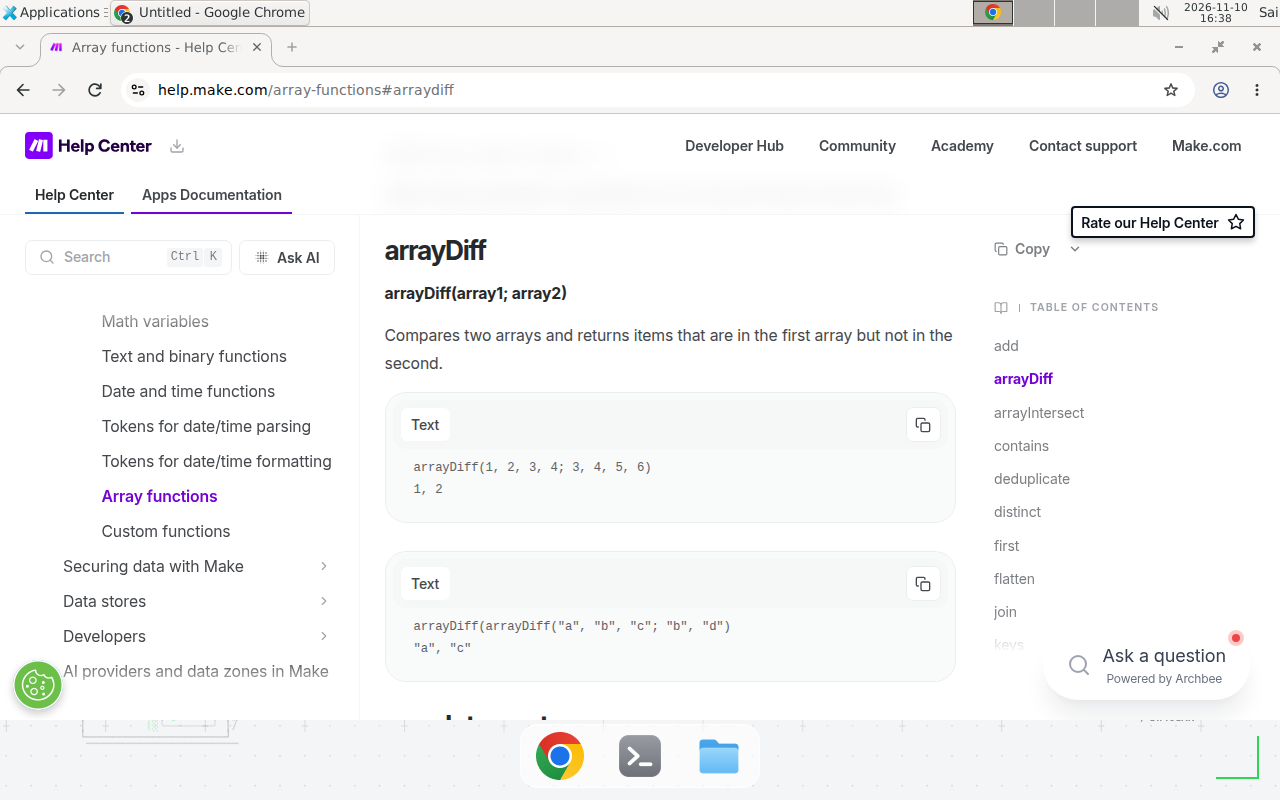
Make’s array functions documentation, checked 2026-11-11.
Step 3: Find the overlap with arrayIntersect
arrayIntersect(array1; array2) returns only the items found in both arrays. The documentation example is arrayIntersect(1, 2, 3, 4; 3, 4, 5, 6), which returns 3, 4. On the same demo lists, arrayIntersect(shopOrders; crmOrders) returns ["ORD-102", "ORD-104"]. Use this to update only the orders both sides already know. Run arrayDiff first to find new orders, then arrayIntersect to find the ones that need an update instead of a create.
Step 4: Diff real records, not just IDs
Real modules return arrays of collections. A Shopify order is a collection with id, email, total, and line items. arrayDiff cannot compare those directly, because it compares primitive values. The fix is one function call upstream: map() pulls one key out of every collection into a plain array. The documentation form is map(Emails[]; email), which returns a primitive array of emails.
For the order sync, map both sides to the same key first, then diff the two mapped arrays exactly as in Step 2:
map(shopOrders[]; id)
map(crmOrders[]; id)
To get the full records back, filter the original array by the resulting IDs. If arrayDiff returns everything or nothing, one side was still an array of collections.
We could not verify how arrayDiff treats duplicate values; vendor docs show only unique-value examples. If your lists can contain the same ID twice, deduplicate first with the distinct() function, then diff.
Step 5: Patch one field with set()
APIs often need one extra field that your source data does not have. The old way was rebuilding the whole collection by hand, key by key. The general functions documentation defines set(object; path; value) as setting or adding a value at a specific location in an array or object, leaving the rest of the structure unchanged. Its examples are set(user; name; John) and set(user; address.city; Prague), so nested paths use dot notation.
Stamp every outgoing order with its source before sending it:
set(order; source; make-functions-demo)
The result is the same order collection with one new key added. Nothing else changes. Use set() when the payload is almost right and one field is wrong or missing.
Step 6: Stop webhook 400 errors with escapeJSON
A note like He yelled, "Run!" and left. is harmless in a form and fatal inside a hand-written JSON body, because the unescaped quotes end the string early and the receiving API answers 400. The text and binary functions documentation defines escapeJSON(text) as escaping special characters like quotes and backslashes so text can be safely used in JSON without causing errors. Its examples: escapeJSON(He yelled, "Run!" and left.) returns the sentence with the quotes escaped, and escapeJSON(C:\Users\Admin) returns C:\\Users\\Admin, with each backslash doubled.
In the HTTP module, write the raw JSON body with the note escaped inside the quotes:
{
  "order_id": "ORD-105",
  "customer_note": "escapeJSON(1. note)"
}
Make evaluates the call, so the body that leaves the module carries \"Run!\" instead of a bare "Run!". Two rules decide whether escapeJSON helps or hurts. First, use it only in a raw JSON body you wrote yourself: if the module builds JSON from structured fields, it already escapes values, and escaping again stores double backslashes in your data. Second, escape exactly once. If the text already arrived escaped from an earlier step, escaping it again corrupts it the same way.
Copy-paste template: one order-sync mapping recipe
The template below is the whole daily sync in four mapping expressions, written for the demo lists in Step 2. Copy the shape and swap in your own module outputs. Example — replace with your values.
Scenario: Daily order sync, shop to CRM
Runs: once a day, 100 orders per run (demo lists use 4 and 3)

1. New orders (in the shop, not in the CRM):
   arrayDiff(map(shopOrders[]; id); map(crmOrders[]; id))
   Demo result: ["ORD-105"]

2. Orders to update (in both systems):
   arrayIntersect(map(shopOrders[]; id); map(crmOrders[]; id))
   Demo result: ["ORD-102", "ORD-104"]

3. Stamp each outgoing order before sending:
   set(order; source; make-functions-demo)
   Demo result: the order collection, plus source = "make-functions-demo"

4. Safe customer note inside the raw JSON body:
   escapeJSON(1. note)
   Demo input: He yelled, "Run!" and left.
   Demo output: He yelled, \"Run!\" and left.
When not to use this / Limits
Do not use these functions where each item needs its own module run. arrayDiff can tell you that 100 orders are new, but it cannot create 100 CRM records by itself; that still needs an Iterator feeding a create module, one run per order. Do not use escapeJSON as a general JSON builder: it escapes one string, it does not validate the surrounding body, and a missing comma elsewhere still returns 400. Finally, these functions compare values, not meaning: “ORD-105” and “ord-105” are different strings. Normalize case and whitespace before comparing.
Cost / scale math
Assume a daily sync of 100 orders, 30 runs a month. The numbers below are arithmetic from Make’s per-module-run billing, not a measured invoice.
| Approach | Credits per run | Credits per month | Share of Free (1,000) | Share of Core (10,000) |
|---|---|---|---|---|
| Iterator plus two downstream modules | 200 | 6,000 | 6x the plan | 60% of the plan |
| Four functions inside mappings | 0 extra | 0 extra | 0% | 0% |
The old approach costs 100 credits per module per run, and two such modules cost 200 per run, or 6,000 a month. The function approach adds no module runs, so the diff itself costs 0 extra credits on either plan. The saving is bounded: the trigger, create, and update modules still run and still cost credits.
Troubleshooting
| Symptom | Likely cause | Command to check | Fix |
|---|---|---|---|
| arrayDiff returns every item, or nothing at all | Compared arrays of collections instead of primitive values | Map both sides first and inspect the mapped arrays | Diff map(shopOrders[]; id) against map(crmOrders[]; id), not the raw collections |
| arrayIntersect returns fewer matches than expected | Different case, type, or trailing spaces, such as “ORD-105” versus “ord-105” | Compare length() of both arrays | Normalize with upper() or trim() on both sides before comparing |
| set() changes nothing visible | Wrong path, or a case-sensitive key that does not match | Read the value back with get(order; shipping.city) | Fix the path and match the key case exactly |
| Webhook still returns 400 after escapeJSON | Text escaped twice, or escapeJSON used where the module already serializes JSON | Inspect the raw request body in the run history | Escape once, inside the quotes, and only in a raw JSON body you wrote yourself |
| New functions missing from the mapping panel | Looked in the wrong tab | Check the Array tab for arrayDiff and arrayIntersect, General for set(), Text for escapeJSON | Open the right tab; the functions are included on all plans |
Common mistakes
- Diffing whole collections. Feed it mapped ID arrays, never raw order objects, or every item looks different.
- Swapping the arrayDiff arguments.
arrayDiff(A; B)andarrayDiff(B; A)answer opposite questions. New orders need shop minus CRM, not CRM minus shop. - Using set() to grow a list. set() writes a value at a path. To append items to an array, use add() instead.
- Escaping text the module already escapes. escapeJSON belongs only in raw JSON bodies; anywhere else it double-escapes.
Test before you rely on it
- Run once with two or three known IDs and compare the output with a hand-computed diff.
- Send a webhook with a quote, a backslash, and a line break in the note, and confirm the receiving API answers 200.
- Compare the payload before and after set(), and confirm untouched fields survived.
- Run the sync twice; the second run should find zero new orders.
- Feed both functions an empty array once, and confirm the scenario handles it with a filter.
- Check the run history credit count before and after removing the Iterator.
FAQ
Do the four functions cost extra operations?
No. They run inside a mapping field, so using them adds no module run. The Make Functions app documentation states the same for its standalone modules: they do not consume any operations or credits.
Which Make plans include them?
All of them. Make’s Help Center product update states the four functions are available on all plans. Unlike custom JavaScript functions, which need Enterprise, these built-ins work on the Free plan too.
Can arrayDiff compare arrays of full records?
No. Both compare functions work on primitive values. Map each array to the same key first, for example map(Orders[]; id), then diff the two ID arrays.
When should I still use an Iterator instead of arrayDiff?
Use an Iterator when every item needs its own module run, such as one API call per order. arrayDiff answers a question about two lists; it does not process items one by one.
Does escapeJSON replace building JSON properly?
No. escapeJSON only escapes special characters inside one text value. If a module builds the JSON body from structured fields, do not escape anything.
What is the difference between set() and add()?
set() writes a value at a path inside a collection, leaving the rest unchanged, for example set(order; status; shipped). add() appends values to an array.
Conclusion
The four functions remove the most boring modules from a Make scenario: the Iterator that only existed to compare two lists, the Aggregator that only existed to rebuild one, and the hand-rolled escaping that only existed to stop 400 errors. Start with arrayDiff on your messiest sync and check the second run finds nothing new. If it does, the direction is backwards, and that is a one-word fix.
If this flow fails at 3 a.m., can your team tell from the run history which direction the diff ran? If not, add the direction to the scenario name first. Next, read how to create reusable custom JavaScript functions in Make for the cases where a built-in cannot express the logic, and how to expose Make scenarios as MCP tools to let an AI assistant call the scenario you just cleaned up. For the same sync problem elsewhere, the complete n8n guide covers n8n’s approach, and how to prevent duplicate records in Make scenarios shows the Data Store pattern for the cases where a mapping function is not enough.
Frequently asked questions
Do arrayDiff, arrayIntersect, set, and escapeJSON cost extra operations in Make?
No. They run inside a mapping field, so using them adds no module to the scenario and no extra module run. The Make Functions app documentation states the same for its standalone modules: they do not consume any operations or credits. You pay for the modules that run, not for the functions inside their fields.
Which Make plans include the four new functions?
All of them. Make's Help Center product update states the four functions are available on all plans, from the mapping panel or the Make Functions app. Unlike custom JavaScript functions, which need Enterprise, these built-ins work on the Free plan too.
Can arrayDiff compare arrays of collections, such as full order records?
No, not directly. Both functions compare primitive values. Map each array to the same key first, for example map(Orders[]; id), then diff the two ID arrays. Use the result to filter the original records.
When should I still use an Iterator instead of arrayDiff?
Use an Iterator when every item needs its own module run, such as one API call or one row write per order. arrayDiff answers a question about two lists; it does not process items one by one. If the work per item is a module call, keep the Iterator.
Does escapeJSON replace building JSON properly?
No. escapeJSON only escapes special characters inside a text value. If a module builds the JSON body for you from structured fields, do not escape anything. Use escapeJSON only when you write a raw JSON body yourself, such as in an HTTP module with a hand-written payload.
What is the difference between set() and add() in Make?
set() writes a value at a path inside a collection or array, leaving the rest of the structure unchanged, for example set(order; status; shipped). add() appends values to an array. Use set() to patch a field, add() to grow a list.