How to Automate Canva Designs with Make: Folders, Exports, and Logging
Your designer drops five finished graphics into a shared Canva folder on Friday afternoon. By Monday, nobody remembers which ones went live, which ones are still drafts, and where the exported PNGs went. This article builds the small machine that stops that: a Make scenario that watches a Canva folder, exports every new design, files it away, and logs it to a sheet, so the folder stays clean and the record keeps itself.
Quick answer
Connect Canva to Make, then run a scheduled scenario: list a folder, export new designs as PNG, log each to Google Sheets, and archive it. No new-design trigger exists, so poll on a schedule and dedupe with a Data Store.
The hard part is not connecting Canva, it is accepting that there is no trigger and designing a poll that never reprocesses the same design twice.
Checked on 2026-11-11 against the Canva modules documentation on Make and Make’s Canva app announcement. Interfaces change fast, so if a menu or label differs, trust the linked page.
Evidence: what the Canva app on Make actually does
Make added Canva in July 2024, announcing it in the community with the words: “Canva is now available on Make! Let’s take a look at the possibilities you can unlock with Canva in your scenarios!” The app launched with 16 modules, grouped in Make’s docs into Images, Brand Templates, Designs, Folders, and Other. The Designs group covers Create, Import, and Export a Design. The Folders group covers creating, listing, getting, updating, and moving items, with several folder modules still marked beta. The Other group is a Make an API Call module for Canva’s REST API at api.canva.com/rest/v1, the escape hatch for the rest.
The scale explains why this integration matters. More than 240 million people used Canva each month as of August 2025, according to Startup Daily, reporting co-founder Cliff Obrecht, and Canva reported more than 265 million monthly users by July 2026. On the Make side, the library holds more than 3,500 apps. Most of those users do not need a design robot, they need the boring part, filing and tracking, to happen by itself.
One boundary shapes the whole design. The Canva app has no trigger module, so a scenario cannot wake up the moment a design appears. Canva’s Connect APIs expose designs, assets, folders, and exports, but no design-created webhook, so polling is the only honest architecture.
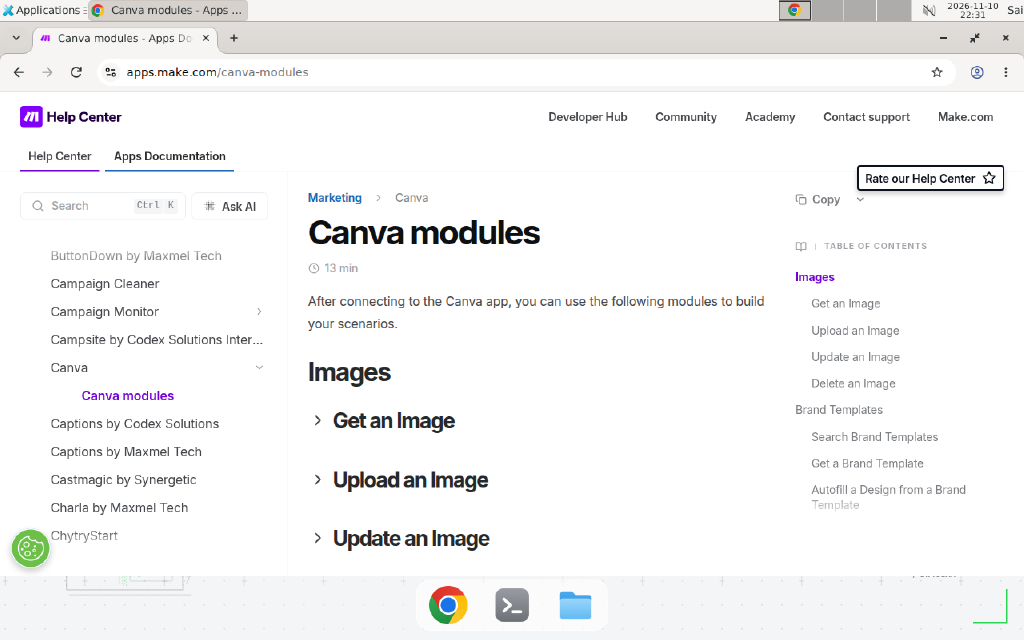
The Canva modules page on Make’s apps documentation, checked November 11, 2026. The Images group and the Brand Templates group, including Autofill a Design from a Brand Template, are visible here; Designs and Folders follow further down the page.
Prerequisites
- A Make account. The Free plan works: 1,000 credits a month, a 15-minute minimum schedule interval, and two active scenarios.
- A Canva account on any plan, including Free. Only Brand Templates need Canva Enterprise.
- A Google account with a sheet to receive the log rows.
- Two Canva folders: one intake folder where finished designs land, and one archive folder where processed designs go. Create both in Canva before you build.
- A rough idea of your volume: how many designs land in the folder per day.
Step 1: Connect Canva to Make
In Make, create a new scenario and add a Canva module, any module, for example List Folder Items. Click Add next to Connection, sign in to Canva in the popup, and approve Make’s access to your designs, folders, and assets. Make stores the OAuth connection, so later modules reuse it without another login.
If the connection shows an error, reconnect once before debugging anything else. OAuth tokens expire, and a stale connection produces confusing errors in every module downstream.
Step 2: Create the two folders and the tracker sheet
In Canva, create a folder called Ready to Publish and one called Published Archive. Use these names or your own, but write them down: the scenario maps folder IDs, not names, and picking the wrong folder is a silent mistake that only shows up in the execution log.
In Google Sheets, create a sheet with one header row: Design name, Design ID, Exported at, Export URL, Folder. Example, replace with your values: a row might read Summer Sale Banner, DAFv1234567, 2026-11-11 06:30, https://example.com/export.png, Ready to Publish. This sheet is the audit trail: when someone asks whether a banner went out, the answer is a search here, not a scroll through Canva.
Step 3: Build the scenario
Add the modules in this order:
- Schedule trigger. Set it to run every hour. On the Free plan the minimum interval is 15 minutes, but hourly keeps the credit math safe, and an hour of delay is fine for a filing job.
- Canva, List Folder Items. Point it at the
Ready to Publishfolder. Each item it finds becomes one bundle flowing downstream. - Filter. Keep only bundles where the item type is a design. Folder listings mix designs, images, and subfolders, and exporting an image asset as a design fails.
- Data Store, Check existence of a record. Look up the design ID in a Data Store named
canva-processed. If the ID exists, stop that bundle. This is the dedupe step: skipping it makes the scenario export the same design every hour forever. - Canva, Export a Design. Map the design ID from the bundle and pick PNG. The export runs as a job on Canva’s side, and the module returns the download URL when the job finishes.
- Google Sheets, Add a Row. Map the design name, design ID, current timestamp, export URL, and source folder into the columns from Step 2.
- Data Store, Add a record. Store the design ID as the key, with the export time as the value, so the next run skips it.
- Canva, Move a Folder Item. Move the design from
Ready to PublishtoPublished Archive.
The Data Store app is built into Make, no extra account needed. Create it from the scenario builder before you wire Step 4. For a refresher on dedupe patterns, see how to prevent duplicate records in Make scenarios.
Step 4: Run it once and read the log
Click Run once and open the execution log. A healthy first run shows one bundle per design in the intake folder, one export per bundle, one new sheet row per bundle, and the designs gone from Ready to Publish. Check three things in the sheet: the export URL opens, the design ID matches the design in Canva, and the timestamp is the run time.
If the run shows zero bundles, the folder mapping is the first suspect. Folder IDs are long strings that all look alike, so open the module, reselect the folder from the dropdown instead of trusting a pasted ID, and run again.
Copy-paste template: the scenario blueprint
Copy this table into your notes. It is the whole scenario on one page.
| Order | App and module | Key setting |
|---|---|---|
| 1 | Schedule, Run every hour | Interval: 60 minutes |
| 2 | Canva, List Folder Items | Folder: Ready to Publish (Example, replace with your folder) |
| 3 | Filter | Item type equals design |
| 4 | Data Store, Check existence | Store: canva-processed, key: design ID |
| 5 | Canva, Export a Design | Format: PNG, design ID from Step 2 |
| 6 | Google Sheets, Add a Row | Columns: name, design ID, timestamp, export URL, folder |
| 7 | Data Store, Add a record | Key: design ID, value: export time |
| 8 | Canva, Move a Folder Item | Destination: Published Archive (Example, replace with your folder) |
Data Store record, one per design. Key: the design ID, for example DAFv1234567 (Example, replace with your values). Value: the export timestamp. Never store the export URL as the key: URLs expire, IDs do not.
When not to use this / Limits
Do not build this scenario if you need to change text, swap images, or resize designs from data. Make cannot edit design content, and no module fills an ordinary template with row data. That job belongs to Make’s Autofill a Design from a Brand Template module, which needs a Canva Enterprise plan, or to Bulk Create inside Canva Pro, where you paste a spreadsheet and Canva generates the variants. Do not use polling if you need a design exported within seconds of creation, because the schedule only checks as often as it runs. And do not use this as a backup: moving a design to another Canva folder is filing, not a backup, since a deleted design is gone from both folders. For a real backup, export to Google Drive or Dropbox as well as the archive folder.
Cost / scale math
Make charges one credit per module that runs, so the arithmetic is simple and worth doing before you pick an interval. Assume 10 designs a day, 30 days, and the 8-module scenario above. Each design costs about 4 credits to process: list, export, log, and move. Empty runs cost 1 credit each for the schedule trigger.
| Schedule | Empty runs a month | Processing credits a month | Total |
|---|---|---|---|
| Every 15 minutes | 2,880 runs x 1 credit | 300 designs x 4 credits | 4,080 credits |
| Every hour | 720 runs x 1 credit | 300 designs x 4 credits | 1,920 credits |
| Every 6 hours | 120 runs x 1 credit | 300 designs x 4 credits | 1,320 credits |
The Free plan includes 1,000 credits a month, so even the hourly schedule at 10 designs a day overruns it. The fix is a saner interval, not a bigger plan. At 3 designs a day, hourly costs 720 plus 360, or 1,080 credits, still just over Free, while every 6 hours costs 120 plus 360, or 480 credits, comfortably inside Free. Empty runs dominate the bill, not the exports. Measure your real daily volume for a week, then pick the interval from this table. Core, which Make’s pricing page lists at $12 a month for 10,000 credits, covers the 15-minute schedule with room to spare.
We could not verify the current Core price from Make’s pricing page on the day of writing, because the page blocks automated checks; the $12 figure is from Make’s pricing page as read on November 11, 2026, and prices change, so confirm it there before you budget.
Troubleshooting
| Symptom | Likely cause | Command to check | Fix |
|---|---|---|---|
Create a Design fails with [404] asset_not_found | You mapped a design ID or a brand template ID into the Asset ID field, but the module expects an image asset ID | Read the Asset ID value in the module’s input bundle | Get the image with the Get an Image module first, then map that image ID |
| Brand Templates modules return 403 or stay greyed out | Brand Templates need a Canva Enterprise plan | Check your Canva plan in Canva settings | Upgrade to Enterprise, or drop the brand template step and use a regular design |
| Scenario exports the same design every run | No dedupe store, or the Data Store check runs after the export | Read the execution log: does the Data Store check run before Export a Design | Add the Check existence step before the export, keyed on design ID |
| Scenario runs but finds zero bundles | Wrong folder mapped, or the folder is empty | Open List Folder Items and reselect the folder from the dropdown | Reselect the folder by name, not by pasted ID, and confirm designs are inside it |
| Export returns no download URL | The export job is still running, or the design is a video format with a long render | Wait and rerun; check the output bundle for a job status | For large or video designs, add a Sleep module before reading the URL, and an error handler that retries once. See Make error handlers |
| Connection fails after weeks of working | The Canva OAuth token expired or was revoked | Open the connection in Make and check its status | Reconnect Canva in Make, and check whether someone revoked Make in Canva’s connected-apps settings |
Common mistakes
- Treating Make as a design editor. Make moves designs, folders, and files around. It does not write headlines into an ordinary design; the one exception is the Autofill module, which only works with Enterprise brand templates. Teams that miss this spend a week on a scenario that was never possible, when Bulk Create in Canva would have done it in an afternoon.
- Polling every 15 minutes on the Free plan. The schedule burns a credit per empty run, so 2,880 credits a month vanish before a single design is processed. Pick the interval from the cost table, not from impatience.
- Mapping folder names instead of folder IDs. Module fields that look like names often hold IDs underneath. Always pick from the dropdown, and verify the first run moved a real design before you trust the mapping.
- Skipping the dedupe store. Without it, every run re-exports every design still sitting in the intake folder, and the sheet fills with duplicate rows. The store is one extra module and it is the difference between automation and a loop.
Test before you rely on it
- Run once with a single test design in the intake folder and confirm the sheet row, the PNG download, and the move to the archive folder.
- Run again with no new designs and confirm the log shows one credit spent and zero exports.
- Add a second design with the same name as the first and confirm the dedupe uses the design ID, not the name.
- Disconnect Canva in Make, run the scenario, and confirm the error names the connection, not a module.
- Let it run for 48 hours, then compare the sheet against the archive folder and confirm every row has a matching design.
- Open an export URL a day after the run and confirm whether it still works, so you know how fast your links expire.
FAQ
Can Make edit the text inside a Canva design?
Only in one narrow case. Make has an Autofill a Design from a Brand Template module, but it works only with Canva Enterprise brand templates. On any other plan, Make cannot edit design content. For ordinary templates, use Canva’s Bulk Create inside Canva Pro instead.
Does Make’s Canva app have a trigger for new designs?
No. The app ships actions and searches only, there is no “watch new designs” trigger, because Canva exposes no design-created webhook. Poll the folder on a schedule instead, and keep a Data Store of design IDs you already processed.
Which Canva plan do I need for the Make integration?
Designs, folders, assets, and exports work on any Canva plan, including Free. Only the Brand Templates modules need Canva Enterprise. Make’s docs state it directly: “Canva requires an Enterprise plan to use the brand templates API.”
How many Make credits does a Canva scenario cost?
Each module that runs costs one credit: an empty run costs one, processing one design costs about four. Check the cost table above before you pick an interval.
Why does Create a Design fail with 404 asset_not_found?
The module expects an image asset ID, not a design ID and not a brand template ID. Passing a template ID produces the 404. Get the image ID with the Get an Image module first, or upload the image with Upload an Image, then map that ID into Create a Design.
Can I export a Canva design as PDF or MP4 with Make?
Yes, Export a Design lets you pick the format, including PDF, PNG, JPG, and video formats for video designs. The export runs as a job on Canva’s side, so large designs take a while. Check the module’s output bundle for the download URL, and download it promptly, because export links expire.
Conclusion
A Canva folder that files itself is a small win, but it is the kind that compounds: every design lands in the archive, every export has a row in the sheet, and nobody spends Monday morning reconstructing what shipped. If this flow fails at 3 a.m., can your team see what happened and undo it? If not, add the execution-log check to your weekly routine before you add more modules. Next, turn a Make scenario into an MCP tool so an AI assistant can trigger exports on demand, or add reusable JavaScript functions to your Make scenarios when the tracker sheet needs computed fields. Still deciding between platforms? Read n8n vs Make for AI agents first.
Frequently asked questions
Can Make edit the text inside a Canva design?
Only in one narrow case. Make has an Autofill a Design from a Brand Template module, but it works only with Canva Enterprise brand templates. On any other plan, Make cannot edit design content. For ordinary templates, use Canva's Bulk Create inside Canva Pro instead.
Does Make's Canva app have a trigger for new designs?
No. The Canva app ships actions and searches only, there is no 'watch new designs' trigger, because Canva exposes no design-created webhook. Build the scenario on a schedule instead: poll the folder every hour, or every 15 minutes on a paid plan, and keep a Data Store of design IDs you already processed.
Which Canva plan do I need for the Make integration?
Designs, folders, assets, and exports work on any Canva plan, including Free. Only the Brand Templates modules need Canva Enterprise. Make's own docs state this directly: 'Canva requires an Enterprise plan to use the brand templates API.'
How many Make credits does a Canva scenario cost?
Each module that runs costs one credit. A run that lists a folder and finds nothing costs one credit for the schedule trigger. A run that processes one design costs about four credits: list, export, log to Sheets, and move to the archive folder. On the Free plan, 1,000 credits a month covers an hourly schedule with room to spare.
Why does Create a Design fail with 404 asset_not_found?
The module expects an image asset ID, not a design ID and not a brand template ID. Passing a template ID produces the 404. Get the image ID with the Get an Image module first, or upload the image with Upload an Image, then map that ID into Create a Design.
Can I export a Canva design as PDF or MP4 with Make?
Yes, Export a Design lets you pick the format, including PDF, PNG, JPG, and video formats for video designs. The export runs as a job on Canva's side, so large designs take a while. Check the module's output bundle for the download URL, and download it promptly, because export links expire.