How to Automate Bluesky Posts with Make: RSS to Post with Link Cards
Your blog published a new post at 2 a.m. By the time you wake up, the moment to share it on Bluesky has passed, and retyping the title and link by hand for every article is the kind of chore that quietly stops happening after the third week. This tutorial builds the small machine that does it for you: a Make scenario that watches your RSS feed, turns each new article into a Bluesky post with a link card, and never posts the same article twice.
Quick answer
Connect Make’s Bluesky app with an app password, then run an hourly scenario: RSS watches your feed, a Data Store check skips posted articles, and Create a Post publishes the title plus link under 300 graphemes.
The hard part is not connecting Bluesky, it is the arithmetic around the 300-grapheme cap and the free plan’s credit meter, because a long title plus a long URL silently fails or burns your whole month of checks.
Checked on 2026-11-12 against Make’s Bluesky app documentation and Bluesky’s API get-started guide. Interfaces change fast, so if a menu or label differs, trust the linked page.
Evidence: the Bluesky app is new, and the limits are small
Make added Bluesky as a native app in late 2026. The Help Center announcement says: “This new app lets you connect with Bluesky to manage users, posts, messages, media, likes, and lists in your account.” A month earlier the only route was the generic HTTP module against the AT Protocol API, so older guides saying Make has no Bluesky app are out of date.
The audience is worth the setup. TechCrunch reported 47 million registered Bluesky users in its October 15, 2026 coverage of the network’s payments push, so a cross-posted link reaches a real audience rather than an empty room. The constraints are small and exact. Bluesky’s own post schema, app.bsky.feed.post, caps post text at 300 graphemes and 3,000 UTF-8 bytes, and allows one embed per post: images, video, a gallery, an external link card, or a quoted post. That schema is the primary source for every length claim in this article.
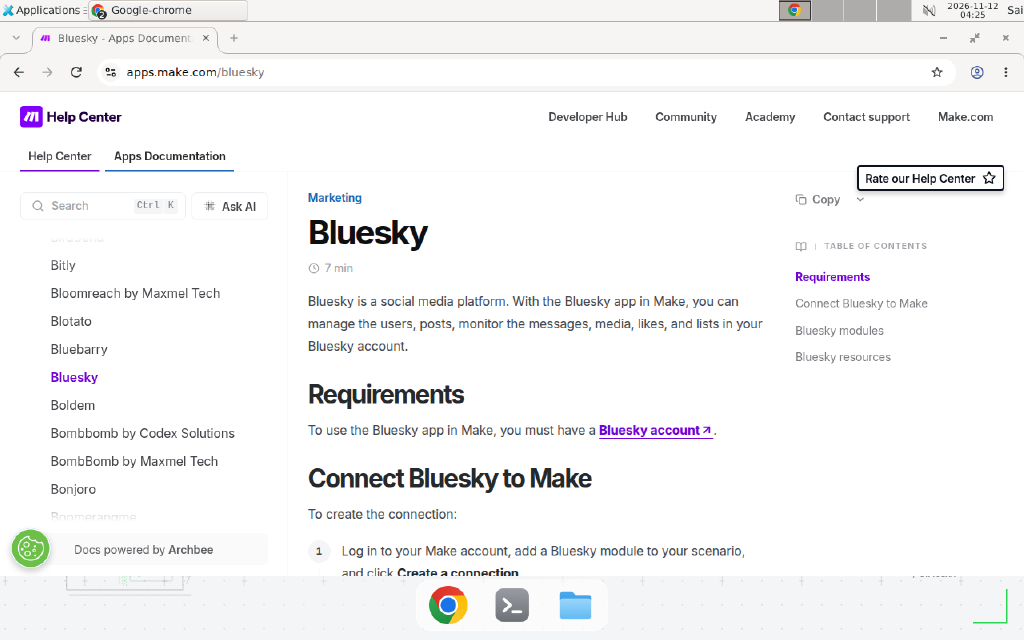
Make’s Bluesky app documentation page (apps.make.com/bluesky), checked 2026-11-12. It lists the connection fields and the modules the app ships.
Prerequisites
- A Make account. The Free plan works: 1,000 credits a month, 2 active scenarios, and a 15-minute minimum schedule interval.
- A Bluesky account. If it has two-factor authentication turned on, create an app password first: in Bluesky, go to Settings, Privacy and Security, App Passwords, then Add App Password. Give it a name like “Make autoposter” so you can revoke it later without touching your main password.
- A blog or site with an RSS feed. Any standard feed works, including a Hugo, WordPress, or Ghost feed.
- A target page with Open Graph tags (title, description, image) if you want the link card to render with a preview image. Without them, the card still appears but with no image.
Step-by-step guide
Step 1: Connect Bluesky to Make
In Make, create a new scenario and add a Bluesky module, for example Create a Post. Click Create a connection. Fill in the three fields exactly as Make’s Bluesky app documentation describes them:
- PDS Host: keep the default,
https://bsky.social, unless you run a custom Personal Data Server. Most accounts live onbsky.social. - Identifier: your Bluesky handle (for example
example.bsky.social) or your registered email address. - Password: your app password if you use two-factor authentication, otherwise your account password. Use the app password whenever you can: it limits what a leaked credential can do, and you can revoke it without changing your login.
Click Save. If Make asks you to authenticate, confirm access in the popup. A successful connection shows the connection name in the module. If it fails, the cause is almost always the password field: a main password on a two-factor account is rejected, so generate the app password and try again.
Step 2: Add the RSS trigger
Add the RSS app’s Watch RSS feed items trigger as the first module and paste your feed URL. Set the schedule to every hour. Do not pick every 15 minutes on the Free plan: each scheduled check costs one credit even when the feed has nothing new, and 96 checks a day is about 2,880 credits a month, nearly three times the free allowance. An hourly schedule costs about 720 credits a month on checks, which leaves room for the posts themselves.
Run the trigger once and pick one real feed item as the sample bundle. Building the rest of the scenario against a real item, with a real title and a real URL, is what makes the field mapping honest instead of guessed.
Step 3: Skip articles you already posted
Add a Data Store module, Check the existence of a record, before the Bluesky module. Use the article URL as the record key. Put a filter between the Data Store check and the Bluesky module that continues only when the record does not exist. After a successful post, add a second Data Store module, Add a record, that stores the URL. This is the dedupe step that stops the same article going out twice when a feed re-delivers an item or when you re-run the scenario by hand.
If you have never used a Data Store in Make, our guide to Make scenario deduplication with a Data Store walks through the same pattern, including the filter condition and the key choice.
Step 4: Build the post text inside the 300-grapheme cap
Add the Bluesky app’s Create a Post module and map the post text. The shape that works is short title, then the link on its own line:
New tutorial: How to self-host n8n on a VPS
https://www.example.com/install-n8n-ubuntu-vps/
Example, replace with your values. Two rules decide whether this posts or fails. First, the whole text, title plus URL, must stay under 300 graphemes. A 60-character URL spends 60 of your 300, so keep titles short or cut them with Make’s built-in substring function before mapping. Second, a post carries one embed: text plus a link gives you the link card, but text plus images gives you images and no card. Do not attach both and expect both.
We could not verify the exact field list inside Make’s Create a Post module from the public documentation, which lists the module but not its fields. If your module shows a separate Link or Embed field, map the article URL there; if it shows only a text field, put the full URL in the text. Either way, publish one test post and open it on bsky.app to confirm the card appears before you switch the scenario on.
Step 5: Attach media only when the post needs it
If a post needs an image, add the Upload Media module before Create a Post and map its output into the post. A later Make update added an optional Size field to the Create a Post and Create a Reply modules: map the Size output from Upload Media into it to avoid [400] InvalidSize errors on posts with media. If you leave Size empty, Make uses the default maximum size. Remember the tradeoff: a post with images shows no link card, so use media for image-led posts and plain text plus a URL for link-led posts.
Step 6: Run once, check the live post, then switch on
Click Run once and watch the execution. Open the post on bsky.app and check three things: the title reads cleanly, the link is clickable, and the link card shows the right title and image. Then check the Data Store: the article URL should be stored. Switch the scenario on with the hourly schedule. The flow looks like this:
flowchart LR
    RSS[Watch RSS feed items\n hourly] --> DS[Data Store:\n URL already posted?]
    DS -- No --> POST[Bluesky:\n Create a Post]
    DS -- Yes --> STOP[Stop:\n nothing to do]
    POST --> LOG[Data Store:\n store URL]
Copy-paste template: the scenario blueprint
Copy this blueprint into your scenario. Field names are examples, replace them with your feed’s fields.
SCENARIO: RSS blog posts to Bluesky (hourly)
------------------------------------------------
[1] RSS > Watch RSS feed items
    Feed URL: https://www.example.com/index.xml
    Schedule: every 1 hour

[2] Data Store > Check the existence of a record
    Data store: posted-articles
    Key: {{1.link}}            (the article URL)

[3] Filter between [2] and [4]
    Continue only if: record does NOT exist

[4] Bluesky > Create a Post
    Text:
      {{substring(1.title; 1; 120)}}
      {{1.link}}
    Rule: keep the total under 300 graphemes.
    If the title is long, 120 characters of title
    plus a short URL is a safe starting shape.

[5] Data Store > Add a record
    Data store: posted-articles
    Key: {{1.link}}
    (Runs only after [4] succeeds.)

[Optional] Bluesky > Upload Media before [4]
    Map its Size output into Create a Post's
    Size field. Use only for image-led posts,
    never together with a link card.
When not to use this / Limits
Do not use this scenario for high-volume posting. Bluesky’s PDS rate limits cap writes at 5,000 points per hour and 35,000 per day, with each new post costing 3 points, which is generous for a blog but not a firehose, and Make’s credit meter binds first on the Free plan anyway. Do not use it for posts that need a human decision, such as announcements with embargo timing or anything you would regret publishing at 3 a.m. without review. For those, post the draft to a sheet first and add a manual approval step. Do not use it to cross-post the same text to five networks, because each network counts length differently and link cards behave differently per platform. Bluesky was also working on an automation label for profiles in October 2026, so automated accounts may be labelled as such in future. If you need queue-based scheduling with a calendar view instead, use a scheduler like Buffer and keep Make for the feed-to-draft step.
Cost / scale math
The Free plan gives you 1,000 credits a month, and almost every module that runs costs one credit. The math for this scenario:
| Item | Credits |
|---|---|
| Hourly schedule checks, 24 a day x 30 days | 720 |
| One published post: RSS trigger + Data Store check + Create a Post + Data Store write | 4 |
| 40 posts a month x 4 credits | 160 |
| Total at 40 posts a month | 880 |
That fits inside 1,000 with about 120 credits to spare. The same scenario on a 15-minute schedule costs about 2,880 credits a month on checks alone and stops working partway through the month. If you publish more than about 60 posts a month, or you want a 15-minute check interval, move to Core at $9 a month billed annually, which includes 10,000 credits. Posting frequency is the cost lever here, not the number of modules.
Troubleshooting
| Symptom | Likely cause | Command to check | Fix |
|---|---|---|---|
| Connection fails with an auth error | Main password used on a two-factor account | Try the connection again after generating an app password | In Bluesky, go to Settings, Privacy and Security, App Passwords, Add App Password, and paste that into Make’s Password field |
Post fails with 400 content_too_long | Text over 300 graphemes or 3,000 bytes | Count the mapped text, including the full URL | Shorten the title with substring, drop hashtags, or split the post into a thread with Create a Reply |
Post fails with [400] InvalidSize | Image size not declared on a media post | Check whether the Size field is mapped | Map the Size output from the Upload Media module into Create a Post’s Size field |
| Link shows as plain text with no card | Target page has no Open Graph tags, or the card was not attached | Open the target URL and view its page source for og:title | Add Open Graph tags to the page, then re-post; a post with images attached never shows a card |
| Same article posts twice | Feed re-delivered the item, or the scenario was re-run | Search the Data Store for the article URL | Confirm the Data Store write runs after Create a Post, and that the filter checks the same key the write stores |
| Scenario stops mid-month | Free credits exhausted by schedule checks | Check Make’s credit usage for the month | Change the schedule from every 15 minutes to hourly, or upgrade to Core for 10,000 credits |
| Post appears but the link goes nowhere | URL mapped with a typo or trailing characters | Open the live post on bsky.app and click the link | Fix the mapped field to the raw feed link with no added punctuation |
Common mistakes
- Using your main Bluesky password in Make. Use an app password. A leaked app password can be revoked on its own; a leaked main password locks you out of the account.
- Writing the title as if the link were free. The URL spends characters from the same 300 graphemes. A 70-character URL plus a 250-character title fails, even though each part looks short on its own.
- Scheduling every 15 minutes on the Free plan. The checks alone cost about 2,880 credits a month, and the scenario stops when the credits run out. Hourly is the right default on Free.
- Attaching an image and expecting a link card. A post carries one embed. Images win, the card disappears, and the link sits in the text as plain text. Pick one: image-led or link-led.
Test before you rely on it
- Publish one test post from a real feed item and open it on bsky.app: title clean, link clickable, card correct.
- Confirm the test article’s URL is stored in the Data Store, then re-run the scenario and confirm the same article is skipped.
- Post a title plus URL that totals close to 300 graphemes and confirm it publishes instead of failing with
400 content_too_long. - Publish a post with an image and confirm the Size mapping works and no
[400] InvalidSizeappears. - Check Make’s credit usage after a day on the hourly schedule and confirm the burn matches the math above, about 24 check credits a day.
- Revoke the test app password in Bluesky, confirm the connection fails, then create a fresh one. This proves you can cut access without changing your login.
FAQ
See the FAQ in the front matter above for the most common questions. Two more worth answering here: there is no official “watch new mentions” trigger documented for the Bluesky app, so build on the RSS trigger or a schedule rather than waiting for a mention trigger that may not exist. And if you manage several Bluesky accounts, create one connection per account: the Identifier field ties a connection to a single handle, and sharing one connection across accounts posts everything to the same profile.
Conclusion
The new Bluesky app turns Make into a quiet cross-posting machine: an hourly RSS check, a dedupe lookup, and a 300-grapheme post with a link card. The two numbers that decide whether it works are the grapheme cap and the credit meter, and both are now written down in the scenario instead of discovered by failure. If this flow fails at 3 a.m., can you tell from the execution log whether the feed was empty, the article was a duplicate, or the post was too long? If not, add the Data Store write and the length check first. Next, read our Make Canva automation tutorial, which uses the same poll-on-a-schedule pattern for a folder of designs, and the n8n complete guide if you want to compare this setup with the equivalent flow in n8n.
Frequently asked questions
Does Make have a native Bluesky app?
Yes, since late 2026. Make's Help Center lists Bluesky as a new app that lets you manage users, posts, messages, media, likes, and lists in your account. Before that, the only route was the generic HTTP module against Bluesky's API, so older guides that say there is no Bluesky app are out of date.
How do I connect Bluesky to Make?
Add a Bluesky module to a scenario and click Create a connection. Keep the default PDS Host, https://bsky.social, unless you run a custom Personal Data Server. Enter your handle or email as the Identifier and your password. If your account has two-factor authentication, you must use an app password from Settings, Privacy and Security, App Passwords, not your main password.
How long can an automated Bluesky post be?
300 graphemes, with a second cap of 3,000 UTF-8 bytes. Those limits come from Bluesky's own app.bsky.feed.post schema. A grapheme is roughly one visible character, so one emoji counts as one. A long URL in the text spends characters from the same 300, so keep the title short and leave room for the link.
Will my post show a link preview card?
A text-only post that contains a link gets a link card for the first link, built from the target page's Open Graph title, description, and image. We could not verify whether Make's Create a Post module attaches the card automatically or needs a separate step, so publish one test post and open it on bsky.app before you turn the schedule on.
Can Make schedule Bluesky posts for later?
Only by delaying the scenario run itself. The AT Protocol has no scheduled publishing: a post record is visible as soon as it is written. If you want a 9 a.m. post, set the scenario schedule to 9 a.m. and let the trigger fire then.
How many Make credits does this scenario cost?
On the Free plan you get 1,000 credits a month. A schedule check costs one credit even when the feed has nothing new, so an hourly schedule burns about 720 credits a month on checks alone. Each post that actually goes out costs about three more credits. An hourly schedule with up to 40 posts a month fits, a 15-minute schedule does not.