GitLab Duo Agent Platform Tutorial: Set Up Agents, Flows, and Cost Controls
Introduction
Your team turned on AI code completion and code got faster. Then nothing else changed. The review queue still sits for days, the same CI pipeline breaks every Friday, and the security backlog grows while everyone writes code faster. That gap is the point of GitLab Duo Agent Platform: code generation was never the bottleneck, the rest of the lifecycle was.
This tutorial sets up the platform on a real project, runs one agent and one flow end to end, and puts a ceiling on what it can spend.
Quick answer
Turn on Duo Agent Platform in Settings, GitLab Duo, confirm you have GitLab Credits, open Agentic Chat, run the Planner Agent on a real issue, then run the Developer Flow to turn that issue into a merge request.
The hard part is not turning the platform on, it is keeping agent spend visible and bounded, because a busy week of flows can eat a month of credits before anyone notices.
Checked on 2026-11-18 against the GitLab Duo Agent Platform docs and the general availability announcement. If a menu or label differs, trust the linked page.
Evidence
Developers report 10x productivity gains in code writing, but only about 20% of a developer’s time is spent writing code, so faster typing alone barely moves delivery speed. GitLab’s summary is blunt: “GitLab Duo Agent Platform addresses the AI paradox by unlocking intelligent orchestration and agentic AI automation across the software lifecycle.”
Premium subscriptions include $12 of GitLab Credits per user per month and Ultimate includes $24, refreshing monthly for a limited time, according to the GA announcement. On-demand credits cost $1 each, and the GitLab Credits docs price one credit at 4 Code Review Flow executions or 50 Code Suggestions on GitLab-hosted models. Free namespaces cap on-demand usage at $25,000 per calendar month.
The platform went generally available on January 15, 2026, as part of GitLab 18.8, on GitLab.com, Self-Managed, and Dedicated. The docs list newer defaults than the January announcement, including Claude Sonnet 5.5 as the default model for Agentic Chat, so treat model names as current-as-checked, not permanent.
Prerequisites
- A GitLab.com group or a Self-Managed instance on GitLab 18.8 or later. With the Duo Enterprise add-on, you need 18.10 or later, because 18.9 and earlier cannot use the platform with that add-on.
- A Premium or Ultimate subscription, or a Free namespace with purchased GitLab Credits. The platform is on by default, but it does nothing without credits.
- Owner role on the top-level group (GitLab.com) or administrator access (Self-Managed).
- A project inside a group namespace, and a Developer, Maintainer, or Owner role on it.
- A GitLab editor extension (VS Code, JetBrains IDEs, Cursor, or Windsurf) for Agentic Chat in the IDE.
- A small, real issue to work on. A bug with a failing test is ideal, because the result is easy to judge.
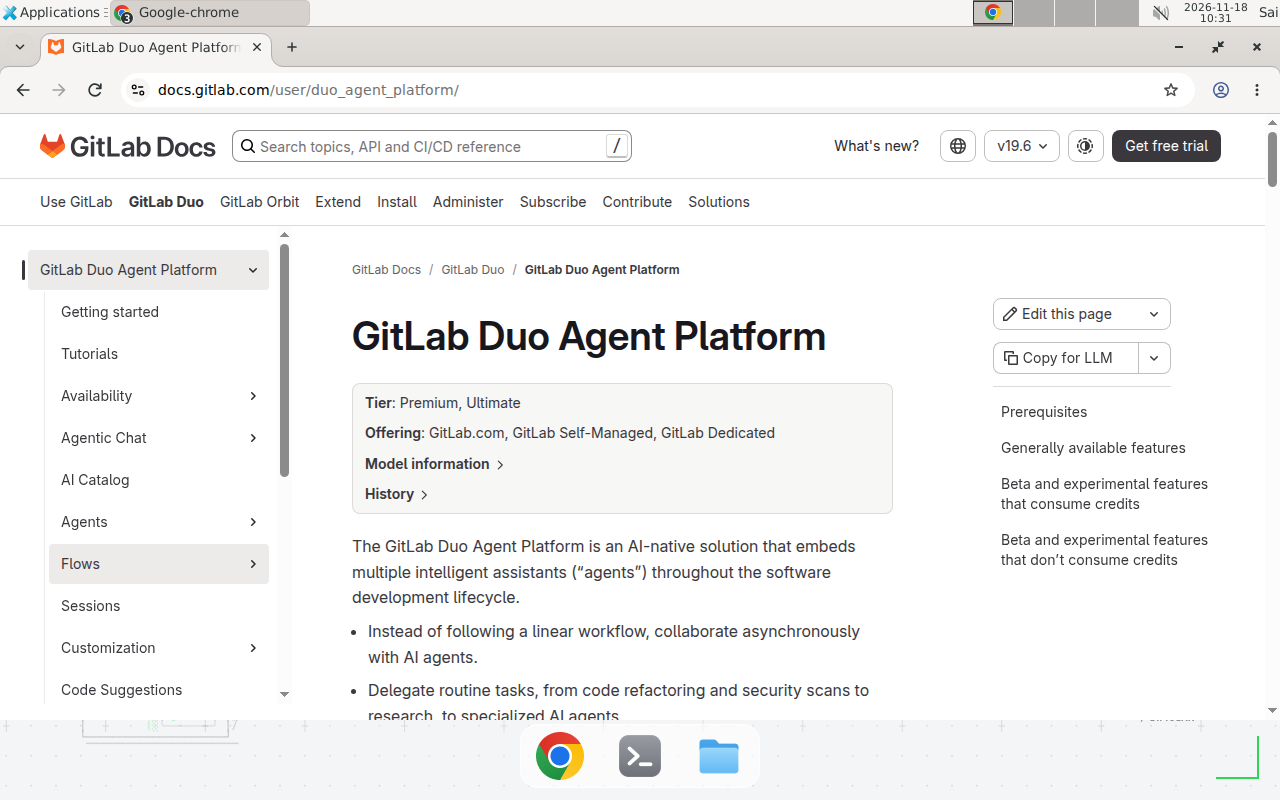
The GitLab Duo Agent Platform docs page, checked 2026-11-18: tier, offerings, and the enablement steps used in this tutorial.
Step 1: Confirm your tier, version, and credits
Before touching any toggle, confirm the three things that silently block teams. Check your tier: the docs list the platform for Premium and Ultimate. Check your version on Self-Managed: 18.8 is the minimum, 18.10 if you use the Duo Enterprise add-on. Check credits: Premium includes $12 per user per month and Ultimate $24, but the offer is time-limited, so open the GitLab Credits dashboard and look at the actual balance.
If the balance is zero on a Free namespace, stop here and buy credits first. Every flow here consumes them, and the platform fails with a credits error rather than a helpful message.
Step 2: Turn the platform on
On GitLab.com, open your top-level group, go to Settings, GitLab Duo, and click Change configuration. Under GitLab Duo Agent Platform, select “Turn on GitLab Duo Agentic Chat, agents, and flows”, then save. On Self-Managed, an administrator does the same from Admin, GitLab Duo in the left sidebar.
The platform is on by default on supported versions, so this is often a verification. Turning it off hides the flow settings, the foundational agents, and the AI Catalog. You also need GitLab Duo itself turned on, or GitLab Duo Core for the group or instance if you have no Duo Pro or Enterprise add-on.
Step 3: Pick your first agent and run it on a real issue
Open GitLab Duo Chat in the web UI or your IDE and start with the Planner Agent, a foundational agent GitLab ships. Give it a real issue, not a test prompt. For example:
Break down issue #42 into implementation tasks. List the files
likely to change, the tests that should cover each task, and anything
that is unclear from the issue description alone.
The Planner Agent structures, prioritizes, and breaks down work directly inside GitLab, and its output is a plan you can argue with before any code exists. Planning first catches the agent misunderstanding the issue while the cost is still one chat turn.
We could not verify the exact credit cost of a single Planner Agent session, because GitLab does not publish per-chat consumption. Vendor docs say Agentic Chat consumes credits, so treat the first week as measurement, not free exploration.
Step 4: Run the Developer Flow, issue to merge request
A flow is a combination of one or more agents working together to complete a task, and the Developer Flow is the one to try first. From the issue, start the Developer Flow (Issue to Merge Request). The flow plans the change, writes the code, and opens a merge request for review.
Do not approve the merge request from inside the flow. Read the diff yourself and run the project test suite on the branch before merging. The flow is good at producing a plausible merge request and bad at knowing whether your tests actually cover the change.
Step 5: Review the merge request with the Code Review Flow
Run the Code Review Flow on the merge request the Developer Flow opened. It reviews the change and reports findings in the merge request, and it is the cheapest flow to measure: 4 executions per credit on GitLab-hosted models, about $0.25 per review at the $1 on-demand credit price.
If it flags a real bug, keep it in the loop. If it only restates the diff, spend the credits on the Developer Flow instead.
Step 6: Pin models per feature, and start cheap
GitLab picks a default model for each feature, and administrators can change it. Go to the top-level group, Settings, GitLab Duo, Model selection, Manage models, find the feature under GitLab Duo Agent Platform, and choose from the dropdown. Agentic Chat has its own default model dropdown, plus an optional restriction to specific models.
The docs advise starting with a faster, cheaper model such as Claude Haiku 4.5 or GPT-5.4 Mini, then upgrading only if needed. A planning chat does not need the most expensive model, and the price difference compounds across a team. Top-level namespace owners choose the model, and subgroups inherit it automatically, so set the default once at the top instead of per project.
Step 7: Give agents more context with Orbit, then watch the Sessions log
To increase the knowledge of your AI agents, use GitLab Orbit. It creates structured representations of your code repositories and helps agents and your team better understand relationships between files, functions, and dependencies. Turn it on before judging whether agents understand your codebase, because an agent without repository context is guessing from file names.
Then open the project, go to AI, Sessions, and review what each agent did, which flow ran, and what it changed. This log is your audit trail, and it is how you spot a flow that ran twice or an agent that touched files outside its task.
Copy-paste template: first-week rollout checklist
Copy this into an issue in your own project and check items off as you go.
## Duo Agent Platform rollout, week 1 (Example — replace with your values)

Project: acme-checkout (Example — replace with your values)
Owner: one named person, not a team alias
Budget: 120 included credits (10 Premium users x $12) (Example — replace with your values)

- [ ] Tier confirmed: Premium or Ultimate; version 18.8+ (18.10+ with Duo Enterprise)
- [ ] Credits confirmed in the GitLab Credits dashboard; on-demand billing terms accepted
- [ ] Platform toggle verified: Settings > GitLab Duo > "Turn on GitLab Duo Agentic Chat, agents, and flows"
- [ ] Planner Agent run on 1 real issue; plan reviewed by a human before code
- [ ] Developer Flow run on the same issue; merge request reviewed, tests run on the branch
- [ ] Code Review Flow run on that merge request; findings compared with human review
- [ ] Model defaults set at the top-level group; cheap model for chat, default for review
- [ ] Sessions log checked (project > AI > Sessions) for every flow run
- [ ] Credit balance checked at end of week; decide whether to buy a commitment pool
- [ ] Go/no-go decision written in this issue: keep, limit to reviews only, or turn off
When not to use this / Limits
Do not roll the platform out to a whole organization in week one. Start with one project and one flow, because usage billing punishes broad rollouts before anyone knows the real cost per task. Do not use it on repositories where agents must not read the code: access controls are group-based, and a misconfigured namespace hands the agent more than you intended. Do not use it as a replacement for code review: the Code Review Flow is a second pair of eyes, not an approver. Do not use it if your GitLab version is below 18.8, or your Duo Enterprise add-on is pinned to 18.9 or earlier, because the platform is not available there at all.
Cost / scale math
All figures below are Example, replace with your values.
A team of 10 Premium users gets 10 x $12 = $120 of included credits per month. At 4 Code Review Flow executions per credit, that buys 480 code reviews a month, or about 22 reviews per working day. A team that reviews 20 merge requests a day, 22 days a month, runs 440 reviews, which fits inside the included credits and costs $0 extra.
Past the included credits, the same 440 reviews cost 440 / 4 = 110 credits, or $110 at the $1 on-demand price. A team of 10 Ultimate users starts with 10 x $24 = $240 of included credits, which covers 960 reviews a month. The Developer Flow is the expensive unknown here, because GitLab publishes no per-run credit figure for it, so measure one full issue-to-merge-request run in week one before forecasting.
Troubleshooting
| Symptom | Likely cause | Command to check | Fix |
|---|---|---|---|
| Agents and flows are missing from the UI | Platform toggle is off, or GitLab Duo is off | Settings, GitLab Duo, Change configuration | Turn on “GitLab Duo Agentic Chat, agents, and flows” and save |
| Flow fails with a credits error | No credits left, or on-demand billing terms not accepted | GitLab Credits dashboard balance | Top up credits or accept usage billing terms; check whether the $12/$24 included credits expired |
| “Cannot use Agent Platform with Duo Enterprise” on 18.9 | Version gate: 18.9 and earlier block that combination | Instance version in Admin, Help | Upgrade to 18.10 or later, or drop the Duo Enterprise add-on |
| Agent answers ignore your codebase | No repository context, Orbit not enabled | Project, AI, Sessions, look at what the agent read | Enable Orbit for the project so agents get structured repository context |
Common mistakes
- Turning it on for everyone on day one. A broad rollout burns credits before anyone knows the cost per task. Start with one project, measure one week, then expand.
- Letting the flow merge its own work. The Developer Flow opens a merge request, it does not approve it. Skipping human review turns a coding gain into a bug-shipping gain.
- Leaving the default model on everything. Planning chats and reviews do not need the same model. Pin a cheaper model to chat and keep the stronger default for review.
- Forgetting the Sessions log. When a flow does something odd, the answer is in project, AI, Sessions. Teams that never open it argue about what the agent did instead of reading it.
Test before you rely on it
- Run the Planner Agent on a real issue and confirm the plan names the right files before any code is written.
- Run the Developer Flow once and confirm the merge request passes your real test suite on its branch.
- Run the Code Review Flow on that merge request and confirm it catches at least one real issue you already knew about.
- Open project, AI, Sessions and confirm every agent action is visible and traceable.
- Check the credit balance after the test runs and confirm the burn matches your forecast.
- Confirm a Developer-role teammate can run the flow, and someone without access cannot see the agents.
FAQ
What is GitLab Duo Agent Platform? It is GitLab’s AI-native layer that embeds agents across the software lifecycle. Instead of only autocompleting code, it runs multi-step flows such as turning an issue into a merge request, reviewing code, and fixing a broken CI/CD pipeline.
Which GitLab tier do I need? The platform is listed for Premium and Ultimate, and it needs GitLab Credits to run. Some features are available on the Free tier if you buy credits. Premium and Ultimate include $12 and $24 of credits per user per month for a limited time.
How much does it cost? On-demand credits cost $1 each. One credit buys 4 Code Review Flow executions or 50 Code Suggestions on GitLab-hosted models, so a code review costs about $0.25 after your included credits run out. Free namespaces cap on-demand usage at $25,000 per month.
What is the difference between agents and flows? An agent is one assistant with one job, such as the Planner Agent. A flow combines agents to finish a task end to end, for example the Developer Flow, which takes an issue and produces a merge request.
Can I use my own models? Yes, on Self-Managed you can run self-hosted models through your own AI Gateway, including fully offline. On GitLab.com, admins pick from GitLab-supported models per feature, and top-level namespace owners set the model that subgroups inherit.
Does it replace GitLab Duo Pro or Enterprise? No. Duo Pro and Duo Enterprise are the older seat-based add-ons. GitLab is moving usage to credits, and the remainder of a Duo Enterprise contract can be converted into GitLab Credits.
Conclusion
It is worth setting up for one reason: it aims at the 80% of development time that code completion never touched, planning, review, CI repair, and security triage. Set it up on one project, measure the credit burn for a week, and let the Sessions log tell you whether it earned a wider rollout.
Ask your team this before expanding it: if a flow opened a bad merge request at 3 a.m., could you see exactly what it did, undo it, and say what it cost? If not, keep it on one project until the answer is yes.
Next, connect the platform to your wider toolchain with Claude Code MCP setup: connect any MCP server in minutes, which shows the same MCP pattern GitLab uses to reach Jira, Slack, and Confluence. For the agent-automation mindset behind flows, read how to run CLI agents on autopilot with Agent Autoloop, and compare hosted automation costs in n8n vs Make for AI agents.
Frequently asked questions
What is GitLab Duo Agent Platform?
It is GitLab's AI-native layer that embeds agents across the software lifecycle. Instead of only autocompleting code, it runs multi-step flows such as turning an issue into a merge request, reviewing code, and fixing a broken CI/CD pipeline, all inside GitLab and your IDE.
Which GitLab tier do I need for Duo Agent Platform?
The platform is listed for Premium and Ultimate tiers, and it needs GitLab Credits to run. Some features are available on the Free tier if you buy credits. Premium and Ultimate subscriptions include $12 and $24 of credits per user per month for a limited time.
How much does GitLab Duo Agent Platform cost?
On-demand GitLab Credits cost $1 each. One credit buys 4 Code Review Flow executions or 50 Code Suggestions on GitLab-hosted models, so a code review costs about $0.25 after your included credits run out. Free namespaces cap on-demand usage at $25,000 per calendar month.
What is the difference between agents and flows?
An agent is one assistant with one job, such as the Planner Agent or the Security Analyst Agent. A flow combines one or more agents to finish a task end to end, for example the Developer Flow, which takes an issue and produces a merge request.
Can I use my own models with Duo Agent Platform?
Yes, on Self-Managed you can run self-hosted models through your own AI Gateway, including fully offline setups. On GitLab.com, admins pick from GitLab-supported models per feature, and top-level namespace owners set the model that subgroups inherit.
Does Duo Agent Platform replace GitLab Duo Pro or Enterprise?
No. Duo Pro and Duo Enterprise are the older seat-based add-ons. GitLab is moving usage to credits, and the remainder of a Duo Enterprise contract can be converted into GitLab Credits. The platform itself is billed by usage, not by seat.