How to Enable Claude Code's You Should Know Mod: The Side Agent That Catches What You Miss
Introduction
You ask Claude Code to refactor the auth module. Twenty minutes later the diff is clean, the tests pass, and you merge. The next morning a teammate points out that the refactor quietly dropped the refresh-token rotation you added last month, and nobody mentioned it, because Claude never said it out loud and you never thought to ask. That is the exact gap Anthropic built the You should know mod to close: a second agent that watches the same session and speaks up about the things that slip past both of you. This tutorial shows you how to turn it on and answer its notes without breaking your flow. It is for anyone who runs Claude Code on long tasks and has learned the hard way that a passing test suite is not the same as a safe change.
Quick answer
Run /plugin enable cc-plugin-you-should-know@builtin inside Claude Code (version 2.1.287 or later, first-party session, telemetry on). A side agent then reviews your session every few steps and shows a note above the prompt when it spots something you might miss.
The hard part
The hard part is not the one-line enable command, it is the telemetry and first-party session gate that silently decides whether the mod even appears in your plugin list.
Checked on
Checked on 2026-11-18 against the Claude Code interactive-mode docs and the v2.1.287 changelog. Interfaces change fast, if a menu or label differs, trust the linked page.
Evidence: what the mod is, and what it costs
Claude Code 2.1.287 shipped on October 1, 2026, and its headline feature was Claude Mods, a new plugin primitive that lets a plugin change how Claude Code itself behaves. The same release shipped the first built-in mod, You should know, disabled by default. Anthropic’s own interactive-mode docs describe it in one sentence: “Runs a side agent that watches your back while Claude works on longer tasks. When it finds something worth knowing that you might miss, it shows you a note above the prompt.” The Claude developers account announced it on October 3, 2026, in the same plain terms: “We’re adding a new plugin to Claude Code: You should Know. It scans Claude’s output for important information you might miss to help keep you in the loop.”
Two measured facts decide whether the mod is worth your attention. First, an independent test on v2.1.293 with Opus 5.5, published October 12, 2026, found the side agent reviews the conversation every 6 steps, and a turn under 6 steps never gets checked at all. Second, claude plugin details cc-plugin-you-should-know@builtin reports 0 always-on tokens per session, so the mod adds nothing to Claude’s context while it waits. Each check is an extra request to your session’s model with the whole conversation, which the API serves mostly from the prompt cache and bills to your plan like the rest of the session, and there is at most one check every 6 steps of a turn, plus one each time you press Learn more.
Hands-on note: this lab has no Claude Code CLI installed and no Claude account, so the enable command and the note behavior in this article are taken from Anthropic’s official docs and the independent test cited above, not from a live session run here. We could not verify the exact in-terminal banner rendering in this lab; vendor docs say the note appears above the prompt input.
Prerequisites
- Claude Code 2.1.287 or later, in the terminal or in the Code tab of the Claude Desktop app.
- A first-party session: signed in with your Claude account or a Console API key, connected directly to Anthropic’s API. Bedrock, Vertex, LLM gateway, and
apiKeyHelpersessions do not get the mod. - Telemetry enabled. Telemetry is on by default for first-party connections, but if you or your organization turned it off, the mod will not appear.
- A task long enough to trigger a check: a turn needs at least 6 steps before the side agent looks at it.
Step-by-step guide
Step 1: Check your version
Run this in your shell before you start:
claude --version
You need 2.1.287 or later. If you are behind, update the way you installed it, for example claude update or npm install -g @anthropic-ai/claude-code, then check the version again.
Step 2: Confirm you are on a first-party session
Start Claude Code and open the plugin manager with /plugin. Look in the Installed tab, under Show disabled, for cc-plugin-you-should-know. If it is listed, your session qualifies and you can skip to Step 3. If it is not listed, you may be connected through Bedrock, Vertex, or a gateway, or your organization may have telemetry off.
Step 3: Enable the mod inside a session
At the Claude Code prompt, run:
/plugin enable cc-plugin-you-should-know@builtin
The mod stays enabled for later sessions. If the command answers Plugin "cc-plugin-you-should-know@builtin" is not installed in this project, the mod is not available for your session, and the troubleshooting table below tells you which gate to check.
Step 4: Enable it from the shell instead
If you prefer to set it up before your next session, run this from your shell:
claude plugin enable cc-plugin-you-should-know@builtin
The mod is enabled for your next session. To confirm the state from the shell, run claude plugin details cc-plugin-you-should-know@builtin, which also shows the 0 always-on tokens figure quoted above.
Step 5: Run a long task and watch for the note
Give Claude a task that takes more than a few steps, for example a multi-file refactor or a dependency upgrade. While Claude works, the side agent rereads the conversation from time to time. When it finds something worth knowing that you might miss, a short note appears above the prompt input, and Claude keeps working while you read it.
What does a useful note look like? The screenshot below shows the real docs page, and here is an illustrative example of a note in a real session. Example, replace with your values: you asked Claude to swap an HTTP client library, and the note reads, “The new library drops automatic retry on 429 responses, and your current code relies on that retry in the checkout path.” The official docs give the same shape of example, a tradeoff Claude chose without calling it out, or a result that may be off.
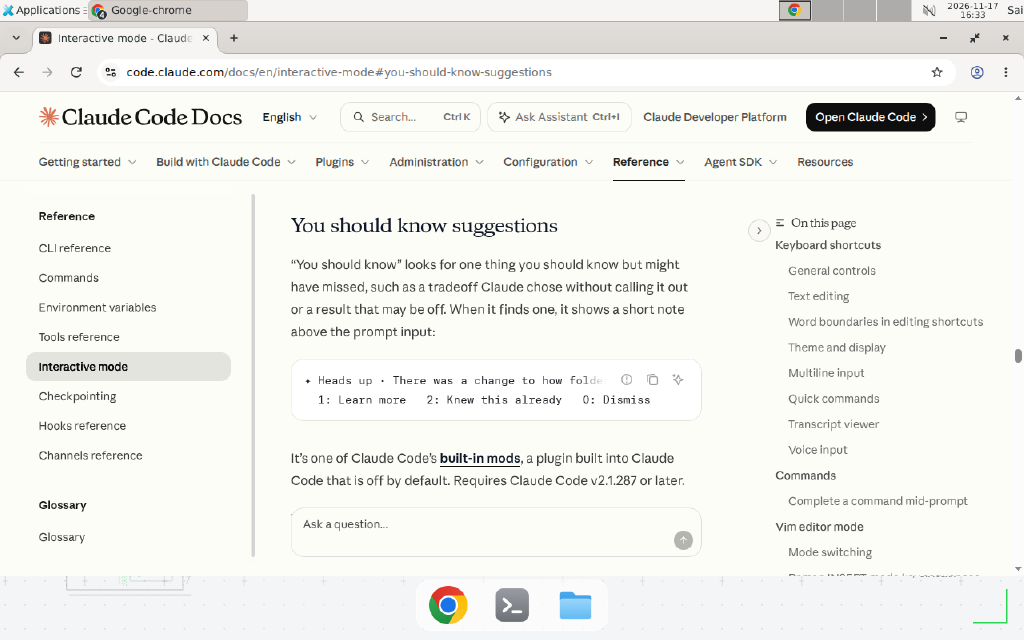
Screenshot: the “You should know suggestions” section of the official Claude Code interactive-mode docs, checked 2026-11-18. The sample note shows the three answers: 1 Learn more, 2 Knew this already, 0 Dismiss.
Step 6: Answer the note, or let it go
A note offers three responses, and you answer by typing the choice’s digit on its own into an empty prompt input:
| Choice | What happens |
|---|---|
| 1, Learn more | Claude explains the note in full, in the main session |
| 2, Knew this already | The topic is marked known and never offered again |
| Chat in main session | The note is put into your prompt so you can raise it with Claude |
The main agent never sees a note unless you send it with Chat in main session. If you keep sending prompts without answering, the note disappears after two prompts. Pressing 2 is the calibration tool: known topics are stored under ~/.claude/plugins/store/, so the mod gets quieter about things you already track.
Step 7: Watch the checks happen with debug output
To see the checks happen, set this in your shell before you start Claude Code:
CLAUDE_CODE_YOU_SHOULD_KNOW_DEBUG=1 claude
Debug output shows each check as it runs. Use it once, on a long task, to confirm the mod is active and to learn what it flags in your codebase.
Step 8: Turn the mod off
When you want it gone, run either of these at the Claude Code prompt:
/plugin disable cc-plugin-you-should-know@builtin
Or turn it off from the Installed tab of /plugin.
Copy-paste template: a one-week trial log
The mod is a judgment call, not a setting you either love or hate on day one, so judge it with a log instead of a feeling. Copy this template into a note and fill in one row per note for a week:
## You should know trial log (week of YYYY-MM-DD)

| Date | Note in one line | Signal or noise? | What I did |
| --- | --- | --- | --- |
| Example — replace with your values | Library swap dropped retry on 429 | Signal | Asked Claude to keep old retry |
|  |  |  |  |
|  |  |  |  |

Verdict after 7 days:
- Notes seen: ___
- Signal (changed my decision): ___
- Noise (already knew, or wrong): ___
- Keep it on? YES / NO
Keep the mod only if at least one note in the week changed a decision you would otherwise have missed. If every note is something you already knew, press 2 on those topics first, and if the signal rate is still zero, turn the mod off. Attention is the real cost here, and a log makes that cost visible.
When not to use this / Limits
Do not enable this mod on short tasks: a turn under 6 steps never gets checked, so quick questions and one-file edits gain nothing and you will conclude the mod is broken when it is simply idle. Do not rely on it as a review step: the side agent has no tools, so it cannot verify a claim against your files, and its notes are heuristics worth checking, not verdicts. Do not enable it where a second model request per 6 steps is a problem, for example on a metered plan during a very long session, or in an organization with HIPAA or zero data retention rules, where the mod is unavailable anyway. For those cases, use tools that do verify: our Claude Code mods tutorial shows how to build a guard mod that intercepts tool calls, and a Claude Code MCP setup wires a real reviewer into the session. The mods overview is the primary reference for what a mod can and cannot do.
Cost math: what the checks actually add
The mod adds 0 always-on tokens, so the fixed cost is zero and the variable cost is the checks. The formula is simple: checks per task are at most one per 6 steps of a turn, plus one each time you press Learn more. Worked example, with assumptions stated: a 60-step refactor task produces at most 10 checks. If the conversation holds about 100,000 tokens by then, each check re-reads roughly that much from the prompt cache, so 10 checks re-read about 1,000,000 cached tokens in total. That is an upper bound, not a bill: short turns trigger no checks at all. Watch notes per week, not tokens.
Troubleshooting
| Symptom | Likely cause | Command to check | Fix |
|---|---|---|---|
/plugin does not list cc-plugin-you-should-know | Not a first-party session, or telemetry off, or org restriction | /plugin, Installed tab, Show disabled | Connect directly with a claude.ai account or Console API key, turn telemetry on, and check your org’s data retention policy |
Enable answers Plugin "cc-plugin-you-should-know@builtin" is not installed in this project | Version below 2.1.287, or mod unavailable for your org | claude --version | Update to 2.1.287 or later; if the version is fine, the mod is not rolled out to your org yet |
| Mod is enabled but no notes ever appear | Your turns are too short, under 6 steps each | CLAUDE_CODE_YOU_SHOULD_KNOW_DEBUG=1 claude | Run a genuinely long task and watch the debug output; short tasks never trigger a check |
| Notes feel noisy or repeat things you know | Early-release threshold tuning; known topics not yet marked | Check ~/.claude/plugins/store/ for the cc-plugin-you-should-know file | Press 2 on known topics so they are stored and never offered again; disable the mod for the session if the noise stays high |
| Notes stop appearing after a long session | Note expired after two unanswered prompts, or session changed | /plugin, check the mod is still enabled | Answer notes promptly or send them to the main session; re-enable with /plugin enable cc-plugin-you-should-know@builtin if it was disabled |
Common mistakes
- Judging the mod on a five-minute task. A turn under 6 steps never gets checked. Give it a real multi-file task before you decide.
- Enabling it on Bedrock or Vertex and assuming it works. The enable command may not even be listed there, and if you paste it in, the “not installed” error is the mod telling you the session does not qualify. Check the connection type first.
- Treating a note as a verified finding. The side agent cannot read files or run commands, so a note about a “missing test” may be wrong about what the test suite covers. Treat every note as a prompt to check, not as a verdict. For a guard that can actually block a risky call, see our Claude Code hooks fail-closed guide.
- Turning telemetry off and wondering where the mod went. The mod is gated on first-party telemetry, so disabling telemetry removes it. If privacy rules require telemetry off, the mod is not available to you, and that is a deliberate tradeoff, not a bug.
Test before you rely on it
Run this checklist before you trust the mod on production code:
-
claude --versionreports 2.1.287 or later. -
/pluginlistscc-plugin-you-should-knowunder Installed, Show disabled. - The enable command succeeds and the mod shows as enabled.
- One long task (more than 6 steps per turn) produces at least one check in debug mode.
- You answered one note with each choice at least once, so you know what 1, 2, and Chat in main session each do.
- You checked
~/.claude/plugins/store/and found the notes file, so you know where known topics live.
FAQ
These are the questions readers ask most after enabling the mod. The version floor is 2.1.287, released October 1, 2026. The token cost is zero always-on tokens plus one cached re-read per check, at most one check every 6 steps. Bedrock and Vertex sessions do not get the mod, because it needs a first-party session with telemetry on. And the side agent cannot change your code, because it has no tools.
Conclusion
The You should know mod is a small bet with a visible payoff: one command, zero always-on tokens, and a second pair of eyes on the long tasks where you are most likely to miss something. The check question to take with you is this: on your next long task, did the side agent flag at least one thing you would have missed? If the answer is yes once, keep it on. If the answer is no after a week of real tasks, turn it off and spend the attention elsewhere. Next, read our Claude Code mods tutorial to build your own guard mod.
Frequently asked questions
What Claude Code version do I need for the You should know mod?
Claude Code 2.1.287 or later, released on October 1, 2026. The mod ships built in from that version, disabled by default, in both the CLI and the desktop app's Code tab. Run `claude --version` to check yours.
Does the You should know mod cost extra tokens?
It adds zero always-on tokens to your session: `claude plugin details cc-plugin-you-should-know@builtin` reports 0. Each check is one extra request to your session's model with the full conversation, mostly served from the prompt cache, and there is at most one check every 6 steps of a turn.
Does You should know work on Amazon Bedrock or Google Vertex AI?
No. The mod is available only in first-party sessions with telemetry on, meaning a session connected directly to Anthropic's API with a claude.ai account or a Console API key. It does not appear when you connect through Bedrock, Vertex, an LLM gateway, or an apiKeyHelper.
Can the side agent change my code or stop Claude?
No. The side agent is a separate request to the same model and has no tools, so it cannot read files, run commands, or change what Claude does. It only shows you a note above the prompt, and the main agent never sees that note unless you send it with Chat in main session.
Where does Claude Code store my You should know notes?
In a file whose name starts with `cc-plugin-you-should-know` under `~/.claude/plugins/store/`. It holds your recent notes and the topics you marked as known. Claude Code deletes the file once it has gone `cleanupPeriodDays` without a session reading or writing it.
How is You should know different from a hook or a subagent?
A hook is a rule you write that runs on an event and can block or rewrite it. A subagent does work for you. You should know is neither: it is a built-in mod that only observes and speaks up. If you want to build your own guard rules instead, start with our Claude Code mods tutorial.