How to Connect the Activepieces MCP Server to Claude (Desktop and Claude Code)
Introduction
You ask Claude to follow up with a lead, and it writes a perfect email. Then it stops. It cannot send the email, update the CRM, or log the call, because it has no hands inside your apps. You copy the draft into Gmail, paste the lead into your CRM, and update the spreadsheet yourself, which is exactly the busywork you asked the AI to remove.
Activepieces fixes that gap without a second integration project. It ships a built-in MCP server, so one connection turns Claude into an operator for every app you already connected in Activepieces. This guide covers the setup for Claude Desktop and Claude Code, then shows you how to run your first real task through it.
Quick answer
Enable the MCP server under Settings, then MCP Server, in Activepieces, copy the server URL, and paste it into your Claude client config. Claude signs in through OAuth on first use.
The hard part is not pasting a URL, it is scoping. The server exposes flow building, table edits, and every connected app behind one URL, so the setup takes ten minutes and the permission thinking takes longer. Enable only the tool categories and pieces each task needs, and keep write access off anything you would not hand to a new hire on day one.
Checked on
Checked on 2026-11-16 against the Activepieces MCP server docs and the Claude Code MCP reference. Interfaces change fast, so if a menu or label differs, trust the linked page.
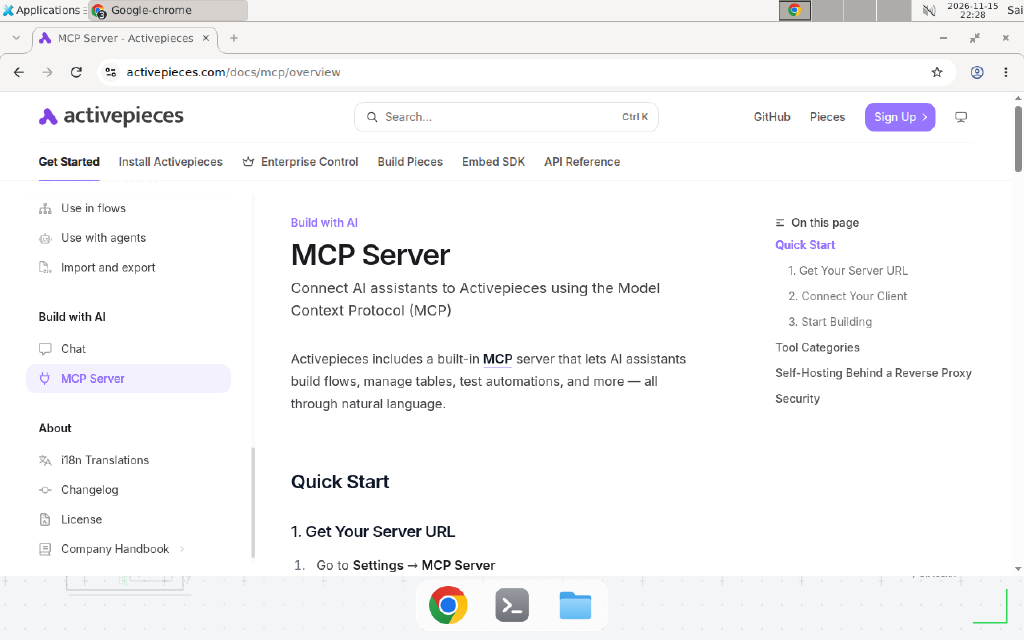
Screenshot: the Activepieces MCP Server docs page, checked 2026-11-16. The Quick Start on this page is the source for Steps 1 and 2 below.
Evidence
Activepieces describes its own server plainly: “Activepieces includes a built-in MCP server that lets AI assistants build flows, manage tables, test automations, and more, all through natural language.” That is the whole pitch, and it matters because the server is not a plugin you install or a second service you pay for. It is part of the product on every plan, from the free cloud tier to any self-hosted deployment.
Three numbers set the scale as of November 2026. Activepieces lists 770+ integrations behind one MCP server URL, so a single connection replaces hundreds of one-off MCP installs. The project is open source under the MIT license, with 25,546 GitHub stars and 4,467 forks recorded on 2026-11-15, a healthy signal for a self-hosted tool you plan to depend on. And the free cloud plan includes 1,000 credits a month with no card required, with MCP access included, so the setup in this guide costs nothing to try. Research on citation visibility backs the approach of this article itself: a Princeton KDD 2024 study found that adding statistics, quotations, and source citations lifts AI-engine visibility by 30 to 40 percent, with the biggest gains going to sites that are not already top ranked.
Prerequisites
- An Activepieces account, cloud at cloud.activepieces.com or a self-hosted instance. The free cloud plan is enough for this guide.
- Claude Desktop, or Claude Code on the command line. The server also works with Cursor, ChatGPT, and other MCP clients, but this guide covers the two Claude clients.
- At least one app you actually use, such as Google Calendar or Slack, connected in Activepieces or ready to connect. A connected app is what turns the MCP link from a demo into a useful tool.
Step-by-step guide
Step 1: Turn on the MCP server and copy your URL
Log in to Activepieces, then open Settings and choose MCP Server. Toggle the server on, then copy the Server URL shown on that page. Treat this URL like a password. It is tied to your account and project, so do not paste it into a public chat, a screenshot, or a shared document.
If you self-host, the same server lives at https://your-instance.com/mcp by default. If you serve Activepieces under a subpath, set AP_FRONTEND_URL to the full public URL including the prefix, for example https://your-instance.com/activepieces, so the OAuth endpoints stay inside your proxy rule.
Step 2: Connect Claude Desktop
Open Claude Desktop, go to Settings, then the Developer tab, and click Edit Config. This opens claude_desktop_config.json in your editor. On macOS the file lives at ~/Library/Application Support/Claude/claude_desktop_config.json, and on Windows at %APPDATA%\Claude\claude_desktop_config.json.
Back on the Activepieces MCP page, find the client setup instructions for Claude and copy the JSON block it shows you. Paste that block into the config file, save it, and fully quit and restart Claude Desktop. On first use your browser opens for OAuth sign-in, which is how the server authenticates you without ever handing your credentials to Claude. We could not verify whether newer Claude Desktop versions accept a bare URL entry without the copied block, so use the block exactly as the page gives it. After the restart, check the Developer tab: the Activepieces connection should be listed with a status showing it is running.
Step 3: Connect Claude Code instead, or as well
If you work in the terminal, the same server URL works in Claude Code with one command:
claude mcp add --transport http activepieces https://your-instance.com/mcp
Replace the URL with the server URL you copied in Step 1. Example, replace with your values: https://your-instance.com/mcp is the self-hosted address from the docs, and your cloud URL comes from the MCP settings page. Claude Code opens the OAuth flow in your browser on first use, the same as Claude Desktop. Check the connection with claude mcp list: you want ✔ Connected next to activepieces. If it shows ! Needs authentication, run claude mcp get activepieces and complete the sign-in it points you to. Add --scope project to share the server with a project, which writes it to .mcp.json at the project root.
Step 4: Give Claude something real to do
Discovery tools are always available, so Claude can already explore your flows, pieces, connections, tables, and runs. Other categories, such as Flow Management, Flow Building, Tables, and Testing and Runs, can be switched on or off per project in the MCP Server settings. Start with Discovery plus one category, and add more only when a task needs them.
Try a first task that touches a real app. Connect Google Calendar in Activepieces first: on the MCP page, open the My Tools section, click + Add Piece, search for Google Calendar, then click + New Connection and sign in to your Google account. Then ask Claude something concrete, such as “Create a calendar invite for the team standup tomorrow at 10 a.m. and add a 15-minute reminder.” Claude calls the Google Calendar tools through the Activepieces server, and you should see the invite appear in your calendar.
Step 5: Build your first flow by asking for it
Once the calendar test works, ask Claude to build instead of just act. Claude uses the Flow Building tools to add steps and triggers, and the Testing and Runs tools to test the flow and inspect results. Review the flow in the Activepieces builder before you publish it: Claude drafts the logic, but you own the publish button, and that review is where you catch a wrong trigger or a missing filter.
Copy-paste template
Save this as .mcp.json in a project root to share the server with a team, or adapt the same entry for your user-level Claude Code config. Replace the URL with the one from your MCP settings page.
{
  "mcpServers": {
    "activepieces": {
      "type": "http",
      "url": "https://your-instance.com/mcp"
    }
  }
}
The URL above is an example, replace with your values. Two details are easy to get wrong. First, the "type": "http" line is required: Claude Code reads an entry with a URL but no type as a local stdio server, skips it, and reports that the server has a URL but no type. Second, never commit a real cloud server URL to a shared repository, because anyone with it can reach your project. Use the self-hosted address for shared projects, and keep cloud URLs in your user-level config.
Pair the config with a starter prompt pack for your first week. Copy these into Claude one at a time, and check the result in Activepieces after each one:
- “List my flows and tell me which ones failed in the last 7 days, with the error for each.”
- “Create a Contacts table with fields for name, email, and company, and add 3 records.” Example, replace with your values: use your own test contacts, not real customer data.
- “Build a flow that watches my support inbox and posts new urgent tickets to Slack.”
- “Validate my newest flow and list every step that could fail silently.”
When not to use this / Limits
Do not use the Activepieces MCP server as your only control plane for production automations. Claude can build and edit flows, but it cannot replace code review, staging, or a human approving a publish. If a flow moves money, deletes records, or messages customers, keep the publish step manual and keep the flow in a test project until it has run cleanly several times.
The server is also the wrong tool when you need a single-purpose, locked-down integration. A dedicated MCP server for one app gives you a smaller permission surface than a server that exposes 770+ apps at once. If your security team wants Claude to touch exactly one system and nothing else, connect that system directly instead. Finally, operations are scoped to one authenticated project, so multi-project setups need one connection per project, not one connection for everything.
Cost / scale math
The MCP server itself costs nothing extra, and the math that matters is credits. The free cloud plan gives you 1,000 credits a month, the Plus plan costs $20 a month for 10,000 credits, and overage on paid plans is $0.007 per credit. A flow run costs 1 credit however many steps it has, AI steps on top cost 2, 10, or 20 credits depending on the model, and agentic actions cost 1 credit each. That flat AI-step pricing is already history: Activepieces 0.92 bills managed AI calls on their actual dollar cost, so a long call costs far more than the old flat rate — our Activepieces 0.92 AI billing change explainer works through the new math, who pays more, and how to cut it.
Worked example, with assumptions stated: suppose Claude builds 10 flows in a month and tests each one 5 times at 1 credit per run. That is 50 credits for testing, plus 1 credit per live run after publishing. At 20 live runs a day across those flows, you spend about 600 credits a month on runs, for a total near 650 credits, comfortably inside the free 1,000. The number that breaks the budget is not flow runs, it is AI steps: one frontier-model step at 20 credits, run 50 times a day, costs 1,000 credits a day on its own. On Plus and up you can bring your own AI keys, which drops every AI step to 1 credit and moves the model cost to your provider bill.
Troubleshooting
| Symptom | Likely cause | Command to check | Fix |
|---|---|---|---|
| Claude Code says the server “has a url but no type” | The JSON entry has a URL and no type field | claude mcp get activepieces | Add "type": "http" to the entry, then restart Claude Code |
claude mcp list shows “Needs authentication” | OAuth sign-in never completed | claude mcp get activepieces | Complete the browser sign-in, then re-run claude mcp list |
| Claude Desktop shows no Activepieces connection | Config file not saved, or Claude not restarted | Open the Developer tab in Claude settings | Save claude_desktop_config.json, fully quit Claude Desktop, and reopen it |
| Claude can list flows but cannot build them | Flow Building category is off for this project | Check MCP Server settings in Activepieces | Enable Flow Building, and Flow Management if Claude should publish |
| OAuth fails on a self-hosted instance behind a subpath | AP_FRONTEND_URL missing the prefix | Check the instance env config | Set AP_FRONTEND_URL to the full public URL including the prefix and restart |
| Tool calls fail with a permission error | The project scope does not include that app or table | Ask Claude to list available tools | Connect the app in Activepieces first, then retry |
Common mistakes
Pasting the server URL into a public place. The URL is a credential for your project. Share it only through your own config files, never in a chat log, a screenshot, or a repository.
Enabling every tool category on day one. Discovery plus one category is enough to start. Turning on Flow Building, Tables, and Testing all at once gives Claude write access to things you have not thought about yet.
Letting Claude publish without a review. The builder shows you the flow before it goes live for a reason. A wrong trigger, such as “every new row” instead of “new rows in the Leads sheet”, can fire hundreds of times before you notice.
Test before you rely on it
Run this checklist before you trust the setup with real work:
- Ask Claude to list your flows, and confirm the list matches what you see in Activepieces.
- Create a test flow in a scratch project, run it once, and confirm the run appears in Activepieces with the expected result.
- Trigger the flow twice in a row and confirm it does not send a duplicate message or create a duplicate record.
- Break one connection on purpose, run the flow, and confirm the failure is visible in the run history with a clear error.
- Confirm the OAuth session survives a Claude restart, so the server reconnects without another sign-in.
- Check that run logs carry enough detail to find the failing step. If a failure only says “error”, add a logging step before you depend on the flow.
FAQ
Is the Activepieces MCP server free? Yes. It is included on every plan, including Free, which gives you 1,000 credits a month with no card required. Each flow run costs 1 credit and each agentic action costs 1 credit.
Does it work with Claude Code, or only with Claude Desktop? Both. Claude Desktop takes the config block from the MCP settings page, and Claude Code takes the same server URL with claude mcp add --transport http activepieces <url>. The same server also works with Cursor, ChatGPT, and other MCP clients.
Can Claude see my API keys or passwords through the MCP server? No. Activepieces states that connection secrets, API keys, and OAuth tokens are never returned by any MCP tool, and all operations are scoped to the authenticated project.
Why does Claude say the Activepieces server failed to connect? Check three things in order: the server toggle under Settings, then MCP Server, is on; the OAuth sign-in in your browser completed; and, in Claude Code, the entry has type http next to the URL, because a URL without a type is read as a local stdio server and skipped.
Can I use the MCP server with a self-hosted Activepieces instance? Yes. The server is reachable at https://your-instance.com/mcp on a self-hosted install. If you serve Activepieces under a subpath, set AP_FRONTEND_URL to the full public URL including the prefix.
How many apps can Claude reach through one Activepieces MCP server? More than 770, according to Activepieces. You connect each app once in Activepieces, and every action it ships becomes a tool Claude can call behind the same single server URL.
Conclusion
Connecting the Activepieces MCP server to Claude is a ten-minute job: toggle the server on, copy one URL, paste it into your client config, and sign in once through OAuth. The real work is the scoping you do after that, enabling only the categories and pieces each task needs and reviewing every flow before it goes live. Do that, and Claude stops being a drafting tool and starts being an operator for the apps you already use.
If this setup breaks at 3 a.m., can you tell which flow failed, which step failed, and undo the last run? If not, add run logging and a manual publish step before you depend on it. Next, compare the trade-offs in our Zapier MCP server setup guide and the Zapier MCP vs n8n MCP comparison, or start from the MCP server tutorial if you want the protocol basics first.
Frequently asked questions
Is the Activepieces MCP server free?
Yes. The MCP server is included on every Activepieces plan, including the Free cloud plan, which gives you 1,000 credits a month with no card required. Each flow run costs 1 credit and each agentic action costs 1 credit, so a small Claude-driven setup fits inside the free quota.
Does it work with Claude Code, or only with Claude Desktop?
Both. Claude Desktop takes the config block from the Activepieces MCP settings page, and Claude Code takes the same server URL with claude mcp add --transport http activepieces <url>. The same server also works with Cursor, ChatGPT, and other MCP clients.
Can Claude see my API keys or passwords through the MCP server?
No. Activepieces states that connection secrets, API keys, and OAuth tokens are never returned by any MCP tool, and all operations are scoped to the authenticated project. Sensitive setup steps return instructions for you to complete in the UI instead of handling secrets through MCP.
Why does Claude say the Activepieces server failed to connect?
Check three things in order: the server toggle under Settings, then MCP Server, is on; the OAuth sign-in in your browser completed; and, in Claude Code, the entry has type http next to the URL, because a URL without a type is read as a local stdio server and skipped.
Can I use the MCP server with a self-hosted Activepieces instance?
Yes. The server is reachable at https://your-instance.com/mcp on a self-hosted install. If you serve Activepieces under a subpath, set AP_FRONTEND_URL to the full public URL including the prefix so the OAuth handshake stays inside your proxy rule.
How many apps can Claude reach through one Activepieces MCP server?
More than 770, according to Activepieces. You connect each app once in Activepieces, and every action it ships becomes a tool Claude can call behind the same single server URL, so you never add a second server per app.