Activepieces 0.92 AI Billing Change Explained: What Each AI Call Costs Now
You upgraded Activepieces to 0.92, and the flow that summarized support tickets every morning suddenly burned through credits ten times faster. Nothing in the flow changed. No step was added, no model was switched, and the run count stayed flat. The bill changed because the pricing model changed underneath it, and the new model charges you for what the model actually costs, not for which tier you picked. This article explains the change in plain terms, works out the new cost math, and shows the three moves that cut the bill back down.
Quick answer
Activepieces 0.92 bills managed AI calls on the actual dollar cost the provider reports, at one credit per $0.0005 of model spend. Your own API key stays a flat one credit per model call.
The hard part is not the new formula, it is that your old mental price list is now wrong in both directions: short prompts on expensive models got much cheaper, while long documents got far dearer, so the flows that hurt are the ones you never priced at all.
Checked on 2026-11-13 against the Activepieces breaking-changes doc and the Activepieces pricing page. Interfaces change fast, so if a menu or label differs, trust the linked page.
What 0.92 actually changed
Release 0.92.0 shipped on 24 September 2026 with four AI-related changes. Billing is the one that moves money; the other three are covered below.
The old scheme: a fixed price per model tier
Before 0.92, the managed provider charged a fixed number of credits per model per step, from a table calibrated at roughly a thousand tokens per call. The pricing page FAQ still lists those old numbers: fast 2 credits, smart 10, frontier 20, agentic actions 1 each. A short call was charged about right. A long one cost the same while costing Activepieces many times more, because the table never looked at tokens used. That flat table made long calls a bargain, but the price had no relationship to the real cost, which is why it had to go.
The new scheme: pay the provider’s reported dollar cost
The breaking-changes doc states the new rule directly:
“Every managed AI call is now billed on the dollar cost the provider reports for that call, converted at
AP_AI_CREDIT_USD_VALUE(default0.0005, so one credit is a twentieth of a cent of model spend).”
Three details do the work. First, the cost is the dollar cost the provider reports for that specific call, so a 200-token prompt and a 50,000-token document now bill very differently. Second, the conversion rate is AP_AI_CREDIT_USD_VALUE, default 0.0005: one credit buys $0.0005 of model spend, so one dollar costs 2,000 credits. Third, self-hosters can change the rate by setting AP_AI_CREDIT_USD_VALUE, the only configuration the change needs.
What did not change matters too. A call on your own API key is still a flat one credit per model call, plus one per tool call. An agent still counts as one credit however many times it goes back to the model. And a plain flow run still costs one credit however many steps it has, so the plumbing stays nearly free and the AI is the entire bill.
One visible consequence: the credit cost shown in the model picker and in the credits breakdown is gone, because there is no longer a fixed number to show. If you open the picker expecting a price tag next to each model, it is not a bug. The price is now whatever the call costs when it runs.
| Before 0.92 | From 0.92 | |
|---|---|---|
| Managed AI call, fast model | 2 credits, fixed | Dollar cost / 0.0005 |
| Managed AI call, smart model | 10 credits, fixed | Dollar cost / 0.0005 |
| Managed AI call, frontier model | 20 credits, fixed | Dollar cost / 0.0005 |
| AI call on your own key | 1 credit per model call | 1 credit per model call, unchanged |
| Tool call inside an AI step | 1 credit each | 1 credit each, unchanged |
| Agent step | 1 credit per agent run | 1 credit per agent run, unchanged |
| Plain flow run | 1 credit, any step count | 1 credit, any step count, unchanged |
| Price shown in model picker | Fixed credits per model | Removed, no fixed number exists |
The cost math, worked out
Credits for a managed AI call equal the dollar cost of the call divided by 0.0005, which is the same as multiplying the dollar cost by 2,000. Example values in the table below, replace with your values.
| Call (example) | Provider cost | Credits at 0.0005 | Old fixed price |
|---|---|---|---|
| Short classification prompt, frontier model | $0.001 | 2 | 20 |
| Medium summary, smart model | $0.005 | 10 | 10 |
| Long document, Extract Structured Data | $0.05 | 100 | 10 |
| Very long document, Extract Structured Data | $0.20 | 400 | 10 |
Two rows tell the whole story: the short prompt on the expensive frontier model falls from 20 credits to about 2, a 90 percent cut, while the long document jumps from 10 credits to 100, a 10x rise, because the old table never counted tokens at all.
We could not verify how Activepieces rounds fractional credits; vendor docs say only the conversion rate, not the rounding rule. Treat small per-call estimates as approximate, and watch your first few runs after upgrading rather than trusting the arithmetic to the credit.
Now put the numbers on a plan. Cloud plans give 1,000 credits a month on Free, 10,000 on Plus at $20 a month, and 50,000 on Team at $200 a month, with overage at $0.007 per credit on Plus and Team. Take a Plus plan running a daily ticket-summary flow, 30 runs a month. Short summaries at $0.005 per call cost 300 credits a month and fit easily. Long summaries at $0.05 cost 3,000 a month: still inside the allowance, but now 30 percent of the plan instead of 3 percent. Long summaries at $0.20 cost 12,000 a month: 2,000 over the allowance, or $14 in overage on top of the $20 plan.
The same flow on your own API key costs 1 credit per call, so 30 credits a month, and the per-call model spend moves to your provider bill, where you can see it, cap it, and choose a cheaper model. For a long-document flow, that is the difference between 3,000 managed credits and 30 credits plus a provider invoice. Bringing your own key is available on Plus and up, and it is the single biggest lever in this change.
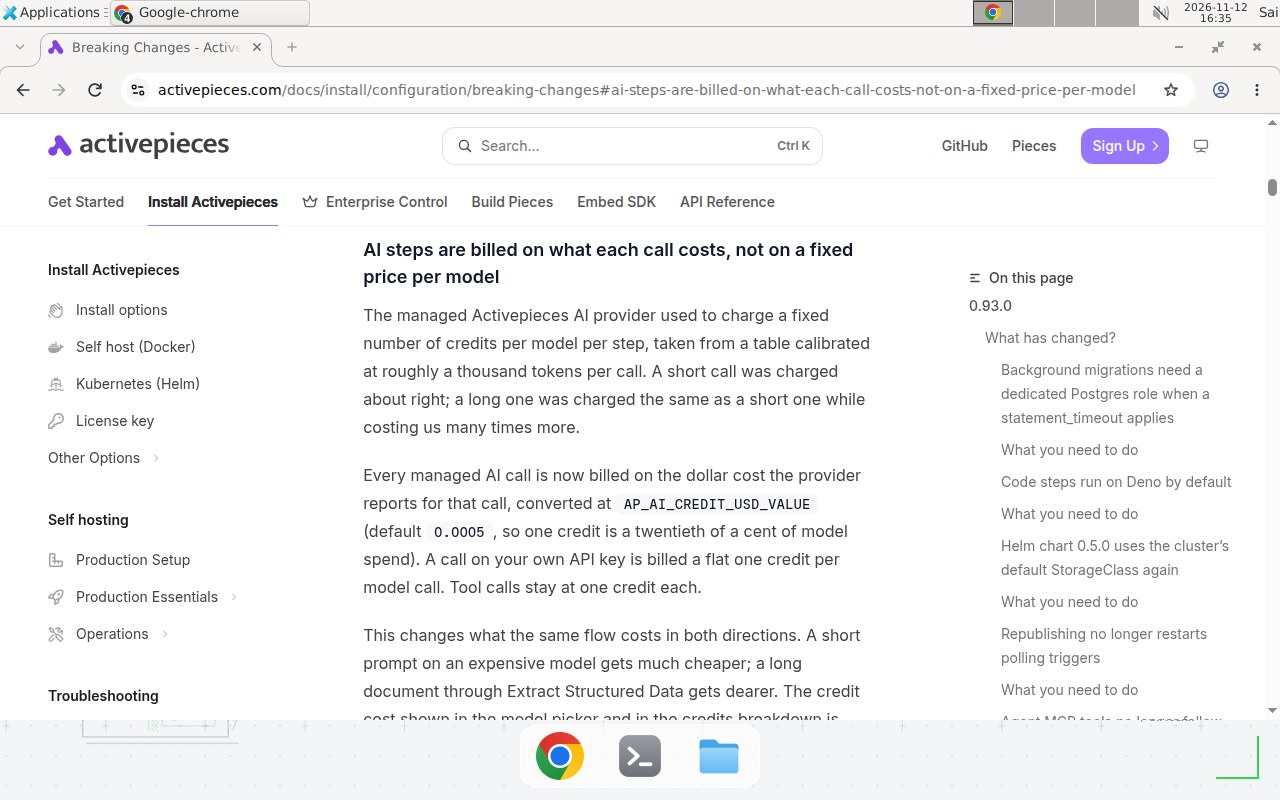
Screenshot: the 0.92.0 section of the official breaking-changes doc, checked 2026-11-13.
The three other 0.92 AI changes you need to know
Billing is the headline, but the same release changed three more things that can break a flow.
AI steps now consume credits on your own API key too. POST /v1/ai/execute refuses to start an AI step when the platform is out of credits, whatever provider the step uses. Previously only the managed provider was gated, so a platform at zero credits kept running AI steps on its own key. Now those steps fail with a credits error instead. Top up, or raise the plan’s credit allowance. Credits are only enforced where a billing provider is configured, so a Community self-host is unaffected.
Files passed to an AI step are capped at AP_MAX_FILE_SIZE_MB. Extract Structured Data and Generate Image used to read file inputs straight from the flow’s memory, so no Activepieces-side size limit applied. Those files are now stored and fetched by the worker that runs the model, which puts them under the same per-file limit as every other file the engine writes: 25 MB by default on a self-hosted install, 10 MB on Cloud, where it is not configurable. The limit is per file, not per step, so several large files in one step are fine as long as each is under it. Raise AP_MAX_FILE_SIZE_MB on a self-hosted install if you need more.
The AI provider config endpoint is removed. GET /v1/ai-providers/:provider/config used to return a provider’s decrypted credentials so an AI step could call the provider directly. AI steps no longer work that way: the worker resolves the credentials and makes the call, which is what lets Activepieces charge managed AI on what the call actually cost. The endpoint now returns 404. If you serve pieces from your own registry, make sure it carries the AI piece at 0.11.0 or later, because a flow on an earlier version would still try to fetch its provider credentials over this endpoint and fail.
Step-by-step: adapt your flows to the new billing
You do not need to rebuild anything. Work through these five steps after upgrading, in order, and stop as soon as the numbers look right.
1. Find the AI steps that will move
Open your most-used flows and list every AI step: Ask AI, Extract Structured Data, Generate Image, and any Run Agent step. The runs that matter are the ones with long inputs: documents, long threads, and agents that loop over tools. A one-line classifier is not the problem. A step that feeds a whole PDF into the model is.
2. Estimate the new cost of each step
For each step, estimate the provider cost of one call. If you already run the same prompt through your provider’s own dashboard, read the real per-call cost there. Otherwise, estimate from tokens: a 10,000-token input on a mid-range model is roughly $0.005 to $0.02, or 10 to 40 credits. Divide the dollar cost by 0.0005 for the credit cost, then multiply by runs per month. Any step over about 50 credits per call deserves a closer look.
3. Switch long calls to your own key
On Plus and up, connect your own provider key and point the expensive steps at it. A step on your own key costs a flat one credit per model call, plus one per tool call, and the model spend lands on your provider bill. This is the correct move for every long-document step, because the saving scales with the call length. Keep short calls on the managed provider: a $0.001 call costs about 2 credits managed, which is close enough to 1 that switching buys little.
4. Set the conversion rate if you self-host with your own billing
Self-hosters who run their own billing provider can set AP_AI_CREDIT_USD_VALUE to the dollar value of one credit. The default is 0.0005. Raise it to cover more model spend per credit, lower it to track provider costs more tightly. Community self-hosts without a billing provider are unaffected. There is nothing else to configure for this change.
5. Check file sizes and the AI piece version
Check any flow that sends files into an AI step. Files over 25 MB fail on a default self-hosted install, and files over 10 MB fail on Cloud. Split the file, compress it, or raise AP_MAX_FILE_SIZE_MB before the flow runs in production. Then confirm your AI piece is at 0.11.0 or later if you serve pieces from your own registry.
Copy-paste template: a credit budget worksheet
Copy this worksheet into a doc or a spreadsheet and fill in one row per AI step. It takes ten minutes the first time and two minutes on every later review. Example values, replace with your values.
Activepieces AI credit budget (0.92 billing)
Plan: Plus ($20/mo, 10,000 credits) | Conversion: 1 credit = $0.0005
Overage: $0.007/credit | Date: 2026-11-13

Step name | Provider | Est. $/call | Credits/call | Runs/mo | Credits/mo
Example: ticket summary | Managed | $0.05 | 100 | 30 | 3,000
Example: ticket triage | Own key | n/a | 1 | 900 | 900
Example: invoice extract | Managed | $0.20 | 400 | 30 | 12,000

TOTAL credits/mo: ________
Allowance: 10,000 | Overage credits: ________ | Overage cost: ________ x $0.007 = $________

Rules of thumb:
- Any step over 50 credits/call: switch it to your own key, or shorten the input.
- Any step under 5 credits/call: leave it on the managed provider.
- Total over allowance: move the biggest row to your own key first.
For self-hosters, the only environment change the new billing needs is one line in your deployment, and only if you want a non-default rate:
# docker-compose.yml, api service environment
environment:
  - AP_AI_CREDIT_USD_VALUE=0.0005   # default: 1 credit = $0.0005 of model spend
  - AP_MAX_FILE_SIZE_MB=25          # default per-file cap for AI step inputs
When not to use this / Limits
Do not switch every AI step to your own key just because the flat 1 credit looks cheaper. A short call on the managed provider costs about the same, and the managed provider saves you a second bill, a second API key to rotate, and a second dashboard to watch. The switch pays off for long calls, not short ones. Do not raise AP_AI_CREDIT_USD_VALUE to make credits look cheap either: the rate is a conversion, not a discount, and inflating it just hides the real model spend from your own budget. And do not treat the per-call estimate as exact. The provider’s reported cost is the source of truth, and the first week’s actual credit burn is the number to budget from, not this article’s table.
Troubleshooting
| Symptom | Likely cause | Command to check | Fix |
|---|---|---|---|
| AI steps fail with a credits error after upgrading | Platform is out of credits, and 0.92 now gates BYOK steps too | Check the platform credit balance in Settings, then confirm the failing step uses POST /v1/ai/execute | Top up credits or raise the plan allowance; on Cloud, overage bills at $0.007 per credit |
| Credit burn jumped 10x on one flow | A long-document step now bills its real cost instead of the old flat 10 credits | Compare the step’s input size against the 25 MB file cap and estimate cost as dollars / 0.0005 | Point the step at your own API key (1 credit per call) or shorten the input before it reaches the model |
| No price shown next to models in the picker | Expected: 0.92 removed the fixed per-model credit cost | None, this is the new behavior | Budget from the conversion rate instead of the picker; watch actual burn for a week |
| AI step fails on a large file | File exceeds AP_MAX_FILE_SIZE_MB (25 MB self-hosted, 10 MB Cloud) | Check the file size in the previous step’s output | Split or compress the file, or raise AP_MAX_FILE_SIZE_MB on a self-hosted install; Cloud cannot raise it |
| Flow fails calling the AI provider config endpoint | AI piece older than 0.11.0 still calls the removed endpoint | Check the AI piece version in the flow builder | Upgrade the AI piece to 0.11.0 or later; if you run your own registry, publish the new version there first |
| Model picker still shows old fixed prices | The pricing page FAQ still lists the old 2 / 10 / 20 table | Read the breaking-changes doc, which is the current source | Ignore the FAQ numbers for budgeting; they describe the pre-0.92 scheme |
Common mistakes
Budgeting from the pricing FAQ. The FAQ still says a smart model is 10 credits. That was the old fixed table. The breaking-changes doc is the current rule, and it bills on actual cost. Budgeting 10 credits per call for a long-document step runs you out of credits mid-month.
Assuming BYOK steps are free. They cost 1 credit per model call plus 1 per tool call, and since 0.92 they fail outright when the platform is out of credits. A platform at zero credits stops all AI steps. Keep a buffer.
Feeding whole documents into Extract Structured Data. The old flat price made this free. Under actual-cost billing, a 50,000-token document is the most expensive step in the flow. Extract the relevant pages first, or summarize in chunks, before the extraction runs.
Forgetting the file cap. A 30 MB PDF into an AI step fails on a default install, and the error names the size limit, not billing. It looks like a billing problem and it is a file problem.
Test before you rely on it
Run this checklist on a staging copy of your most expensive flow before you trust the new billing in production:
- Run the flow once and read the actual credits consumed, then compare it with the dollars / 0.0005 estimate. If they disagree, trust the actual burn.
- Run the same flow on your own API key and confirm it bills 1 credit per model call, plus 1 per tool call.
- Run a flow with the platform at a low credit balance and confirm the BYOK step fails with a credits error instead of running silently.
- Send a file just over the size cap into an AI step and confirm it fails with the size error.
- Confirm the AI piece version is 0.11.0 or later on every flow that calls the provider.
FAQ
Did Activepieces 0.92 change what a flow run costs?
No. A run still costs one credit however many steps it has. Only AI steps changed: managed calls now bill on the actual dollar cost the provider reports, at one credit per $0.0005.
Why did my AI flow suddenly cost far more credits after upgrading to 0.92?
Long AI calls are the usual cause. The old fixed price was calibrated at roughly 1,000 tokens per call, so a long document through Extract Structured Data cost the same 10 credits as a one-line prompt. Under 0.92, a call that costs the provider $0.05 bills 100 credits.
Does bringing my own AI key still save credits in 0.92?
Yes, and the saving is bigger for long calls: a model call on your own key is a flat one credit, plus one per tool call. But those steps now consume credits too, so a platform out of credits stops them.
What is the file size limit for AI steps in 0.92?
Files passed to an AI step are capped at AP_MAX_FILE_SIZE_MB: 25 MB per file by default self-hosted, 10 MB on Cloud, where it is not configurable. The limit is per file, not per step.
Do I need to change anything when I upgrade to 0.92?
For most users, nothing. Self-hosters can set AP_AI_CREDIT_USD_VALUE for a different conversion rate. If you serve pieces from your own registry, make sure it carries the AI piece at 0.11.0 or later.
Conclusion
Activepieces 0.92 did not make AI more expensive. It made AI honestly priced: short calls got cheaper, long calls now cost what they actually cost, and the flat table that hid the difference is gone. The winners are teams with short prompts and teams that bring their own keys for long documents.
If your credit burn jumped after upgrading, do the math once: dollars per call divided by 0.0005, times runs per month, against your plan allowance. Then move the biggest row to your own key.
If one of your AI flows burned credits after this upgrade, can you say what a single call costs in credits now, and which step is the most expensive? If not, run the worksheet before the next billing cycle. Next, read How to Build Custom Pieces in Activepieces (CLI, Auth, Actions, and Triggers) to turn the flow you just fixed into a reusable piece, and compare the credit model with other tools in n8n vs Make for AI Agents.
Frequently asked questions
Did Activepieces 0.92 change what a flow run costs?
No. A flow run still costs one credit however many steps it has. Only AI steps changed: managed AI calls are now billed on the actual dollar cost the model provider reports, converted at AP_AI_CREDIT_USD_VALUE (default 0.0005, so one credit equals $0.0005 of model spend). A call on your own API key still costs a flat one credit per model call.
Why did my AI flow suddenly cost far more credits after upgrading to 0.92?
Long AI calls are the usual cause. The old fixed price was calibrated at roughly 1,000 tokens per call, so a long document cost the same 10 credits as a one-line prompt. Under 0.92, a call that costs the provider $0.05 bills 100 credits. Short prompts on expensive models got cheaper; long calls got dearer.
Does bringing my own AI key still save credits in 0.92?
Yes, and the saving is bigger for long calls. A model call on your own key is a flat one credit, plus one per tool call, and the model spend moves to your provider bill. The change is that AI steps on your own key now consume credits at all: if your platform is out of credits, POST /v1/ai/execute refuses to start the step, where before it only gated the managed provider.
What is the file size limit for AI steps in 0.92?
Files passed to an AI step are capped at AP_MAX_FILE_SIZE_MB, which is 25 MB per file by default on a self-hosted install and 10 MB on Activepieces Cloud, where it is not configurable. The limit is per file, not per step, so several files under the cap in one step are fine. Raise AP_MAX_FILE_SIZE_MB on a self-hosted install if you need more.
Do I need to change anything when I upgrade to 0.92?
For most users, nothing. Self-hosters who want a different conversion rate can set AP_AI_CREDIT_USD_VALUE to the dollar value of one credit. If you serve pieces from your own registry, make sure it carries the AI piece at 0.11.0 or later, because the old provider config endpoint now returns 404. Check any flow that sends files over 25 MB to an AI step.
Is the old fixed price of 2, 10, or 20 credits per AI call still shown anywhere?
The pricing page FAQ still lists fast 2, smart 10, and frontier 20 credits, but the breaking-changes doc says the per-model fixed credit cost is gone from the model picker and the credits breakdown, because there is no longer a fixed number to show. Treat the FAQ numbers as the old scheme, not the current one.